
Marquee 🏷️✨
Status Bar Custom Message & Emoji Banner Plugin for Omarchy / Quickshell: Displays customizable text and emojis directly on your status bar, with an interactive popup panel and a full-featured searchable emoji picker.
Inspired by billboard.
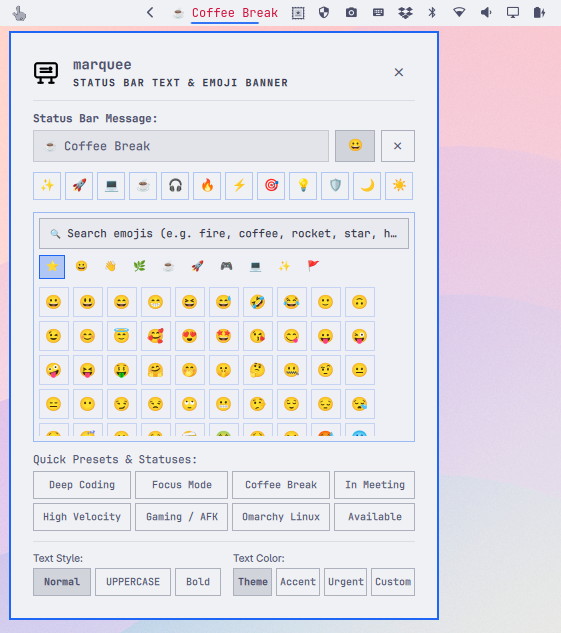
✨ Features
- 🏷️ Custom Bar Text & Emojis: Display any message, custom status, or emoji sequence directly on the status bar.
- 💬 Interactive Popup Panel: Clicking the bar message opens an interactive panel to update text in real time.
- 😀 Integrated Emoji Picker: Dedicated emoji button right beside the input field to toggle a rich emoji drawer:
- 🔍 Real-Time Search: Search emojis by name and keywords in English & Portuguese (e.g.,
fire,coffee,rocket,star,heart,music,fogo,cafe). - 🗂️ Categorized Collections: Smileys & Emotion, People & Gestures, Animals & Nature, Food & Drink, Travel & Places, Activities & Games, Objects & Tech, Symbols & Status, Flags.
- ⭐ Quick Emoji Chips: 1-click insertion for popular status symbols (
✨,🚀,💻,☕,🎧,🔥,⚡,🎯,💡,🟢, etc.). - 📌 Cursor-Aware Insertion: Clicking an emoji seamlessly inserts it at your current cursor position without losing input focus.
- 🔍 Real-Time Search: Search emojis by name and keywords in English & Portuguese (e.g.,
- ⚡ Preset Status Templates: 1-click status presets (Deep Coding, Focus Mode, Coffee Break, In Meeting, High Velocity, Gaming / AFK).
- 🎨 Typography & Styling:
- Case formatting: Normal, UPPERCASE, lowercase, and Capitalize.
- Font weight: Regular and Bold.
- Color tinting: Theme foreground (
theme-fg), Accent (theme-accent), Urgent (urgent), or Custom color palette & hex code.
- 🔄 Real-Time Synchronization: All status bar text and style changes update dynamically in real time.
- 💻 CLI Integration (
marquee): Update your status message directly from scripts, keybindings, or terminal commands.
🚀 Installation
Clone the repository and run the installation script:
git clone https://github.com/jvlianodorneles/marquee.git
cd marquee
./install.sh
The installer will:
- Copy plugin files to
~/.config/omarchy/plugins/dorneles.marquee - Register the widget in Omarchy's bar layout (
shell.json) - Install the
marqueeCLI helper to~/.local/bin/marquee - Trigger a live shell restart
🖥️ Command Line Interface (CLI)
You can manage your status banner via terminal commands or keyboard shortcuts:
# Set a new message with emojis
marquee set "🚀 Deep Coding"

# Set bold text with accent tint
marquee set "🎧 Focus Mode" --bold --tint theme-accent

# Get the current message
marquee get

# Clear the status bar text
marquee clear

# Toggle, open, or close the interactive panel
marquee toggle
marquee open
marquee close

# View configuration status
marquee status
⚙️ Configuration File
Configuration is saved automatically to:
~/.local/state/omarchy/marquee/config.json
{
  "text": "✨ Marquee",
  "bold": false,
  "tintMode": "theme-fg",
  "customColor": "#ffffff",
  "textTransform": "none"
}
🙏 Credits & Inspiration
🗑️ Uninstallation
To completely remove the plugin:
./uninstall.sh