
🎨 omasaver
A native Omarchy 4 modal studio for live ASCII art generation, screensaver management (
ttfx), and branding customization.
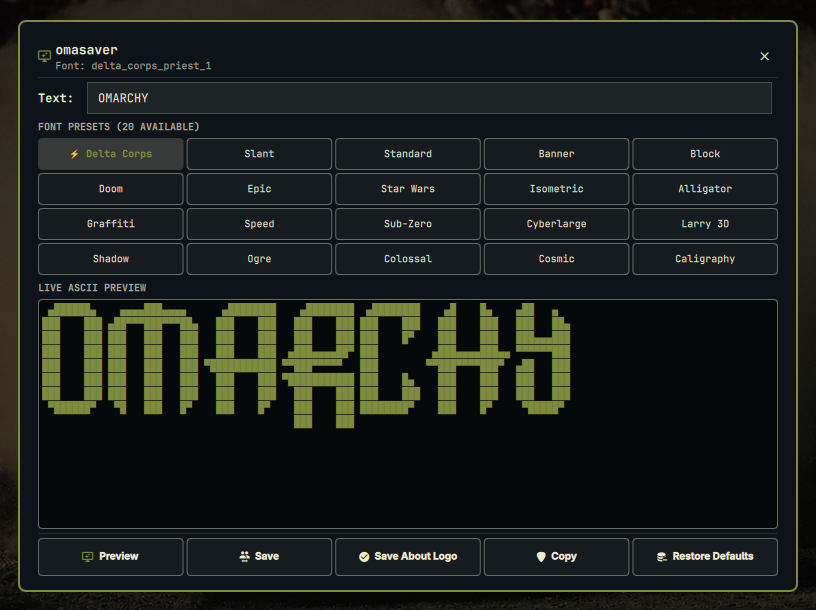
omasaver transforms text into beautiful ASCII art instantly, integrating seamlessly into your Omarchy 4 desktop workflow. Easily generate, customize, preview, and sync your ASCII art across your Omarchy screensaver (screensaver.txt) and system about branding (about.txt).
✨ Features
- ⚡ Centered Modal Window:
- Fast, responsive ASCII rendering as you type with auto-focus and full Wayland keyboard capture.
- 20 curated font presets in a 1-click grid, including Omarchy's signature
delta_corps_priest_1,slant,banner,doom,epic,starwars,cyberlarge, and more. - Monospaced, scrollable live preview box.
- Press
Escor click outside to close.
- 👁️ Fullscreen Screensaver Preview: Test the
ttfxscreensaver animation in full screen with one click, and automatically return to the window when dismissed. - 💾 1-Click System Branding Sync & Restore:
- Save: Update
~/.config/omarchy/branding/screensaver.txt(with automatic.bakbackup). - Save About Logo: Update
~/.config/omarchy/branding/about.txt(Fastfetch/system branding). - Restore Defaults: 1-click restoration of Omarchy's original screensaver (
logo.txt) and about logo (icon.txt).
- Save: Update
- 📋 Clipboard Integration: Instantly copy generated ASCII art to clipboard (
wl-copy/pyperclip). - 🪄 Zero Bar Clutter: Runs as a lightweight overlay service, opened instantly via shortcut or menu without consuming top bar space.
- 🛠️ Automation CLI: Scriptable Python backend for shell scripts and system hooks.
⌨️ Shortcuts & Controls
| Shortcut / Action | Function | Description |
|---|---|---|
| <kbd>Super</kbd> + <kbd>Alt</kbd> + <kbd>O</kbd> | Open Omasaver | Opens the centered Omasaver modal |
| <kbd>Esc</kbd> | Close Modal | Dismisses the modal |
📦 Installation
Automated Installation (Recommended)
Clone and run the included installer:
git clone https://github.com/jvlianodorneles/omasaver.git ~/.config/omarchy/plugins/dorneles.omasaver
cd ~/.config/omarchy/plugins/dorneles.omasaver
./install.sh
The installer:
- Sets up an isolated Python virtual environment (
.venv) with pinned dependency versions, leaving your system Python untouched. - Creates safety backups (
.bak) of any modified configuration files. - Registers Omasaver as an overlay service in
shell.json. - Configures Hyprland keybinding (<kbd>Super</kbd> + <kbd>Alt</kbd> + <kbd>O</kbd>) in
bindings.lua. - Adds entries to the Omarchy root menu (
omarchy-menu.jsonc). - Reloads the shell and Hyprland.
🗑️ Removal / Uninstallation
To cleanly and completely uninstall Omasaver and revert all configuration changes:
cd ~/.config/omarchy/plugins/dorneles.omasaver
./uninstall.sh
Or run directly:
bash ~/.config/omarchy/plugins/dorneles.omasaver/uninstall.sh
The uninstaller automatically:
- Removes the isolated Python virtual environment (
.venv) and plugin directory. - Reverts plugin registration from
shell.json. - Reverts keybinding entries from
bindings.lua. - Reverts menu entries from
omarchy-menu.jsonc. - Reloads the shell and Hyprland.
⌨️ CLI Usage
omasaver includes a command-line backend utility for terminal power users and automation scripts:
# Render ASCII art directly
python3 scripts/omasaver-ctl.py render "OMARCHY" delta_corps_priest_1 center

# Update Omarchy screensaver
python3 scripts/omasaver-ctl.py save-screensaver "OMARCHY" delta_corps_priest_1

# Update Omarchy about logo
python3 scripts/omasaver-ctl.py save-about "OMARCHY" delta_corps_priest_1

# Restore original Omarchy defaults
python3 scripts/omasaver-ctl.py restore-defaults

# Launch screensaver animation preview
python3 scripts/omasaver-ctl.py preview "OMARCHY" delta_corps_priest_1

# Copy rendered art to clipboard
python3 scripts/omasaver-ctl.py copy "OMARCHY" delta_corps_priest_1
🔗 Related Projects
- tuisaver: Standalone terminal TUI studio built with Python Textual.
🛠 Dependencies
- Omarchy 4 (Quickshell / Qt6 QML)
- ttfx (Terminal text effects engine)
- Pyfiglet (FIGlet ASCII engine)
- pyperclip /
wl-copy(Clipboard integration)
📄 License
This project is licensed under the MIT License.
Built with ❤️ for Omarchy.