
🖃 OmaStamp
Desktop Background Logo & Watermark Overlay Plugin for Omarchy.



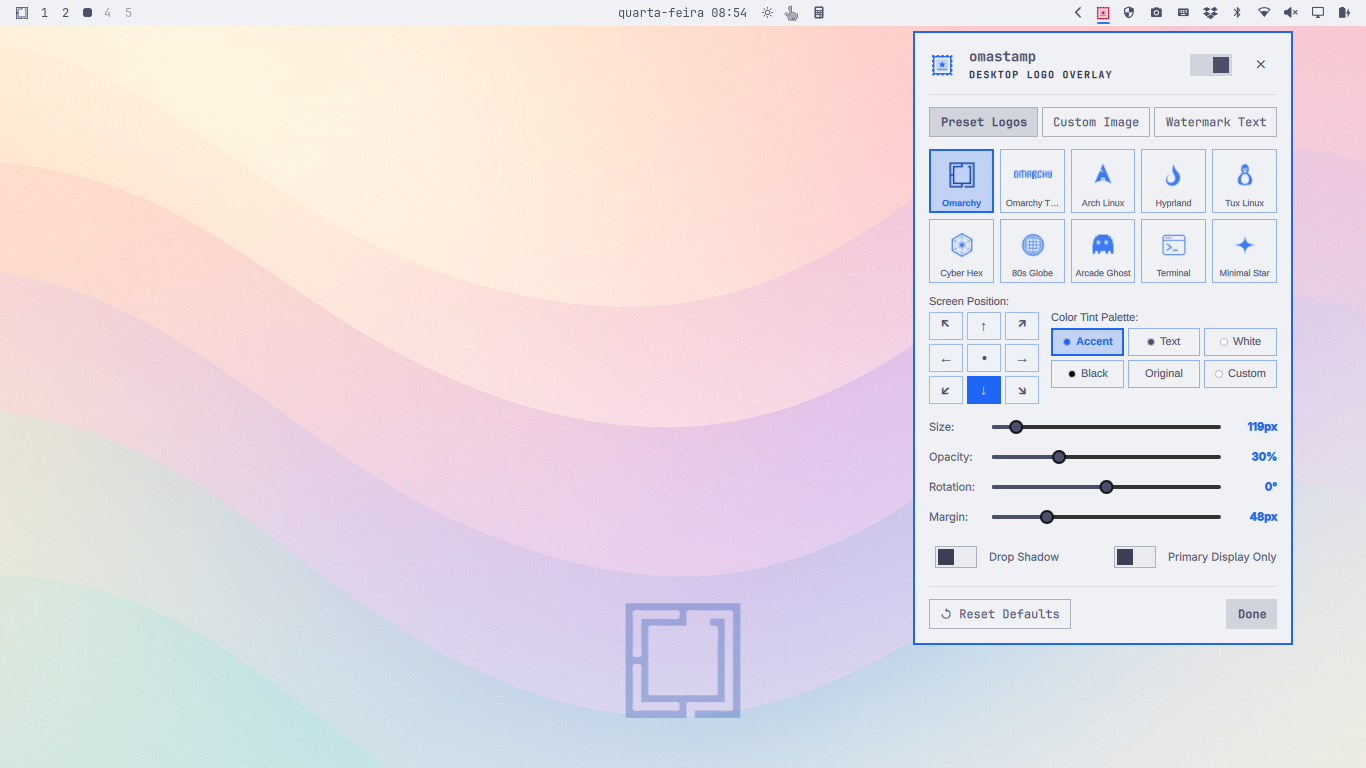
OmaStamp stamps clean, customizable logos, distro crests, vector insignias, and typographic or ASCII art watermarks directly over your desktop wallpaper. It runs seamlessly behind all application windows on Wayland LayerShell (WlrLayer.Bottom), completely transparent to mouse clicks (mask: Region {}).
✨ Features
- 🖼️ 3 Powerful Overlay Modes:
- Preset Vector Crests: Bundled high-resolution SVG insignias (Omarchy Mark, Omarchy Wordmark, Arch Linux, Hyprland, Tux Linux, Cyber Hex, Retro 80s Globe, Arcade Ghost, Terminal Badge, Minimal Star).
- Custom Image / Logo File: Stamp any custom PNG, SVG, JPG, or WebP logo with integrated desktop file browsing.
- Watermark Text & ASCII Art: Custom wordmark text with support for 20 typography and ASCII art fonts (Slant, Block, Doom, Banner, Star Wars, Cyberlarge, Delta Corps, etc.) with real-time auto-scaling preview.
- 🎯 9-Point Interactive Placement Matrix:
- Center, Top-Left, Top-Center, Top-Right, Center-Left, Center-Right, Bottom-Left, Bottom-Center, Bottom-Right.
- Fine-grained margin and offset sliders.
- 🎨 Adaptive Omarchy Theme Tinting:
- Theme Accent (
Color.accent): Matches your active Omarchy theme colors dynamically. - Theme Foreground / Text: Matches theme font color.
- Original Colors: Unfiltered raw colors for full-color artwork.
- Monochrome White / Black or Custom Hex Color.
- Theme Accent (
- 🎛️ Full Visual Customization:
- Live Opacity slider (1% to 100%).
- Size slider (32px to 800px).
- Rotation angle slider (-180° to +180° with smooth animated transitions).
- Optional subtle drop shadow effect.
- Primary display only toggle for multi-monitor setups.
- 🖱️ Zero-Interference Click-Through:
- Built with an empty Wayland input region (
mask: Region {}), so desktop wallpaper double-clicks (wallpaper/theme switcher) and mouse actions pass straight through with zero lag or blocking.
- Built with an empty Wayland input region (
- 🖥️ Status Bar Widget & Studio Popup:
- Clean Postal Stamp vector icon on the Omarchy status bar.
- Left-click: Opens interactive OmaStamp Studio control popup.
- Right-click: Instant on/off toggle.
- Middle-click: Quick cycle to next logo preset.
- 💻 Standalone CLI & IPC Controller (
omastamp):- Control every aspect of the stamp from scripts, terminals, or Hyprland keybindings.
🎨 Customizing & Adding Preset Insignias
You can easily add your own vector logos, community crests, or custom insignias to the preset collection:
1. Vector Format Best Practices
For your SVG to support dynamic theme tinting (adapting automatically to your Omarchy color palette, accent color, and custom hex tints):
- Use pure white (
#ffffff) for fills and strokes:fill="#ffffff"orstroke="#ffffff". - Use square viewports when possible (e.g.
viewBox="0 0 100 100"orviewBox="0 0 512 512"). - Remove static background rectangles so transparency is preserved.
2. Adding the SVG File
Place your SVG file into the logos directory:
cp my-custom-crest.svg assets/logos/my-custom-crest.svg
3. Registering the Preset in Code
To make your new insignia appear in the OmaStamp Studio grid and CLI cycle list:
-
In
Panel.qml, add an entry topresetsList:readonly property var presetsList: [ { id: "my-custom-crest", name: "My Crest", icon: "assets/logos/my-custom-crest.svg" }, // ... existing presets ] -
In
scripts/omastamp-ctl.py, add an entry toPRESETS:PRESETS = [ {"id": "my-custom-crest", "name": "My Crest", "desc": "Custom vector insignia"}, # ... existing presets ] -
Reinstall to apply:
./install.sh
💡 No-Code Alternative (Custom Image Mode):
If you don't want to edit files, you can instantly stamp any image or SVG without registering it as a preset. Simply open OmaStamp Studio → Custom Image → Browse... or run:omastamp set-image ~/Pictures/my-custom-crest.svg
🚀 CLI Commands
# Toggle overlay on/off
omastamp toggle
omastamp on
omastamp off

# Switch logo presets
omastamp list-presets
omastamp set-preset omarchy
omastamp next-preset

# Watermark text & fonts (Typography + ASCII Art)
omastamp list-fonts
omastamp set-text "OMARCHY" --font slant
omastamp set-font block

# Custom image
omastamp browse
omastamp set-image ~/Pictures/my-branding.svg

# Adjust alignment & dimensions
omastamp set-position center
omastamp set-position bottom-right
omastamp set-size 320
omastamp set-opacity 25
omastamp set-rotation -15
omastamp set-tint theme-accent
omastamp set-shadow true

# Status & Reset
omastamp status
omastamp reset
⌨️ Hyprland Keybinding Examples
Add quick shortcuts in ~/.config/hypr/hyprland.conf:
# Toggle desktop stamp overlay
bind = SUPER SHIFT, S, exec, omastamp toggle

# Cycle through logo presets
bind = SUPER CTRL, S, exec, omastamp next-preset
📦 Installation
git clone https://github.com/jvlianodorneles/omastamp.git
cd omastamp
./install.sh
To remove:
./uninstall.sh
📄 License
MIT License © 2026 Juliano Dorneles