
omarchy-plex

A Plex media player for Omarchy. Real window in the tiling tree, library browsing, poster grids, a proper theater view, and a picture-in-picture mode that can be resized and plopped on additional monitors.
I wanted a Plex player that was lightweight, performant, and true to the Omarchy theme, so I built this player exactly as I wanted it. Use it, tweak it, and upgrade it as you like!
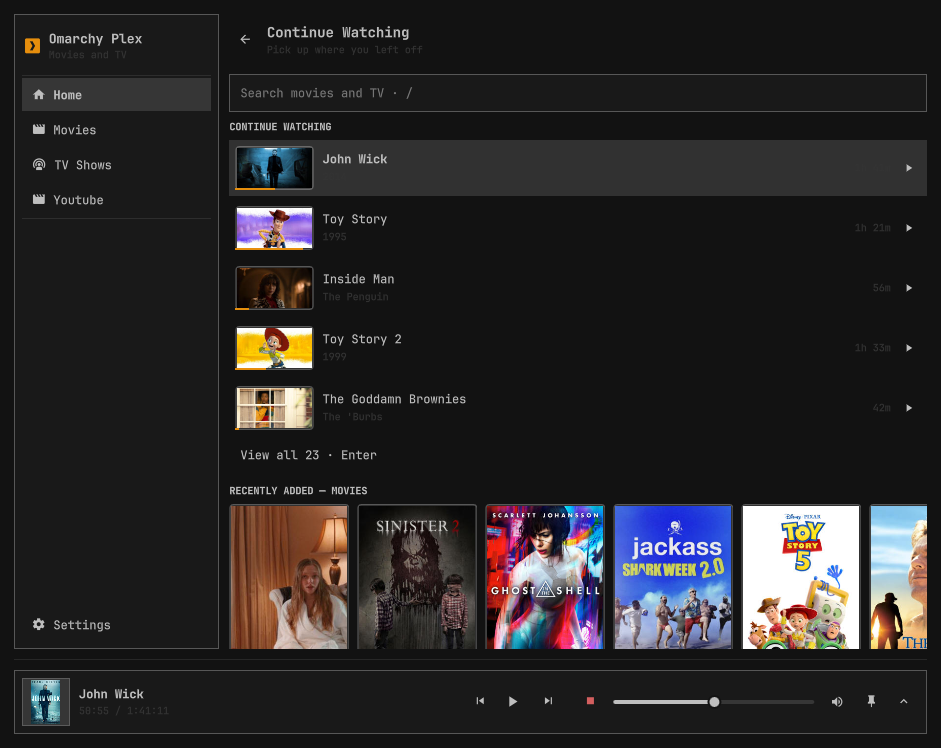
What you get
- Media Browser — Home page with Continue Watching and Recently Added shelves, a sidebar entry per video library, poster grids, and detail pages with backdrop art, synopsis, and season/episode drill-down. Movies and TV only; your music stays in your music player.
- Search everything —
/from anywhere, whole server, results as you type. - Theater + minibar — video fills the window with controls that get out of the way. Hit Esc and it keeps playing behind a now-playing bar while you browse for what's next.
- PiP —
ppops the video into a corner card that floats above everything and is click-through everywhere else. Drag it anywhere (it shows you exactly where it'll land, even across monitors), snap it to corners, resize it, walk it across displays withn. Esc brings it home. - Real playback — with the optional native module, video renders through libmpv: hardware decode, proper HDR tone mapping (your dark scenes will stop looking crushed), and image subtitles (PGS/VOBSUB) rendered natively instead of via server burn-in.
- Tracks and quality —
a/s/qmid-playback for audio tracks, subtitles, and stream quality. Direct-play switches are instant; anything needing the server restarts at your position. - Volume to 200% — for those movies mixed by people who hate you.
- Keyboard-first — arrows and
hjkldrive one shared cursor; the whole app works without a mouse. Full reference below. - Bar widget — the icon grows a scrolling now-playing title while something plays. Click toggles the window.
- Resume, progress sync, and scrobbling all work like you'd expect — Plex knows where you stopped, whatever client you open next.
Install
git clone https://github.com/dot3x3q/omarchy-plex
ln -s "$(pwd)/omarchy-plex" ~/.config/omarchy/plugins/dot3x3q.omarchy-plex
omarchy restart shell
Then add the bar widget from Omarchy's bar settings, or just toggle the panel directly:
omarchy-shell shell toggle dot3x3q.omarchy-plex
The native video module (recommended)
Out of the box, video renders through QtMultimedia — works fine, zero extra steps. But the good stuff (HDR tone mapping, NVDEC/VAAPI hardware decode, native image subtitles) comes from a small compiled libmpv module:
./native/install.sh
omarchy restart shell
That's it — the plugin detects the module and upgrades itself. No module, no
problem: it falls back to QtMultimedia automatically, always. (This fallback
is permanent by design — the module is OpenGL-only, so a shell forced onto
the Vulkan scene graph would need it. See native/README.md.)
Setup
First open drops you on a setup page:
- Server URL —
http://your-server:32400 - X-Plex-Token — Plex's guide: finding your token
- Backend — leave it on "In panel" unless you specifically want playback in an external mpv window
Config lands in ~/.config/omarchy-plex/config.json, chmod 600, written
atomically. The token travels in request headers wherever technically
possible; the exceptions (image URLs, QtMultimedia media URLs — neither can
send headers) are documented in docs/DESIGN.md. The native module sends it
header-only, which is one more reason to build it.
The two surfaces
The window is a real Hyprland toplevel — tile it, float it, fullscreen it. Drag any bare part of it to move it; the edges resize. This is where browsing lives.
The PiP is video only, on purpose. It floats above everything, ignores your clicks everywhere except the card itself, and gets out of your way. When you drag it toward another monitor it pins at the border and paints a ghost outline where it'll drop — release and it's there, still playing.
Keeping the window fully opaque
Omarchy's default window rules make every unfocused window slightly
translucent. For most apps that looks great; for a movie it doesn't.
Add this to ~/.config/hypr/hyprland.lua to opt the player out (the
same idiom Omarchy's stock rules use for mpv-style PiP and qemu):
o.window({ class = "^org\\.quickshell$", title = ".*Omarchy Plex$" }, {
  tag = "-default-opacity",
  opacity = "1 1",
})
Match by title, not class alone: the window's class is org.quickshell,
shared with the entire shell. The leading .* is required — Hyprland
regexes must match the whole string, and during playback the title
becomes "<media> — Omarchy Plex", so a bare Omarchy Plex$ silently
stops matching the moment something plays.
Keyboard reference
One cursor, shared by mouse and keyboard. Everything below has a mouse equivalent.
Browsing
| Key | Action |
|---|---|
↑ ↓ ← → / h j k l |
Move the cursor |
Tab / Shift+Tab |
Cycle region (search → page → sidebar → minibar) |
/ |
Focus search |
Enter |
Open / play / run search |
Esc |
Layered: clear search → leave field → exit theater → back → arm close → close |
Alt+Left |
Back |
PageUp / PageDown |
Page the view |
r |
Refresh |
p |
Toggle PiP |
Space |
Play/pause, globally, whenever something's playing |
m |
Mute, likewise |
While playing (theater / PiP)
| Key | Action |
|---|---|
Space / Enter |
Play / pause |
← / →, Shift+← / Shift+→ |
Seek 10s / 30s |
↑ / ↓ |
Volume ±5 (0–200%) |
m |
Mute |
x |
Stop |
a / s / q |
Audio / subtitle / quality picker (window only) |
p |
Toggle PiP |
n / Shift+n |
Walk the PiP across monitors |
Esc |
PiP → window; theater → browse (keeps playing) |
Pickers (once open)
↑↓/jk move, Home/End jump, Enter selects, a/s/q switch
lists, Esc closes.
Hacking on it
docs/DESIGN.md— the design spec: every decision and why.docs/PLEX-API.md— every Plex endpoint used, verified against a live server.AGENTS.md— dev-loop commands (lint, tests, the compile gate that catches what the linter can't).node --test tests/*.test.mjs— Api mappers, IO safety, and static contract pins over the QML.
Pull requests
CI runs the unit tests on node 22/24/26 and compiles every *.qml with
qmlcachegen, so a PR gets checked without needing me at a keyboard. Two things
CI can't do for you, because they need Omarchy itself rather than a container:
- run
qmllintagainst the shell'sqs.Commons/qs.Uitypes, and - actually load the plugin on a compositor.
So if a change touches QML behaviour rather than plain logic, say in the PR whether you ran it on a real Omarchy session. I'd rather know it's untested than assume it isn't.
Removing
rm -rf ~/.config/omarchy-plex ~/.local/state/omarchy-plex
rm ~/.config/omarchy/plugins/dot3x3q.omarchy-plex
Credit
This project started life as a fork of Joshua Warren's omarchy-plexmini, a deliberately tiny bar-summoned miniplayer. It has since been rebuilt into something else entirely, but the foundation — the Plex API plumbing and the genuinely careful security posture around the token — is his work, and this project wouldn't exist without it. Go star the original.
License
MIT — see LICENSE, which carries both copyrights.