
Monitor Placement & Refresh Rate — Omarchy shell plugin
A bar widget for Omarchy that arranges an external monitor around the laptop display, aligns it along the shared edge, rotates monitors, sets each monitor's refresh rate and VRR, and switches the GPU mode on hybrid laptops — one click, applied live, saved so it survives reboots.
Features
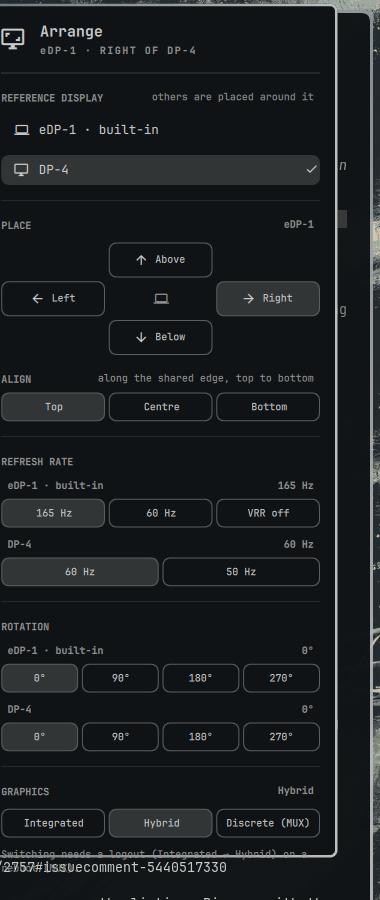
- Placement — put an external monitor left, right, above, or below the built-in display. Positions are computed in logical pixels (scale and rotation aware), so edges line up regardless of DPI.
- Alignment — slide the external along the shared edge: top / centre / bottom when it sits beside the laptop, left / centre / right when it sits above or below. Fixes the "cursor jumps at the seam" problem when the two panels differ in size.
- Rotation — 0° / 90° / 180° / 270° per monitor. Rotating re-derives the arrangement, so a portrait external stays where you put it.
- Refresh rate — every enabled monitor, built-in included, gets a row of the rates Hyprland offers at its current resolution. Handy for dropping a 165 Hz laptop panel to 60 Hz on battery, or pushing an external display to its fastest mode.
- VRR — a
VRR on/offpill on every monitor whose connector reportsvrr_capable(read straight from DRM; Hyprland doesn't expose it). The pill shows the saved rule; its tooltip says whether adaptive sync is actually engaged right now. - Graphics mode — Integrated / Hybrid / Discrete (MUX) on laptops with
supergfxd(whatomarchy toggle hybrid gpuuses). Behind a confirm dialog, because supergfxd will ask you to log out or reboot. - Works without a laptop panel — on a desktop with no built-in display a "Reference display" picker chooses which monitor the others are placed around; the choice is saved. Laptops anchor on the built-in panel automatically (the picker appears only if you override that).
- Persistent — changes are written to a marked block in
~/.config/hypr/monitors.lua; nothing else in the file is touched. Rules are keyed by monitor description (desc:…), not connector name, so they survive theeDP-2→eDP-1/DP-2→DP-4renames that happen when the kernel enumerates GPUs in a different order after a reboot. - Keyboard-first — same
hjklnavigation as Omarchy's own panels. - Scriptable — a plain bash CLI and shell IPC for keybindings and hooks.
Install
omarchy plugin add https://github.com/edbron/omarchy-monitor-placement-refresh-rate.git --enable
Pick a bar section when prompted (defaults to the right). Click the icon in
the bar to open the panel, or bind it to a key in ~/.config/hypr/bindings.lua:
o.bind("SUPER + SHIFT + M", "Monitor placement", "omarchy-shell edbron.monitor-arrange toggle")
Using the panel
| Section | What it does |
|---|---|
| Reference display | Shown on desktops (no eDP-* connector) or when an anchor was chosen explicitly: the monitor everything else is placed relative to. |
| Place | Above / Left / Right / Below buttons; the current placement is highlighted. With several external monitors, a list above the grid picks which one to move. |
| Align | Where the external sits along the shared edge (Top/Centre/Bottom beside the laptop, Left/Centre/Right above or below it). |
| Refresh rate | One row per monitor with a pill per available rate; the active rate is highlighted. |
| Rotation | One row per monitor: 0° / 90° / 180° / 270°. |
| Graphics | Only when supergfxctl is installed: the modes it supports, current one highlighted. Click → confirm → supergfxctl -m; its reply (log out / reboot) is shown under the pills. |
Keys: j/k move between rows, h/l jump to Left/Right in the grid or
step through pills in a row, Enter applies, Esc closes.
Mode and scale are captured from the current state, so change scale with Omarchy's Display panel first, then place.
Uninstall
omarchy plugin remove edbron.monitor-arrange
To also undo saved placements and rates, delete the marked block at the end
of ~/.config/hypr/monitors.lua (see below); Hyprland reloads and returns to
Omarchy's automatic layout and preferred modes.
Command line
Everything runs through bin/omarchy-monitor-arrange, which you can call
directly:
omarchy-monitor-arrange state                        # JSON: internal, externals + placement, monitors + rates
omarchy-monitor-arrange left|right|top|bottom [MONITOR] [--align start|center|end] [--dry-run]
omarchy-monitor-arrange align start|center|end [MONITOR] [--dry-run]
omarchy-monitor-arrange rotate <MONITOR> <0|90|180|270> [--dry-run]
omarchy-monitor-arrange rate <MONITOR> <HZ> [--dry-run]
omarchy-monitor-arrange vrr <MONITOR> <on|off>
omarchy-monitor-arrange anchor <MONITOR|auto>
omarchy-monitor-arrange gpu [Integrated|Hybrid|AsusMuxDgpu]
The anchor resolves as: a saved explicit choice (if that monitor is
connected) → the built-in display (eDP-*/LVDS-*/DSI-*) → the first
monitor Hyprland lists. anchor auto clears the saved choice. It is stored as
a comment line at the top of the managed block, keyed by description like
the rules.
bin/omarchy-monitor-drm-props is a small helper that reads DRM connector
and CRTC properties (vrr_capable, VRR_ENABLED) via plain KMS ioctls — no
root, no extra packages; logind's seat ACL on /dev/dri/card* is enough.
start/center/end run along the shared edge: top/centre/bottom for a
side placement, left/centre/right for above/below. Placing without --align
keeps the current alignment when the monitor is already on that side.
--dry-run prints the hl.monitor(...) line it would apply without
touching anything. Rates are validated against what the monitor actually
offers at its current resolution and rounded to whole Hz — Hyprland matches a
requested rate to the nearest mode within 1 Hz, so 59.94 and 60.00 are the
same choice.
IPC
omarchy-shell edbron.monitor-arrange state
omarchy-shell edbron.monitor-arrange arrange left|right|top|bottom
omarchy-shell edbron.monitor-arrange align start|center|end
omarchy-shell edbron.monitor-arrange rotate <MONITOR> <0|90|180|270>
omarchy-shell edbron.monitor-arrange rate <MONITOR> <HZ>
omarchy-shell edbron.monitor-arrange vrr <MONITOR> on|off
omarchy-shell edbron.monitor-arrange anchor <MONITOR>
omarchy-shell edbron.monitor-arrange open|close|toggle
How it works
The anchor display (built-in panel by default, see above) is placed at 0x0
and the external is placed relative to it in logical pixels (physical size ÷ scale,
swapped for 90°/270° transforms). Alignment offsets the external along the
shared edge by 0, (internal − external) / 2, or internal − external
logical pixels. Rotation changes a monitor's logical size, so every external
with a known placement is re-placed from its placement + alignment. Changes are applied immediately with
hyprctl eval "hl.monitor({...})" — Omarchy's Lua config refuses
hyprctl keyword — and persisted as one hl.monitor(...) line per touched
monitor inside a marked block at the end of ~/.config/hypr/monitors.lua:
-- omarchy-monitor-arrange: begin (managed; edit via the Arrange panel)
hl.monitor({ output = "desc:BOE NE160WUM-NXA", mode = "1920x1200@165", position = "0x0", scale = 1.25, transform = 0 })
hl.monitor({ output = "desc:Ancor Communications Inc VS248 E8LMQS121067", mode = "1920x1080@60", position = "1536x0", scale = 1.25, transform = 0 })
-- omarchy-monitor-arrange: end
Only that block is ever rewritten. Because it comes last, it overrides
Omarchy's catch-all hl.monitor({ output = "", ... }) line for those outputs
only; every other monitor keeps automatic placement. Rules for monitors that
are currently unplugged are kept as they are, so a display you carry between
desks keeps its layout. Lines from 1.1.0 and earlier that were keyed by
connector name are converted to desc: the next time you click anything.
Two identical monitors with no serial number in their EDID share a description and therefore a rule; give them different scales or modes on Omarchy's Display panel first if you need to tell them apart.
VRR needs a modeset
Hyprland 0.56 only commits an adaptive-sync change together with a modeset:
hyprctl eval, a config reload, and a DPMS cycle all leave the new value
pending until the next mode change (verified against the CRTC's
VRR_ENABLED on i915). So vrr saves the rule, then bounces the refresh
rate to another available one and back — two quick modesets on that
monitor. A monitor with a single rate can't be bounced; its rule is saved and
lands on the next mode change or login.
Graphics mode
The switch is supergfxctl -m <mode>; supergfxd updates its own config and
reports what it needs next. Omarchy's omarchy toggle hybrid gpu additionally
installs a sleep hook and a supergfxd start delay when going Integrated and
reboots outright — if you want that exact setup, use Omarchy's command.
Other GPUs
Nothing here is NVIDIA-specific. Placement, rates and rotation use only
hyprctl and hl.monitor; VRR capability comes from the DRM vrr_capable
property, which i915, xe, amdgpu, nouveau and nvidia all expose; the
Graphics section only appears when supergfxctl is installed and answers,
so Intel-only, AMD-only, and virtual machines simply don't see it. A hybrid
laptop without supergfxd gets a one-line hint pointing at
omarchy toggle hybrid gpu (which installs and enables it); a machine where
the daemon is installed but not answering is told to make sure the supergfxd
service is running. Tested on
Intel + NVIDIA; other drivers by design rather than by test.
Requirements & license
Omarchy 4.x (Lua Hyprland config, omarchy plugin CLI). Uses only what
Omarchy already ships: bash, jq, hyprctl. No network access, no elevated
privileges. The only file it writes is ~/.config/hypr/monitors.lua, and
only when you click a placement, alignment, rotation, rate, VRR, or
reference-display button.
The GPU switch talks to supergfxd over D-Bus (no root); nothing else is
touched.
MIT — see LICENSE.