
Bouncing Ball
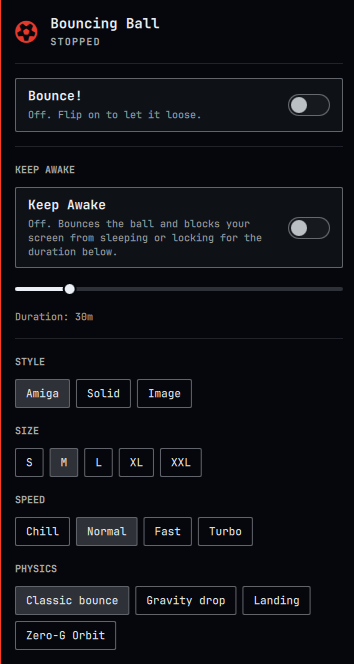
A customizable ball that bounces around your screen, Amiga Boing Ball-style, for Omarchy. Click the bar icon to start/stop it and tweak its style, size, speed, and physics; click the ball itself to boop it back into the air. It doubles as a "keep awake" tool: an optional mode bounces the ball as a visible reminder while blocking your screen from locking, sleeping, or dimming, for a duration you set with a slider.
Install
omarchy plugin add https://github.com/eddygarcas/omarchy-bouncing-ball.git --enable
Or manually:
git clone https://github.com/eddygarcas/omarchy-bouncing-ball.git \
  ~/.config/omarchy/plugins/eduard.bouncing-ball
omarchy-shell shell rescanPlugins
omarchy plugin enable eduard.bouncing-ball
Remove
omarchy plugin remove eduard.bouncing-ball
This deletes ~/.config/omarchy/plugins/eduard.bouncing-ball/ and removes
the widget from your bar layout. There's nothing else to clean up: settings
are in-memory only (see below) and the plugin writes no files -- the only
external processes it ever starts are short-lived (omarchy-menu-images
when picking an Image-style photo, hyprctl while Zero-G Orbit is active;
see Permissions & dependencies below), and none of them persist past this
removal.
What it does
Click the bar icon (a soccer ball) to open the panel:
- Bounce! — starts/stops the ball.
- Style — Amiga (red/white checker sphere), Solid (pick from 6 colors),
Image (wrap a picture of your own around it — click Choose Image… to
pick one from
~/Picturesvia Omarchy's own image picker), or Black Hole (see below — bundled with the Black Hole physics mode; picking either one sets the other automatically). - Size — S / M / L / XL / XXL.
- Speed — Chill / Normal / Fast / Turbo.
- Physics — Classic bounce (constant velocity, bounces off all four edges forever, DVD-logo style), Gravity drop (falls, loses energy each bounce, eventually settles and rolls along the floor), or Landing (a lunar-lander-style mini-game: the ball falls under the same gravity as Gravity drop, but ↑ thrusts up against it and ← / → nudge it sideways, both held-to-thrust rather than one-shot taps. Touch down gently and it comes to a dead stop — a clean landing; come in too fast and it's a rough, bouncy crash instead. Either way, hold ↑ again once it's settled to lift off for another attempt. The panel shows the controls and the current attempt's outcome while Landing is selected. Landing is the one physics mode that reads keyboard input — click the ball once to give it keyboard control (the same click also boops it), then ↑ / ← / → fly it; click anywhere else and it lets go again, same as clicking into a different app window would), or Zero-G Orbit (no floor, no falling — the ball orbits your live mouse cursor instead, pulled by a real inverse-square gravity well centered on it. Move your mouse and the well moves with it; a close pass slingshots the ball hard, a distant one barely curves its path, same as an actual two-body orbit. A Wrap Screen Edges toggle (on by default) picks how the viewport boundary behaves: on, swinging past one edge reappears from the opposite one and keeps orbiting unbounded; off, it bounces off all four edges like the other physics modes instead), or Black Hole (the exact same orbit motion as Zero-G Orbit -- same well, same Wrap Screen Edges toggle -- but the ball itself renders as a near-black event-horizon disc with a bright photon ring, and the real desktop wallpaper right around it is visibly bent/swirled by a genuine pixel-displacement shader, like light lensing around a real black hole. Picking this also switches Style to Black Hole, and picking Black Hole from Style switches Physics here too -- it's one bundled option, not two independent ones). A Screen Capture Snapshot toggle (off by default) switches the halo's source from the wallpaper picture to a one-shot snapshot of the real desktop (via Wayland screen capture), taken once each time this starts and then warped just like a picture from then on -- not a continuous feed, so windows under the halo get warped too instead of just covered, but only as they looked at that snapshot moment. See Known limitations and Permissions & dependencies below for the trade-off this involves.
- Gravity — a slider (50–2000 px/s²) for free adjustment, plus Moon / Mars / Earth preset buttons that jump straight to real-world-scaled values and light up whenever the slider happens to land exactly on one. Only shown while Gravity drop, Landing, Zero-G Orbit, or Black Hole is selected (Classic bounce ignores gravity entirely). Earth (900 px/s²) is the same strength Gravity drop and Landing always used; Moon (150) and Mars (340) are scaled down proportionally to their real surface gravity, so Landing under Moon gravity gives you a much longer, more forgiving descent to practice a soft touchdown than Earth does. In Zero-G Orbit and Black Hole the same number instead sets how strongly the cursor pulls; in Black Hole it also scales how strong the visual lensing looks.
- Keep Awake — a toggle plus a slider (0 to 3 hours, in 5-minute steps; 0 means "until you turn it off"). Turning it on starts the ball bouncing if it isn't already and inhibits the system idle cycle for the chosen duration, so the screensaver, lock, and auto-suspend won't fire — handy for watching a long build finish or a video call without input. It stops itself automatically when the timer runs out, or turn it off (or hit Bounce!) to end it early. Dragging the slider while it's already on re-arms the countdown immediately with the new duration.
Click the ball itself at any point to boop it — it kicks upward and nudges sideways away from wherever you clicked, like batting a real ball. That works whether it's mid-bounce or has already settled at the bottom in Gravity mode, so repeated clicking is how you keep it going. It also works as a mouse-only way to relaunch a landed or crashed ball in Landing mode, instead of the keyboard.
It renders as a full-screen, click-through overlay (the same technique Omarchy's own on-screen-display uses): everywhere except the ball itself stays click-through, so it never blocks the desktop underneath it. A background service owns the physics so it keeps running independently of whether the settings panel is open.
Keep Awake works through the standard Wayland idle-inhibit-v1 protocol
(Quickshell's IdleInhibitor, attached to the overlay window) rather than
touching Omarchy's own idle/lock settings or its separate built-in "Stay
Awake" indicator — Omarchy's idle service already runs its idle detection
with respectInhibitors: true, so this is the same mechanism any other
idle-inhibiting app (a video player, a video call client) would use, and it
stays fully self-contained: nothing outside this plugin's own state changes,
and nothing persists once it's off.
Known limitations
- Single monitor. It bounces on whichever screen its overlay window lands on; there's no per-monitor roaming.
- Black Hole's lensing halo warps the wallpaper FILE by default, not
real screen content. It samples
~/.local/state/omarchy/current/backgrounddirectly, so it lines up seamlessly with the real desktop wherever that's actually what's showing -- but if a real app window happens to be sitting under the halo, the effect shows wallpaper-based warping over part of that window rather than warping the window itself. This is the same category of limitation the ball itself has always had (it already paints opaquely over whatever's beneath it, app windows included), just extended slightly beyond the ball's own circle. The opt-in Screen Capture Snapshot toggle warps real window content too, at the cost described under Permissions & dependencies below -- but since it's a ONE-SHOT snapshot taken when it starts, not a continuous feed, a window that moves, changes, or appears after that moment still won't be reflected until the next snapshot (re-toggling, or restarting the ball). - Settings don't persist across
omarchy restart shell— resets to Amiga / Medium / Normal / Classic bounce each time. In-memory only, no config file, since this is a toy rather than something worth persisting. - Neither the Amiga checker nor the Image style is a pixel-exact sphere
projection, but both are close. Both are tessellated into the same grid
of lat/lon cells: latitude bands are spaced by
r*sin(latitude)so they genuinely compress near the top/bottom like a real sphere's foreshortening, and each cell's left/right edges are sampled along the actual projected meridian ellipse (x = r*sin(theta)*cos(phi),y = r*sin(phi)) instead of straight radii to the center, so both read as wrapped around a sphere rather than flat pie slices. Cells whose entire longitude span faces away from the viewer (cos(theta) < 0) are culled before drawing -- without that, front and back cells land on the exact same screen pixels under orthographic projection, and painter's-order overdraw made the two halves of the ball appear to spin in opposite directions asphaseadvanced. Two more approximations: each meridian edge is a handful of line segments rather than a true curve (invisible at the current band count, would show as faceting iflatBandswere lowered a lot), and adjacent cells are deliberately given a small (~4%) overlap ("bleed") rather than sharing an exact boundary -- two independently clipped draws that share a mathematically exact edge still leave a faint anti-aliased seam where neither is fully opaque, which reads as thin grid lines through an Image texture and extra "grout" on the checker. - Do not reintroduce per-pixel canvas rendering for the Amiga/Image
textures. An earlier version used
createImageData/putImageDatato reconstruct each pixel's 3D position for a mathematically exact sphere projection. It looked right, but reliably froze the entire Omarchy shell after roughly 15-25 seconds of continuous repainting -- confirmed via CPU-monitored soak tests, independent of texture resolution, throttling, or the input-region mask. The current implementation avoids that path entirely: both styles draw only with vector primitives and single GPU-backed blits (arc/clip/fillRect/moveTo/lineTo/drawImage, never a raw pixel buffer read/write), soak-tested clean with flat CPU and no RSS growth over a minute of continuous Image-style repainting. If you improve the sphere accuracy, keep it on that side of the line. - The Image style uses a fisheye/orthographic mapping, not an
equirectangular one, and only covers one hemisphere. An equirectangular
wrap (the same flat layout as a world map) was the first approach, but it
assumes the source image already reads as that kind of map -- an ordinary
photo doesn't, so it got sliced into ~20 disconnected vertical ribbons
instead of reading as wrapped around a sphere. The current approach
instead treats the image as a flat circular photo glued to the ball's
surface: both source axes use
amp = r*sin(angle)(the same linear-disc spacing the destination geometry and the checker style already use) rather than the angle itself, so the image compresses toward the limb the way the sphere's own foreshortening already does, and a given patch of the image stays glued to the same patch of the ball's surface as it spins (using each cell's intrinsic longitude, not the rotated one) instead of scrolling sideways underneath the wedges. Only cells on the hemisphere where that mapping is monotonic get the image (isImageDecalWedge); the rest fall back to a solid fill using the picked image's own background color (see below), not the panel's palette color. A full-sphere version (image mirrored on the back hemisphere, usingsin's natural symmetry) was tried twice -- it's mathematically sound and passes every offline geometry check clean, but live, the un-mirrored hemisphere reads as a fragmented, torn version of the image rather than a clean mirror. That isn't a coordinate-math bug (a Cairo-based standalone render of the exact same algorithm can't reproduce it), so it's presumed to be another manifestation of thedrawImagereliability issue documented next, rather than a reason to redo the mapping. drawImagehas repeatedly, silently dropped paints under QtQuick's Canvas, for reasons this file could only chase down empirically, one live reproduction at a time -- so the Image style keeps itsdrawImageusage as small and simple as it can. In order: the original full circle+rect+meridian-polygon clip stack (clipSphereCell, what the checker style also uses viafillRect, which has never dropped a paint in any test here) turned out to makedrawImagedrop cells; simplifying that down to a plain rect helped but didn't fully fix it, because a sufficiently narrow rectangular clip triggers the identical drop (an earlier isolation test missed this because it happened to use a full-width rect, never a narrow one);widenThinSpanfixed that by flooring both the clip rect anddrawImage's own destination rect to at least 6px per axis together (never just one), holding the source/ destination scale fixed and clamping the correspondingly widened source span to the image's bounds. LimitingdrawImageto one hemisphere (previous point) is the last piece: not a fix for this bug, but cutting the number ofdrawImagecalls per frame in half cuts the exposure to whatever about it still isn't fully understood. A separate, unrelated bug found and fixed along the way: the solid-fill fallback for non-decal cells originally filled the entire ball (fillRect(-r, -r, 2*r, 2*r)) rather than clipping to its own cell first -- harmless-looking on its own, but painted after an image cell earlier in the same per-frame loop, it silently erased that image cell (and everything else drawn so far) each time. Caught by rendering the exact algorithm standalone with each branch mapped to a flat debug color (blue for image cells, red for solid) instead of the real image and clip logic -- the debug render immediately showed far more red than the geometry implied it should.- A related but distinct bug, found later: large picked images (roughly
1920px+ on a side) made the ball go fully transparent a moment after
looking correct. Not the same failure mode as the point above (a
silently dropped paint) -- this one threw a real, uncaught
drawImage(), index size errorevery repaint, visible in Quickshell's own log, which aborted the rest of thatonPaintcall (including the rim/gloss overlay), leaving the canvas at whateverclearRecthad just wiped it to. Root cause:widenThinSpan's source-rect math (and the plain sx/sy/sw/sh math above it) is exact in principle, but floating- point rounding can leavesrcStart + srcSpana few ULPs past the image's actual width/height -- negligible as a number, but QtQuick's Canvas throws for any overage, however small. That epsilon only crosses into "actually breaks something" territory once the image dimensions are large enough to amplify it into something QtQuick's bounds check can see -- never reproduced against a 256x256 test image, reliably reproduced with a 1920x1280 one, confirmed with a zero-tolerance offline sweep ofwidenThinSpan's output across a full phase range at both sizes. Fixed by havingwidenThinSpanclamp its own output into[0, srcExtent]as a final defensive step, unconditionally, rather than trusting the arithmetic above it to land exactly on the boundary. - The un-decaled hemisphere's fill color is the picked image's own
background color, sampled once per image pick, not a per-frame
computation.
Overlay.qmldraws the loaded image into a hidden 32x32Canvasexactly once (when it finishes loading), then averages only the outermost ring of that canvas's pixels via a singlegetImageDatacall -- not every pixel. A typical picked photo is a subject (a ball) roughly centered against a plain backdrop, so the backdrop is what reaches the edges of the frame while the subject usually doesn't; averaging every pixel instead pulled the result toward whatever color the subject itself was (e.g. a red/white checker ball averaging to a muted pink) rather than the plain white actually behind it. 32x32, not smaller, for the same reason: at 16x16 each border pixel is a bilinear blend of a large block of source pixels, close enough to the ball's silhouette in a test photo to still smudge red into the "background" read. Sampling only the ring is still a one-shot cost paid on image pick, categorically different from the per-pixel, per-frame sphere reconstruction the point above warns never to reintroduce. It guards against the samedrawImage-drops-a-paint issue (a near-zero alpha sum after the draw means the sample itself silently failed) by leaving the color unset rather than reporting black, in which caseModel.jsfalls back to the panel's palette color instead.
Permissions & dependencies
- No external packages or network access required to RUN this plugin --
everything it needs at runtime ships with Omarchy itself. (The one
build-time-only exception,
qt6-shadertools, is explained under Black Hole below -- it was needed once, by this plugin's author, to compile a shader that's already committed to the repo; it is not needed by you.) - Runs mostly inside the shared
omarchy-shellprocess via a background service, a bar-widget settings panel, and a full-screen click-through overlay -- no files written to disk. The two exceptions are Zero-G Orbit and Black Hole (see below), which spawn short-livedhyprctlsubprocesses, and Black Hole additionally reads (never writes) the active wallpaper file. - Zero-G Orbit needs the live global mouse position to orbit around,
but the overlay is deliberately click-through and so never holds pointer
focus -- it can't receive continuous Wayland mouse-move events the way a
normal focused window would.
hyprctl cursorposis the sanctioned way to read the compositor's cursor position without grabbing it. Polled via a real subprocess (Quickshell.Io.Process) at 30/s, well under the 60Hz physics tick, and only while this mode is actually selected and bouncing -- never while any other mode is active or the ball is stopped. - Black Hole reads (never writes) two files: it polls
~/.local/state/omarchy/current/background(the same symlink Omarchy's own background layer follows) every ~3s while active, and loads whatever it currently points at as a texture for the lensing halo's shader. The cursor-pollinghyprctlsubprocess described above is shared with this mode too, since Black Hole reuses Zero-G Orbit's motion outright. The halo itself is a real GPU fragment shader (lens.frag, compiled tolens.frag.qsband committed alongside its source so it's rebuildable and reviewable) rather than a per-pixel Canvas trick -- that compiled file is the one binary artifact in this repo. It was built once, here, withqt6-shadertools'qsbtool (qsb --glsl "100 es,120,150" -o lens.frag.qsb lens.frag); confirmed empirically (an isolatedquickshell -n -p <scratch>test instance, checking/proc/<pid>/maps) that running a compiled.qsbviaShaderEffectdoes NOT loadlibQt6ShaderToolsat runtime -- only the same Qt6 librariesomarchy-shellalready links.qt6-shadertoolsis a build-time-only tool; end users need nothing beyond what a normal Omarchy install already has to run this style. - Black Hole's Screen Capture Snapshot toggle (off by default) is a
real, material change from the default behavior above -- but a ONE-SHOT
one, not a continuous feed: while it's on, each time Black Hole
(re)starts the halo takes exactly one snapshot of this monitor's real
composited output -- via Quickshell's
ScreencopyView(Quickshell.Wayland) withlive: false, which uses Hyprland'swlr-screencopyprotocol, the same onegrim(this repo's own screenshot tool) uses -- and then holds and reuses that single frame exactly like the wallpaper file, instead of reading from disk. Confirmed directly against Quickshell's own C++ source thatlive: falsereally does mean "capture once, then hold" (no per-frame re-capture the waylive: truewould) -- and separately, via an isolated, non-visual test (quickshell -n -p <scratch>, checkinghasContent/sourceSizeviaconsole.logonly, twice a couple seconds apart, confirming it stays true and doesn't need a running feed -- deliberately never rendered or screenshotted, to avoid capturing this machine's own real screen content as part of testing) that a real capture genuinely completes and holds. That one snapshot reads whatever's genuinely on screen at that instant, including the content of any real window under the halo -- but it won't reflect anything that changes after that moment until the next snapshot (re-toggling, or restarting the ball). Nothing is ever written to disk or sent anywhere by this plugin either way -- the captured frame only ever feeds the same shader the wallpaper path already uses -- but even a one-shot read of real screen content is a meaningfully bigger capability than a picture-file read, which is exactly why it's opt-in rather than the default. - Choose Image… shells out to
omarchy-menu-images(ships with Omarchy) pointed at~/Pictures, the same fullscreen picker used for wallpapers and themes, rather than this plugin reimplementing a file browser. It's a real subprocess (Quickshell.Io.Process), so it can't block the shell; only the picked file's path comes back, read from its own stdout. - Keep Awake uses the standard Wayland
idle-inhibit-v1protocol (via Quickshell'sIdleInhibitor) to block screensaver/lock/suspend while it's on -- the same mechanism any idle-inhibiting app uses, not a custom workaround. It only takes effect while this plugin's overlay window is visible and Keep Awake is toggled on, and stops the moment either is off. - The Landing physics mode only takes keyboard focus once the player
explicitly clicks the ball (
wantsFocusinOverlay.qml), and releases it again on the very next click anywhere else -- it does NOT grab keyboard focus just because Landing is selected and the ball is bouncing. Two earlier designs were tried and both confirmed live to be real bugs, not just theoretical: (1) a permanentWlrKeyboardFocus.Exclusivegrab for the whole time Landing was selected+bouncing trapped the entire session's keyboard AND mouse; (2) a permanentWlrKeyboardFocus.OnDemandgrab (primed via a briefExclusiveburst, mirroring Omarchy's ownKeyboardPanel.qml) still swallowed clicks aimed at other windows entirely -- verified with real synthetic clicks viaydotoolandhyprctl activewindowas ground truth, not just visual impression. In this Hyprland version, a layer-shell surface holding ANY non-None keyboard-interactivity appears to capture pointer input for its full extent, not just its declared input-region mask, for as long as it holds that focus -- so the only way to actually let clicks through is to never hold it longer than a single click-to-click window: the mask widens to full-screen and keyboard focus (briefly primedExclusive, thenOnDemand) is requested only between a click on the ball and the next click anywhere else, which a dedicated full-screenMouseArea(focusReleaseCatcher, placed so the ball's own click still wins over it) detects and immediately releases. That release click is itself consumed (Wayland has no way to forward it on to the window underneath), so leaving Landing mode's keyboard control takes one click to release focus and, if you wanted to click something specific, one more to do it -- same as dismissing any other focus-grabbing overlay. - Like every Quickshell plugin, this code runs unsandboxed inside that
shared process -- review
Panel.qml/Service.qml/Overlay.qml/Model.jsbefore installing.
Files
| File | Purpose |
|---|---|
manifest.json |
Plugin manifest (service + bar-widget + overlay) |
Panel.qml |
Bar icon + settings panel |
Service.qml |
Background physics + Keep Awake + image-picker state, IPC |
Overlay.qml |
Full-screen click-through window that renders the ball |
Model.js |
Presets, physics step function, and the ball-drawing routines |
lens.frag |
Black Hole lensing halo's shader source (GLSL) |
lens.frag.qsb |
lens.frag, compiled for ShaderEffect -- see Permissions above |
License
MIT — see LICENSE.