
Power Timings
An Omarchy shell plugin that adds a bar widget for controlling how long the system waits before the screensaver, the lock screen, and suspend kick in — plus quick "Lock now" / "Suspend now" actions.
Why
Omarchy's built-in idle service already reads idle.screensaver and
idle.lock from ~/.config/omarchy/shell.json, but there's no UI to change
them and no auto-suspend timeout at all. This plugin adds both: a popup with
a slider for each of the three timeouts, and a background timer that suspends
the machine after the configured idle period.
Install
omarchy plugin add https://github.com/eddygarcas/omarchy-power-timings.git --enable
Or manually:
git clone https://github.com/eddygarcas/omarchy-power-timings.git \
  ~/.config/omarchy/plugins/eduard.power-timings
omarchy-shell shell rescanPlugins
omarchy plugin enable eduard.power-timings
What it does
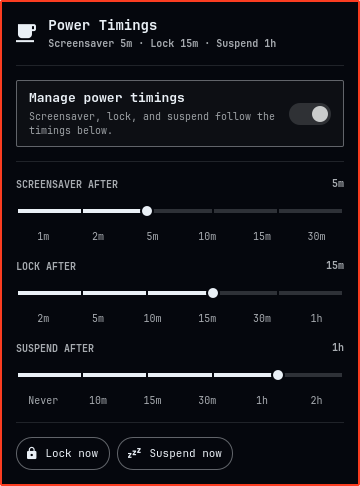
Click the bar icon to open the panel:
- Manage power timings — a switch at the top. Turn it off to disable everything below and let the system's own idle defaults apply (screensaver and lock keep working as Omarchy ships them; auto-suspend is disabled).
- Screensaver after / Lock after — sliders, marked at each preset
stop, that write straight into
idle.screensaver/idle.lockin~/.config/omarchy/shell.json, the same keys the built-in idle service already reads. - Suspend after — a new
idle.suspendtimeout, also a marked slider ("Never" at the low end). A background service (Service.qml) watches for that much idle time and runssystemctl suspend. It respects the existing "Stay awake" indicator, so turning that on also pauses auto-suspend. - The three sliders always keep screensaver < lock < suspend ("Never" is exempt): dragging one past a neighbor pushes that neighbor forward to its own next preset instead of landing on an invalid order.
- Lock now / Suspend now — run
omarchy-system-lock/systemctl suspenddirectly, regardless of the switch above.
Session locking before any suspend (manual or automatic) is already handled
by Omarchy's own omarchy-sleep-lock service, so this plugin never needs to
lock the screen itself before suspending.
Known limitations
Changing idle.screensaver / idle.lock while the shell is already running
doesn't reliably re-arm a countdown that's already in flight — in testing, a
new short timeout sat for 90+ seconds with no effect until the shell was
restarted, at which point it fired right on schedule. This is a property of
Omarchy's built-in idle-notify plumbing that these sliders write into, not
something this plugin controls. If releasing a slider doesn't seem to take
effect immediately, run omarchy restart shell (or just wait through one
natural idle → active cycle) to make it stick.
Remove
omarchy plugin remove eduard.power-timings
This deletes ~/.config/omarchy/plugins/eduard.power-timings/, removes the
widget from your bar layout, and stops the background auto-suspend timer.
It does not revert idle.screensaver / idle.lock / idle.suspend in
shell.json — whatever values were last set stay in effect (the built-in
idle service keeps reading idle.screensaver / idle.lock either way).
Delete those keys by hand, or run omarchy refresh shell, if you want them
back to Omarchy's defaults too.
Permissions & dependencies
- Requires Python 3 on
PATH— standard on any Omarchy install. No other runtime dependencies, and no network access at all. - Reads
idle.*in~/.config/omarchy/shell.jsonlive through a QuickshellFileView(same file the built-in idle service already owns). Writes go throughpower_timings_ctl.pyinstead, never a direct path-based write: the script opens~/.config/omarchyvia an ancestor-nofollow, owner-checked directory descriptor (refuses if any component from$HOMEdown is a symlink, or if the directory isn't owned by you — but never chmods it, since it's shared with the rest of Omarchy and every other plugin), re-validatesshell.json's identity immediately before committing (aborts rather than overwrite if it changed, appeared, or disappeared since it was read), and commits via a same-directory, exclusively-created temp file that's fsync'd and atomically renamed over the real name — safe even ifshell.jsoncurrently is (or becomes) a symlink, sincerename(2)replaces the destination without ever following it. - Reads
~/.local/state/omarchy/indicators/stay-awake(the same file the built-in "Stay awake" bar indicator manages) to pause auto-suspend. - Runs two commands, both already used by Omarchy's own system menu:
omarchy-system-lock(Lock now) andsystemctl suspend(Suspend now, and automatically once the configured suspend timeout elapses). - Like every Quickshell plugin, this code runs unsandboxed inside the shared
omarchy-shellprocess — reviewPanel.qml/Service.qml/power_timings_ctl.pybefore installing.
Files
| File | Purpose |
|---|---|
manifest.json |
Plugin manifest (service + bar-widget) |
Panel.qml |
Bar icon + popup UI |
Service.qml |
Background auto-suspend timer |
Model.js |
Preset lists and duration formatting |
power_timings_ctl.py |
Symlink-safe, atomic shell.json idle-block writer |
License
MIT — see LICENSE.