
Workspaces Preview
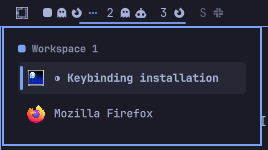
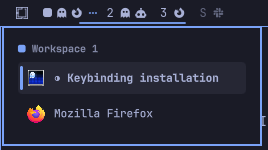
An Omarchy shell plugin that replaces the built-in workspace indicator with one that lets you preview and pick a window before switching, instead of jumping blind into a busy workspace.
Why
Omarchy's built-in omarchy.workspaces widget switches straight to a
workspace on click. That's fine when a workspace has one window, but on a
busy workspace you land wherever the compositor last left focus, then have
to hunt for the window you actually wanted. This plugin adds a picker: click
(or press SUPER+<number>) on a workspace with more than one window and a
popup lists its windows so you can jump straight to the right one.
Install
omarchy plugin add https://github.com/eddygarcas/omarchy-workspaces-preview.git --enable
Or manually:
git clone https://github.com/eddygarcas/omarchy-workspaces-preview.git \
  ~/.config/omarchy/plugins/eduard.workspaces
omarchy-shell shell rescanPlugins
omarchy plugin enable eduard.workspaces
Installing switches the bar to this widget in place of the built-in
omarchy.workspaces.
Optional: wire up SUPER+<number>
By default SUPER+<number> still runs Hyprland's plain
hl.dsp.focus and switches immediately. To make it defer to this widget's
picker on busy workspaces, run:
~/.config/omarchy/plugins/eduard.workspaces/scripts/install-keybinding.sh
This appends a marked, idempotent block to ~/.config/hypr/bindings.lua
(backing it up first) and Hyprland picks it up automatically on save. To
revert it later: scripts/uninstall-keybinding.sh.
Prefer to do it by hand instead? Add this to ~/.config/hypr/bindings.lua:
local workspace_picker = os.getenv("HOME") .. "/.config/omarchy/plugins/eduard.workspaces/scripts/switch-or-preview.sh"
for workspace = 1, 10 do
  local key = "code:" .. tostring(workspace + 9)
  hl.unbind("SUPER + " .. key)
  o.bind("SUPER + " .. key, "Switch to workspace " .. workspace, workspace_picker .. " " .. tostring(workspace))
end
Either way, this is a Hyprland keybinding change, not something the plugin installer runs on its own — Omarchy's plugin manager deliberately never runs plugin code or install hooks on add/update/enable, so it's opt-in and won't touch your existing bindings otherwise.
What it does
- Click a workspace — switches directly if it has 0-1 windows. If it has more, opens a popup listing its windows instead of switching blind.
- Pick a window from the popup — arrow keys (or mouse hover) to move the
selection,
Enter/click to jump to it. The popup auto-dismisses after 2 seconds of inactivity, or onEsc. SUPER+<number>(once wired up per above) — same behavior as a click, viascripts/switch-or-preview.shand anIpcHandler(eduard.workspaces preview <id>) that relays the request to whichever monitor is currently focused.- Workspace
10displays as0, matching the built-in widget.
App icons and hidden empty workspaces
Each workspace pill shows a Nerd Font glyph per open window beside its number, and workspaces without windows are hidden unless they are on screen (so a linked pair's empty partner still renders while it is shown). The approach and the icon map come from decent-workspaces.
Settings go on the widget's entry in ~/.config/omarchy/shell.json, or:
omarchy bar set eduard.workspaces <key> <value> --json
| Key | Default | Meaning |
|---|---|---|
showIcons |
true |
Draw a glyph per open window beside the number. |
maxIcons |
0 |
Cap glyphs per workspace, collapsing the rest to +N. 0 means no cap. |
showEmpty |
false |
Keep workspaces 1-5 pinned on the bar whether or not they hold windows. |
showScratchpad |
true |
Show a pill for the scratchpad while it holds windows. |
scratchpadName |
special:scratchpad |
Which special workspace that pill tracks. Only an optional special: prefix plus [A-Za-z0-9_-] is accepted; anything else falls back to the default. |
scratchpadLabel |
S |
Text on the scratchpad pill. Set "" for icons only. |
Icons are resolved in IconRules.js, an ordered list of { pattern, icon }
where the pattern is a case-insensitive regex tested against the window title
first and the class second; the first match wins, so title-specific rules sit
above generic class rules. To find a window's class:
hyprctl clients -j | jq -r '.[] | "\(.class)\t\(.title)"'
The scratchpad
SUPER + ALT + S stashes a window in special:scratchpad and SUPER + S
brings it back. While the stash holds windows, a pill labelled S sits after
the workspace numbers with a glyph per stashed window. It is dimmed until the
stash is open on that bar's monitor, and clicking it toggles the stash there.
It shows on every bar, because the scratchpad is one global stash rather than
something a monitor owns.
Multi-monitor workspace linking
On a setup with exactly two monitors, workspaces pair up automatically:
1+2, 3+4, 5+6, and so on. Switching to either member of a pair
shows both at once — the odd id lands on your leftmost monitor (by
position), the even id on the other — instead of the switch stealing the
workspace from whichever monitor already had it.
Workspace 3 just got selected — its pair partner, 4, comes along on
the other monitor. The dotted line marks the pair; 1+2 are linked too,
just not the active pair right now.
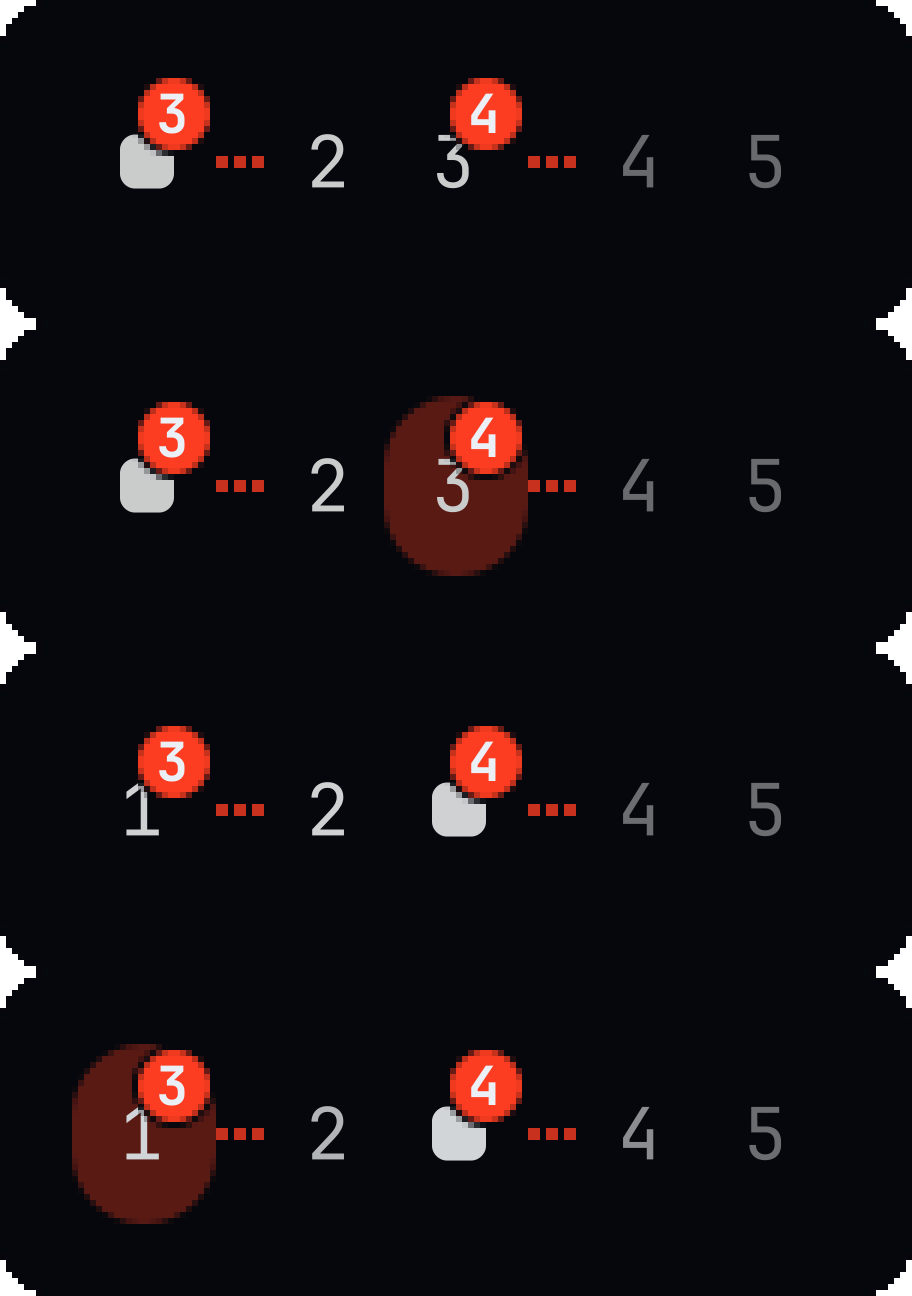
The bar reflects the pairing: a dotted line connects a linked pair, and a workspace that's only on-screen because its pair partner was selected still shows at full brightness instead of reading as empty/unfocused.
This applies to both SUPER+<number> and clicking a workspace in the bar.
Setups with one monitor, or three or more, are unaffected — each workspace
switches on its own, same as the built-in widget.
Known limitations
The SUPER+<number> integration requires running scripts/install-keybinding.sh
(or editing ~/.config/hypr/bindings.lua by hand, see above) — a plugin can't
safely rewrite another config file's keybindings for you, so this step isn't
automated by install/enable.
Permissions & dependencies
- No external packages or network access required.
- Reads workspace/window state via Quickshell's
Hyprlandintegration and switches viascripts/focus-workspace.sh. scripts/focus-workspace.shcallshyprctl monitors -j,jq, andhyprctl dispatch hl.dsp.focus(...)to switch — and, only on an exactly-two-monitor setup, a few extrahl.dsp.focus({monitor=...})dispatches to link a workspace pair across both monitors (see above).scripts/switch-or-preview.sh(only used if you wire up the optional keybinding) callshyprctl workspaces -j,jq,omarchy-shell, andscripts/focus-workspace.shfor the actual switch.scripts/install-keybinding.sh/scripts/uninstall-keybinding.shonly ever touch~/.config/hypr/bindings.lua. They resolve it to its real file (which must be a regular file), back that up, write the new content to amktemp'd sibling and rename it into place -- never writing through a pathname that could be swapped for a symlink.- The scratchpad pill's
scratchpadNamesetting is validated against a narrow allowlist before it is placed in thehyprctl dispatchLua expression; values outside it fall back tospecial:scratchpad. - Like every Quickshell plugin, this code runs unsandboxed inside the shared
omarchy-shellprocess — reviewWorkspaces.qmlbefore installing.
Files
| File | Purpose |
|---|---|
manifest.json |
Plugin manifest (bar-widget) |
Workspaces.qml |
Bar widget, popup UI, and IPC handler |
IconRules.js |
Window class/title to Nerd Font glyph rules |
scripts/focus-workspace.sh |
Switches workspaces; links odd/even pairs on 2 monitors |
scripts/switch-or-preview.sh |
Optional SUPER+<number> keybinding helper |
scripts/install-keybinding.sh |
Wires up the optional keybinding (see above) |
scripts/uninstall-keybinding.sh |
Reverts install-keybinding.sh |
Remove
omarchy plugin remove eduard.workspaces
This deletes ~/.config/omarchy/plugins/eduard.workspaces/ and restores the
built-in omarchy.workspaces widget on the bar. If you wired up the optional
keybinding, revert that block in ~/.config/hypr/bindings.lua by hand.
Credits
The per-window icons, the hidden-empty-workspace behaviour, the scratchpad pill
and IconRules.js
are taken from decent-workspaces
by TheTrueFerret (MIT), whose icon map is in turn adapted from saif.workspaces
by Saif Omar (MIT).
License
MIT — see LICENSE.