
Omarchy Background Low Memory
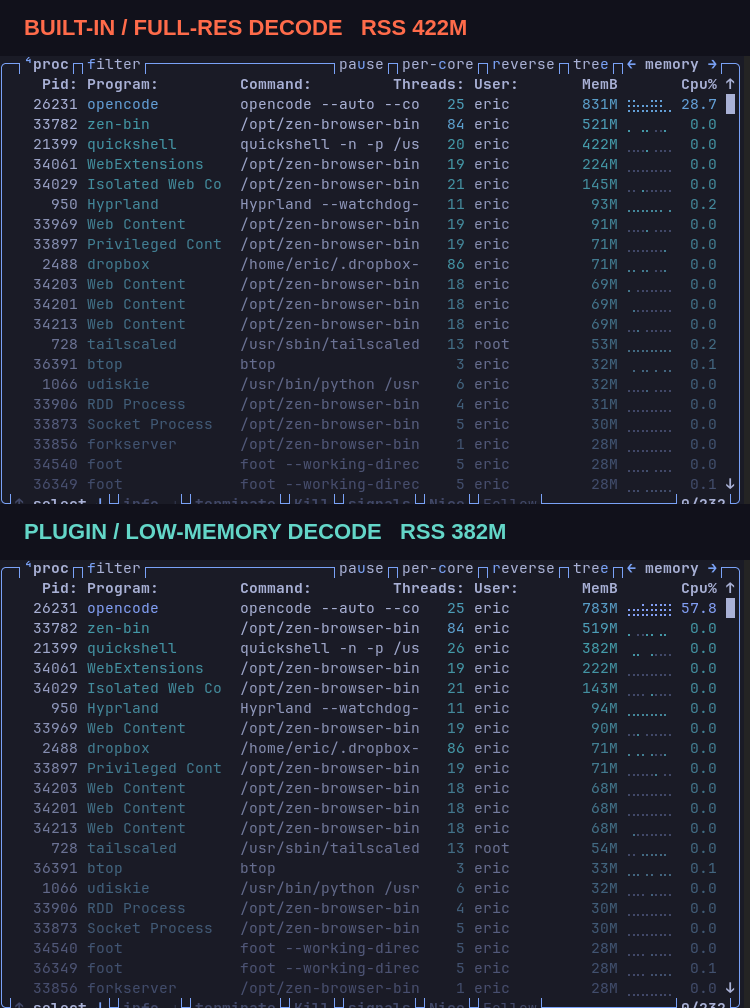
A drop-in replacement for the Omarchy Quattro background service that bounds large wallpaper decoding when the system starts with less than 4 GiB of available memory. The low-memory path keeps the wallpaper sharp at the physical display size while avoiding the full-resolution image allocation that can make Quickshell expensive on small-memory machines.
[!IMPORTANT] This plugin is for Omarchy 4 (Quattro). It replaces the built-in
omarchy.backgroundservice and is not intended for older Omarchy releases.
Behavior
- Reads Linux
MemAvailableonce when the Omarchy shell starts. - Below 4 GiB available memory, bounds the base wallpaper and both transition frames to the physical display size and device-pixel ratio.
- Uses
Image.PreserveAspectCropso the bounded decode covers the display without fitting and enlarging the image. - Keeps the existing full-resolution behavior at or above the threshold.
- Does not poll memory, start a helper process, modify user configuration files directly, or launch a second Quickshell process.
- Leaves smaller source images unscaled rather than enlarging them.
The plugin keeps the built-in background IPC target and declares omarchy.background as its source. Quattro automatically disables the built-in service when ericvrp.background-low-memory is enabled, so both full-screen background services are never active together. Disabling or removing this plugin restores the built-in service.
Memory comparison
The reference measurement used a 6930x3960 wallpaper on a 1366x768 display at device-pixel ratio 1 in an isolated Omarchy shell.
| Mode | Quickshell RSS | Quickshell PSS |
|---|---|---|
| Original full-resolution decode | ~474 MiB | ~365 MiB |
| Low-memory display-sized decode | ~386 MiB | ~277 MiB |
| Reduction | ~88 MiB | ~88 MiB |
The comparison is a startup measurement with the test bar parked off-screen. The low-memory path is selected only when MemAvailable is below 4 GiB; the decision is intentionally made once per shell startup.
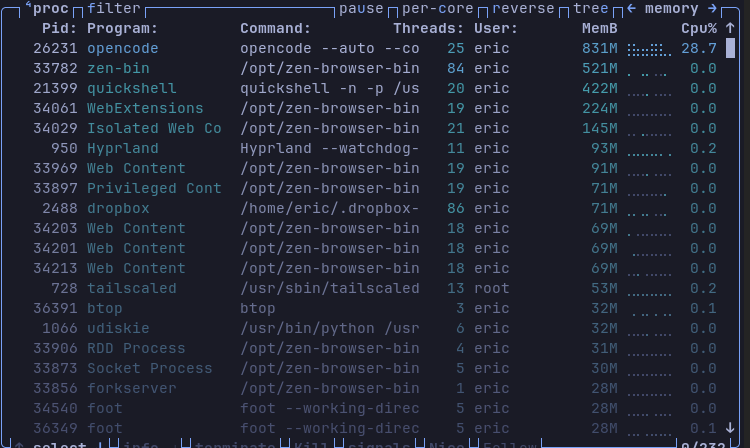
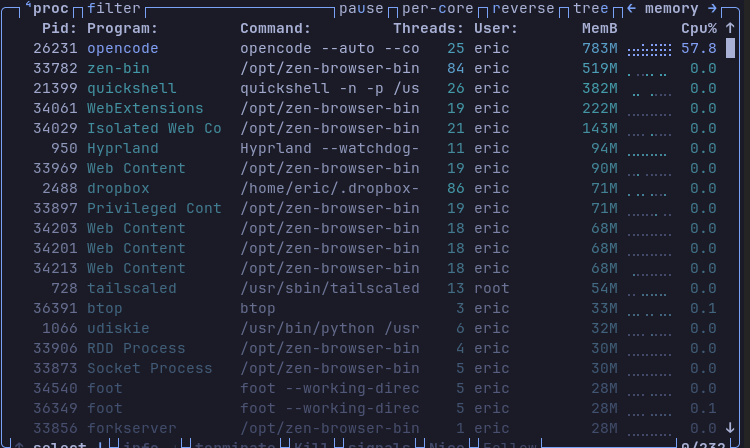
The preview's source crops are btop-full-resolution.png and btop-low-memory.png. They show the same Quickshell PID in btop's MemB column before and after the replacement was enabled; live values vary with the rest of the desktop workload.
Install
omarchy plugin add https://github.com/ericvrp/omarchy-background-low-memory.git --enable
Enabling this plugin automatically disables omarchy.background before loading ericvrp.background-low-memory. Do not enable both background services at the same time. It runs in the existing user session and requires no package installation, external service, or additional runtime dependency.
Confirm the active replacement with:
omarchy plugin list --json | jq --arg id ericvrp.background-low-memory '.[] | select(.id == $id)'
Disable or remove
Disabling the plugin restores the built-in background service:
omarchy plugin disable ericvrp.background-low-memory
Disabling restores omarchy.background automatically. Removing an enabled plugin also restores it:
omarchy plugin remove ericvrp.background-low-memory
Requirements
- Omarchy Quattro with the Quickshell desktop shell.
- A wallpaper larger than the physical display to benefit from bounded decoding.
btop is used only for the memory screenshots and is not a runtime dependency.
Development
Validate the manifest, model tests, and QML imports from the repository root:
omarchy plugin validate .
./test/background-test.sh
qmllint -I "$OMARCHY_PATH/shell" Background.qml
The implementation is based on Omarchy's first-party background service and the changes in Omarchy PR #7941. The plugin intentionally keeps the first-party background behavior and only adds startup-time memory detection plus bounded image decoding.
License
Licensed under the MIT License. The wallpaper renderer is derived from Omarchy's MIT-licensed background service.