
Omarchy Bar Autohide
An event-driven auto-hide service plugin for the Omarchy bar.
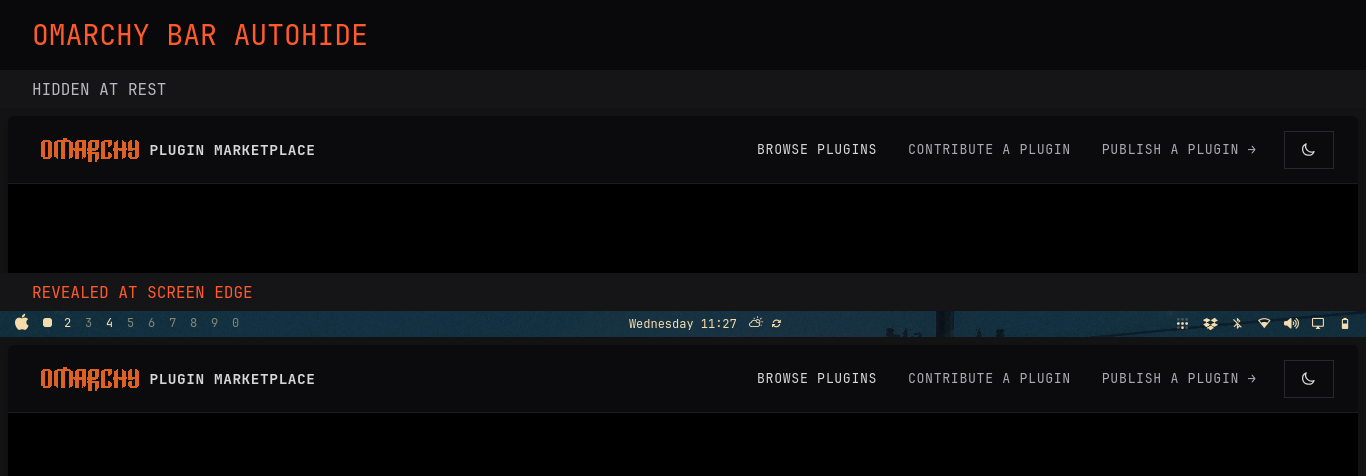
[!IMPORTANT] This plugin is for Omarchy 4 (Quattro), where the desktop shell and bar use Quickshell. It is not intended for older Omarchy releases that use Waybar.
Behavior
- Supports bars anchored to the top, bottom, left, or right screen edge.
- Reveals the bar only when the pointer reaches its anchored screen edge.
- Keeps the bar open while the pointer remains over it.
- Hides the bar 1000ms after the pointer leaves that area.
- Leaves the bar visible when the user opens it with the bar hotkey.
- Keeps the bar visible while a bar popout is open.
- Supports multiple monitors, scaling, rotation, and monitor offsets.
A transparent one-pixel Quickshell surface listens for pointer entry at the bar edge. A passive hover observer attached to each live bar surface handles pointer exit without blocking its controls. There is no cursor polling and no persistent helper process, so the plugin causes no idle timer wakeups.
Requirements
- Omarchy with the Quickshell bar
- Hyprland
Install
omarchy plugin add https://github.com/ericvrp/omarchy-bar-autohide.git --enable
Omarchy clones the repository to
~/.config/omarchy/plugins/ericvrp.bar-autohide, validates it, and enables the
service in the shell configuration.
Update
omarchy plugin update ericvrp.bar-autohide
Disable
omarchy plugin disable ericvrp.bar-autohide
Disabling or removing the plugin restores the bar visibility state from before the plugin was enabled.
Uninstall
omarchy plugin remove ericvrp.bar-autohide
License And Warranty
Licensed under the MIT License.
The software is provided as is, without warranty of any kind, express or implied. See the license for the complete warranty and liability disclaimer.
Development and local testing instructions are in DEVELOPING.md.