
OmiDocker
Docker containers and compose stacks on the Omarchy bar.
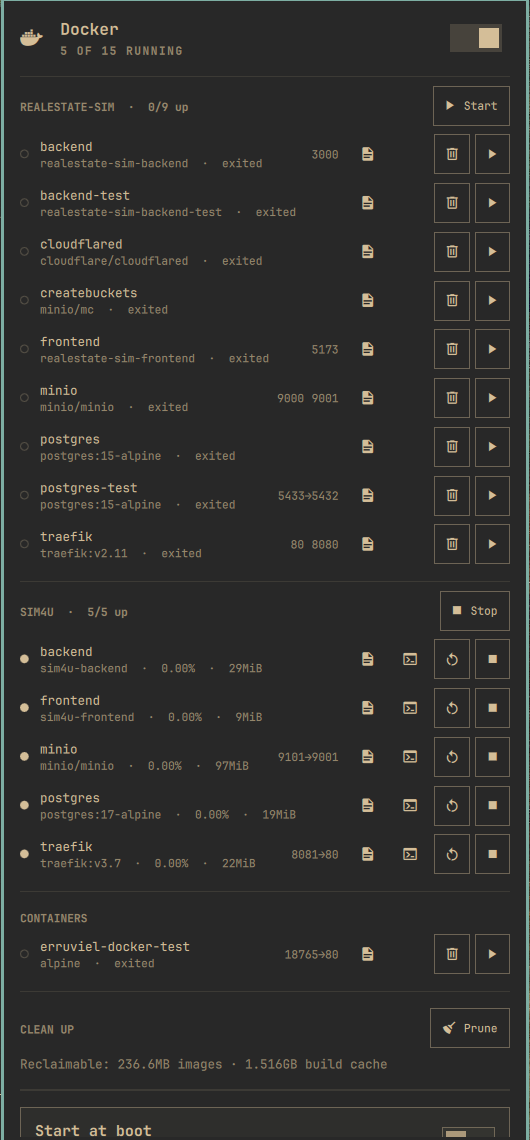
A whale in the status bar, a control panel one click away:
- Compose stacks — containers grouped by
com.docker.compose.project. Stack start runsdocker compose up -d(recreates removed containers, picks up compose.yml changes); stack stop is a plaindocker stop, never a destructivedown. - Per-container controls — start, stop, restart, unpause, and remove (stopped containers only, behind a confirm dialog).
- Logs and shell — one click opens a floating terminal with
docker logs -for an interactivedocker execshell. - CPU/memory per container — sampled with
docker statswhile the panel is open; the closed widget costs nothing. - Clickable ports — a published port opens
http://localhost:<port>in the browser. - Live updates — the panel follows
docker events, so work done in a terminal (compose up, stops, health flips) shows up immediately. - Health at a glance — unhealthy containers turn urgent in the panel, put a badge dot on the bar icon, and raise a desktop notification when they flip (can be turned off).
- Port-conflict hints — a stopped container whose published host port is held by a running one is told exactly who is squatting on it.
- Clean up — see how much space dangling images and build cache hold, and prune them behind a confirm dialog. Stopped containers and volumes are never touched.
- Daemon switch and autostart — start/stop
docker.serviceand toggle enable-at-boot from the panel, authorized through the regular polkit prompt.
Install
omarchy plugin add https://github.com/Erruviel/omarchy-docker.git --enable
That's it. The plugin runs entirely unprivileged: container data and actions
go through the docker CLI (your docker group membership), and the daemon
switch calls systemctl as your user, which authenticates through polkit.
Nothing is installed outside the plugin directory, and nothing runs as root.
Requirements
-
dockerCLI and, to see any containers, membership in thedockergroup:sudo usermod -aG docker $USER(log out and back in afterwards). Without it the panel explains what to do.
-
jq(ships with Omarchy).
If Docker is not installed at all, the widget hides itself.
Settings
In ~/.config/omarchy/shell.json, on the widget entry:
| Key | Default | Meaning |
|---|---|---|
interval |
10 |
Background poll interval in seconds while the panel is closed. Events refresh the panel regardless; this is the safety net. |
showCount |
false |
Show the number of running containers next to the whale on the bar. |
notifyUnhealthy |
true |
Desktop notification when a container turns unhealthy. |
{ "id": "erruviel.docker", "interval": 30, "showCount": true }
Uninstall
omarchy plugin remove erruviel.docker
License
MIT — see LICENSE.