
omarchy-wwan
Mobile broadband (WWAN/LTE) support for Omarchy, packaged as an Omarchy shell plugin: a bar widget with an anchored control panel — connect switch, live link stats, SIM slot, carrier wizard, data cap with auto-cutoff — plus a Setup → Mobile menu.
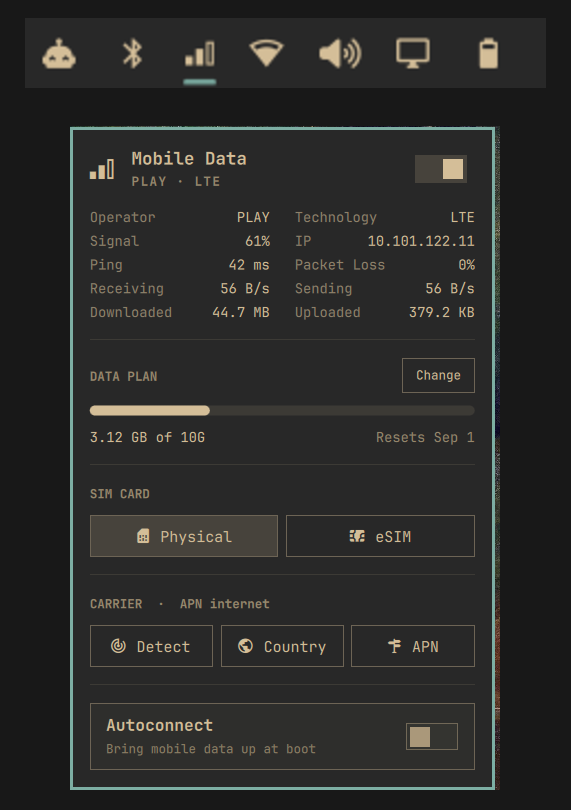
Built and tested on a Dell Latitude 9430 with the DW5821e-eSIM Snapdragon X20 LTE modem, Omarchy 4.0 (quattro), systemd 261.
Requirements
- Omarchy 4.0 (quattro) or newer — the bar widget and menu entries plug into the Quickshell-based omarchy-shell. (The last waybar/walker version for Omarchy 3 is in this repo's history.)
- systemd 260 or newer — the
[MobileNetwork]section this is built on does not exist before that, and without it nothing will establish a connection. - ModemManager, and
mobile-broadband-provider-infofor the carrier wizard. Both ship with Omarchy already. - A networkd-managed WWAN interface, i.e.
/etc/systemd/network/20-wwan.networkmatchingww*, which is Omarchy's default.
Why this exists
Omarchy manages networking with iwd + systemd-networkd, not NetworkManager. Everything
needed for mobile data is already installed — ModemManager runs, the kernel drivers bind,
/etc/systemd/network/20-wwan.network exists — but nothing ever brings the modem up, and
there is no NetworkManager UI to hang the controls off. That last mile is what this adds.
The connection itself is not script-driven. systemd 260 added a [MobileNetwork] section
that makes systemd-networkd drive ModemManager directly and apply the addressing the bearer
hands back. This repo generates that configuration and supplies the parts it does not
cover: SIM slot selection, the on/off switch, the desktop integration, and the permissions
that make the whole thing work unattended.
Wi-Fi takes priority, mobile is the fallback
Both default routes stay in the table at once:
default via 192.168.1.1  dev wlan0            metric 600   <- traffic goes here
default via 10.0.0.1     dev wwp0s20f0u4c2    metric 700
The lower metric wins, so Wi-Fi carries traffic whenever it is up. Lose Wi-Fi and its route
disappears, leaving the modem's — failover is immediate, because the modem stays connected
the whole time instead of dialling on demand. Reconnect Wi-Fi and traffic moves straight
back. ROUTE_METRIC in the config is the single knob controlling this.
Install
The repo is itself a valid Omarchy plugin, so the plugin manager can fetch it:
omarchy plugin add https://github.com/Erruviel/omarchy-wwan.git
~/.config/omarchy/plugins/erruviel.wwan/install.sh
Or from a checkout (the installer copies the plugin files into place itself):
git clone https://github.com/Erruviel/omarchy-wwan.git ~/Projects/omarchy-wwan
cd ~/Projects/omarchy-wwan
./install.sh
Either way install.sh does the rest: the CLI, the bar widget (enabled next to the Wi-Fi
indicator), the menu entries, the post-update check, and — via sudo — the system-side
pieces. Run it as your normal user. It is idempotent, so re-running it is also the repair
command.
To repair only the desktop integration on a machine where the system half is already in place, and skip the password prompt:
OMARCHY_WWAN_SKIP_SYSTEM=1 ./install.sh
Carrier wizard
APNs come from mobile-broadband-provider-info — the same database
NetworkManager's mobile broadband wizard uses, covering 154 countries. MMS and WAP
APNs are filtered out, so you only ever see ones that carry data.
Easiest path, when the modem is already registered:
omarchy-wwan carrier auto     # reads MCC/MNC off the SIM and applies that carrier's APN
omarchy-wwan apply
Or pick by hand:
omarchy-wwan carrier list                  # 154 countries
omarchy-wwan carrier list pl               # carriers in Poland
omarchy-wwan carrier list pl Orange        # that carrier's data APNs
omarchy-wwan carrier set pl Orange         # apply APN, username and password
omarchy-wwan carrier choose                # the same, as Omarchy menu pickers
From the desktop: Setup → Mobile → Carrier, offering Detect from SIM, Choose country (country → carrier → APN, with the APN step skipped when there is only one) and Enter APN manually.
Username and password are filled in automatically for carriers that need them — Orange
Poland, for instance, requires internet/internet.
Data limit
Monthly (or daily) cap with auto-cutoff, for plans sold by the gigabyte:
omarchy-wwan limit 5G          # cap the billing period at 5 GB
omarchy-wwan limit day 12      # the package renews on the 12th
omarchy-wwan limit             # usage, period, next reset
omarchy-wwan limit reset       # zero the counter (e.g. bought extra data)
omarchy-wwan limit off         # disable the cutoff (usage is still tracked)
Usage is metered from the interface byte counters into
~/.local/state/omarchy-wwan/usage, so it survives reboots, suspends, and interface
re-creation. The panel draws a progress bar with the next reset date (urgent color from
90%), and the same settings are reachable from the panel's Set limit button or
Setup → Mobile → Data Limit.
At the limit, mobile data is disconnected with a notification. Reconnecting manually while over the limit is honored — the auto-cutoff stands down until the period renews. The counter resets itself when the billing period rolls over.
The meter ticks with the bar's status poll (every ~10 s), so a cutoff can overshoot by whatever transfers in those few seconds.
Usage
The bar icon opens an anchored control panel, just like the built-in Wi-Fi and battery widgets: a connect switch, live connection stats (ping and packet loss measured over the modem link itself, current throughput, session totals), the data-plan usage bar, SIM slot picker, carrier setup, and autoconnect. Right-click toggles mobile data directly; middle-click refreshes.
The same controls are also in the Omarchy menu under Setup → Mobile
(or omarchy menu summon mobile) for keyboard-driven use.
omarchy-wwan status              modem, operator, signal, IP
omarchy-wwan connect|disconnect  bring mobile data up or down
omarchy-wwan toggle
omarchy-wwan sim [1|2]           physical card (1) or built-in eSIM (2); bare: show config
omarchy-wwan carrier ...         carrier wizard (see above)
omarchy-wwan limit ...           data cap with auto-cutoff (see above)
omarchy-wwan apn <name>          set the APN by hand
omarchy-wwan apply               re-read the config and reconnect
omarchy-wwan autoconnect on|off
omarchy-wwan log
omarchy-wwan doctor              verify the patch is still fully in place
disconnect uses rfkill, and systemd-rfkill remembers that across reboots — mobile data
stays off until you connect again.
Surviving Omarchy updates
Everything lives in user config or /etc, so omarchy update cannot overwrite it. The
menu entries are plain JSONC extensions and the widget is a regular plugin — nothing forks
upstream code anymore, so there is no drift to worry about. Two things can still come
loose:
omarchy refresh shellresetsshell.jsonand drops the widget from the bar layout.- Refreshing
extensions/omarchy-menu.jsoncloses the Setup → Mobile entries.
A hook installed at ~/.config/omarchy/hooks/post-update.d/omarchy-wwan runs
omarchy-wwan doctor after every omarchy update and sends a desktop notification if
anything needs attention.
Run omarchy-wwan doctor yourself any time. If it reports problems, re-run ./install.sh.
Uninstall
./uninstall.sh            # keeps ~/.config/omarchy/wwan.conf
./uninstall.sh --purge    # removes it too
This removes the shell plugin, takes the widget out of the bar layout in shell.json, and
strips the menu entries. Edits to shared files are wrapped in >>> omarchy-wwan >>>
markers, so uninstalling cuts out exactly this patch and leaves anything else you put in
those files alone. Originals are also copied to ~/.local/state/omarchy-wwan/backups/ on
first modification. 20-wwan.network and ModemManager are left as they were. Leftovers
from an Omarchy 3 install (waybar module, menu.sh block) are cleaned up too.
What gets installed where
| Path | Purpose |
|---|---|
~/.local/bin/omarchy-wwan |
CLI, status JSON, health check |
~/.local/bin/omarchy-launch-wwan |
opens the menu |
~/.local/bin/omarchy-wwan-providers |
reads the carrier database |
~/.config/omarchy/wwan.conf |
APN, SIM slot, PIN, route metric |
~/.config/omarchy/plugins/erruviel.wwan/ |
the shell plugin (bar widget + panel) |
~/.config/omarchy/shell.json |
widget placed in bar.layout |
~/.config/omarchy/extensions/omarchy-menu.jsonc |
Setup → Mobile entries (marked block) |
~/.config/omarchy/hooks/post-update.d/omarchy-wwan |
post-update check |
~/.local/state/omarchy-wwan/usage |
data-limit meter state |
/usr/local/bin/omarchy-wwan-helper |
privileged operations |
/etc/systemd/system/omarchy-wwan*.service |
connect at boot and after resume |
/etc/systemd/network/20-wwan.network.d/10-omarchy-mobile.conf |
generated [MobileNetwork] |
/etc/polkit-1/rules.d/50-omarchy-wwan.rules |
permissions (see below) |
Permissions
Two grants, both deliberate:
systemd-networkgetsorg.freedesktop.ModemManager1.Device.Control. systemd-networkd drops privileges to that user, which has no login session, so ModemManager's stockallow_active=yespolicy can never match it and everysimple-connectis refused. Without this the modem never connects.- An active
wheelsession gets modem control and start/stop on the twoomarchy-wwanunits — so the panel, menu, and data-limit cutoff never raise a password prompt. The systemd grant is scoped to those two unit names.
Gotchas worth knowing
- The drop-in must be readable by
systemd-network(root:systemd-network 0640). A root-only0600file makes networkd discard the entire.networkand leave the interface unmanaged. - This modem defaults to the eSIM in slot 2; the physical card is slot 1. Switching
slots is root-only and no polkit rule can change that: ModemManager's D-Bus policy
denies method calls by default and whitelists them individually, and
SetPrimarySimSlotis not on that list — the bus rejects the message before polkit is consulted.omarchy-wwan simtherefore delegates the switch to the helper. The giveaway is the error text:DBus.Error.AccessDeniedis the bus, whereas a polkit refusal namesPolicyKitand the action it wanted. - Selecting an empty eSIM leaves the modem registered nowhere, which looks exactly like
poor coverage.
doctorflags a config/hardware slot mismatch for that reason. modem.generic.bearers.value[N]is the data bearer.3gpp.eps.initial-bearerappears first inmmcli -Koutput and has no interface — do not pick it.- When mobile data misbehaves, read
journalctl -u systemd-networkdfirst. Every failure above was silent or misleading everywhere else.
License
MIT