
OmaCapy
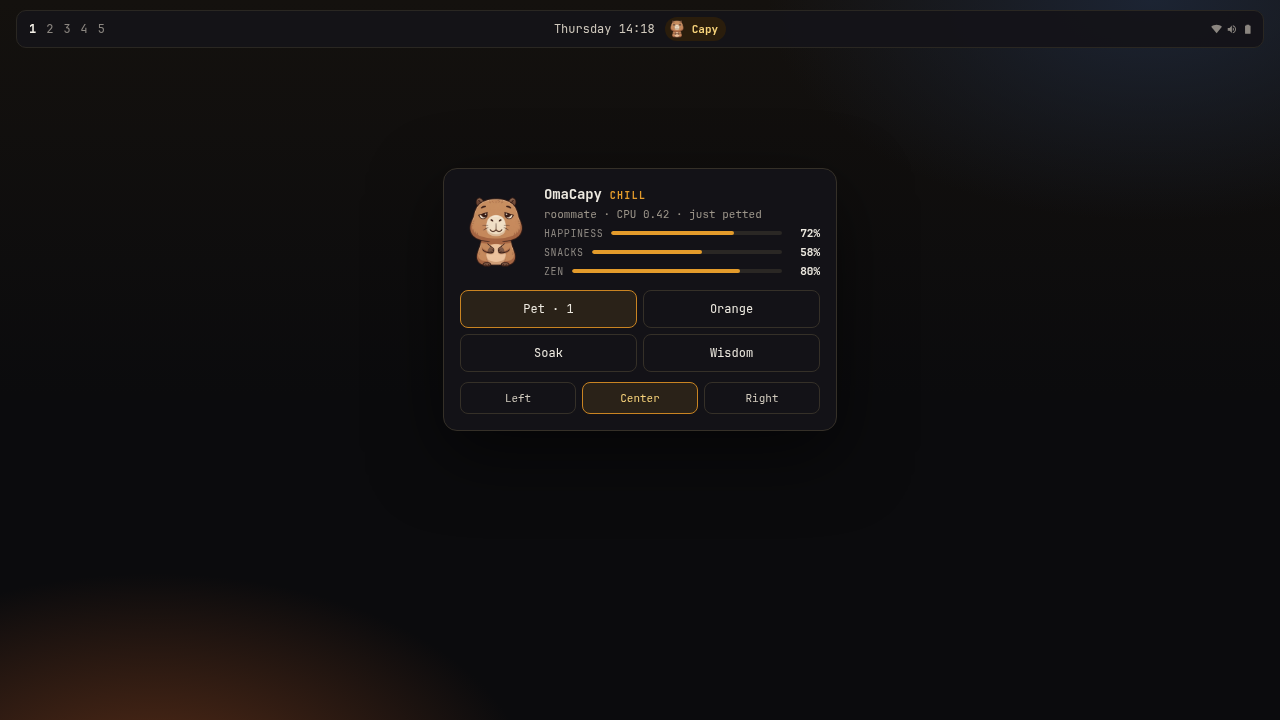
A roommate for the Omarchy compositor — same shell, same theme, nothing extra to install.
It hatches onto your desktop, not into a popup. It walks the floor, climbs the window you are using, and comes to the cursor when you sit still. The lounge is just home: call it back, feed it, soak it. Ignore it long enough and it floats back to the river. Pet the ghost to begin again.
A headless service keeps it alive with the lounge closed — the same trick Omagotchi used to win second place in the first plugin competition.
Computers can be useful and fun.
What you do
| Button | Tamagotchi job |
|---|---|
| Pet / Hatch / Rebirth | Play. Warm the egg. Start the next generation. |
| Orange | Feed. Overfeed three times and it gets sick. |
| Soak | Clean poop. River medicine when sick. Cool a fried CPU. |
| Nap | Lights out. Energy comes back. Petting wakes it (it will remember). |
| Wisdom | A one-liner. No refunds. |
| River / Home | Free-range on the desktop (default after hatch). Home kenneled it. |
| Let go | Adults and elders may walk off. A new egg appears. |
| Play | Catch the bouncing orange. Click snacks to serve. |
| Trick | Double-click the face for a backflip. |
Drag across the face to scrub it clean. Hover and it looks at you. It blinks, bobs, and talks in little bubbles. On the desktop: pet for zoomies, double-click for a flip, drag to carry.
Happy, snacks, zen, and energy fade in real time — even with the lounge closed. Night auto-tucks it in after a few idle minutes. High CPU load cooks zen until you soak. Pending pacman updates make it hungrier; orphaned packages make it messier.
The badge flashes !! when it needs you. Hatch, growth, sickness, and goodbye also send a desktop notification and a tiny sound. Mute with "soundVolume": 0 in ~/.local/state/omarchy/omacapy-settings.json.
It watches the focused window. Terminals are pair-programming. Browsers are a doomscroll tax — it will walk over and say so. Switch workspaces and it splashes in from the river bank. The lounge is a tty — try :help.
Prompt / starship
It writes ~/.local/state/omarchy/omacapy-prompt.txt. In ~/.config/starship.toml:
[custom.omacapy]
command = "omacapy"
when = "test -s ~/.local/state/omarchy/omacapy-prompt.txt"
style = "bold yellow"
install -m 0755 scripts/omacapy ~/.local/bin/omacapy
Life
| Stage | When |
|---|---|
egg |
New save, or after a rebirth. Pet to hatch, or wait ~4 minutes. |
pup |
First 30 minutes. Hungrier. Smaller. |
young |
30 minutes – 3 hours. |
adult |
3–12 hours. |
elder |
After 12 hours of life. |
ghost |
Neglected too long (sick ~80 minutes, or starving ~100). Pet to reincarnate. |
Poop appears about 10 minutes after an orange. Three piles left sitting make it sick. Soak is the toilet and the medicine.
Moods
The badge word and the face change with the roommate:
| Mood | Means |
|---|---|
egg |
Not hatched yet |
chill |
Default floating coworker |
soaked |
Just back from the river |
munching |
Currently orange |
napping |
Lights out |
hyped |
Over-petted |
hungry |
Feed it |
messy |
There is poop. Soak. |
sick |
Soak is medicine. Do not wait. |
tired |
Tuck it in |
fried |
Load is high, or zen collapsed |
lonely |
Nobody visited for hours |
meh |
Happiness ran low |
ghost |
It left. Pet to begin again. |
Badge shortcuts
- Left-click — the capy jumps and the lounge opens
- Middle-click — quick pet (hatch / rebirth if needed)
- Right-click — quick wisdom
- Scroll up / down — pet / orange
In the lounge:
- Click the face — pet, with hearts
- p / o / s / n / r / w / g (or 1–7) fire Pet, Orange, Soak, Nap, River, Wisdom, Let go
- Click the roaming capy to pet it. Drag to carry it. Drop it on a window.
- Side moves the badge and panel to the left, center, or right of the bar
State lives in ~/.local/state/omarchy/omacapy.json. Nothing leaves the machine.
To start over from an egg:
rm ~/.local/state/omarchy/omacapy.json
The shell will hatch a new roommate on the next tick.
Install
omarchy plugin add https://github.com/Esegnorelli/omarchy-omacapy.git --enable
Local checkout:
omarchy plugin validate .
omarchy plugin add "$PWD" --enable
Optional placement:
omarchy bar move esegnorelli.omacapy --section center
Remove
omarchy plugin disable esegnorelli.omacapy
omarchy plugin remove esegnorelli.omacapy --yes
# optional: rm ~/.local/state/omarchy/omacapy.json
Requirements
- Omarchy Quattro shell
- Nothing else. No accounts, no network, no extra packages.
Why
The plugin marketplace is full of VPNs, AI token meters, and printer queues. OmaCapy exists so your status bar can also host a wet friend who believes in snacks.
License
MIT