
Dexcom Share for Omarchy (unofficial)
See your, or your loved one’s, Dexcom Share CGM readings on your Omarchy desktop bar — live reading, trend arrow, and a simple history chart.
This is a community project for those with Type 1 diabetes, their caregivers, and/or followers who already use Dexcom Share. It is not made by Dexcom, not a medical device, and not for treatment decisions.
Best-effort community visibility on the desktop — not a Dexcom product, not affiliated with Dexcom, and not meant to compete with or harm Dexcom in any way.
Before you start
You need:
- Omarchy already installed and working on your computer
- A Dexcom Share login that can already see the readings in the official Share / Follow apps
- About five minutes
You do not need to be a programmer or even computer savvy to use this!
Install (three steps)
1. Add the plugin
Open a terminal and run:
omarchy plugin add https://github.com/Fail-Safe/omarchy-dexcom.git --enable
That downloads the widget and puts it on your Omarchy bar.
2. Create your Share login file
Still in the terminal:
cp ~/.config/omarchy/plugins/failsafe.dexcom/dexcom-share.example.json ~/.config/omarchy/dexcom-share.json
chmod 600 ~/.config/omarchy/dexcom-share.json
Then open this file in any text editor:
~/.config/omarchy/dexcom-share.json
It looks like below. Don't feel overwhelmed by the curly braces (sometimes referred to as 'moustaches'). Simply replace the example values that begin with 'your-dexcom-...' with your Dexcom Share username and password:
{
  "accountName": "your-dexcom-share-username",
  "password": "your-dexcom-share-password",
  "region": "us"
}
- Use the same Share login you use to follow readings
- Set
"region"to"us"if you are in the United States, or"ous"if you are outside the US - Save the file
- Leave the file permissions alone (
chmod 600keeps it private to you)
3. Wait a moment
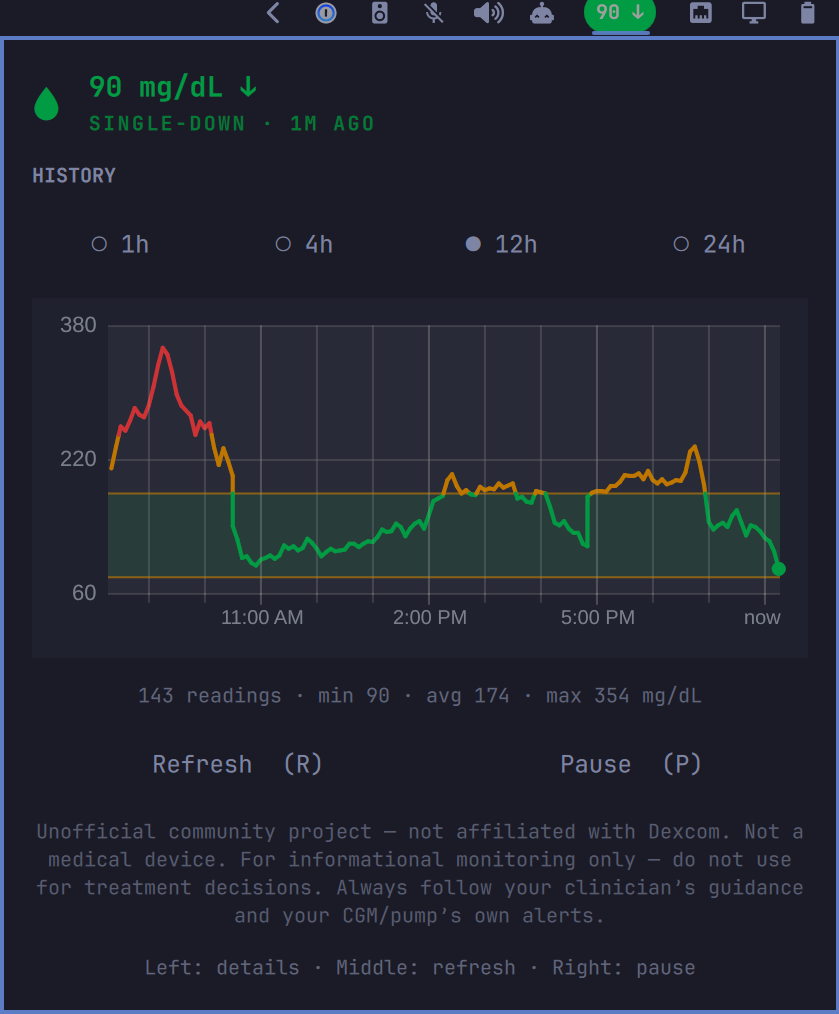
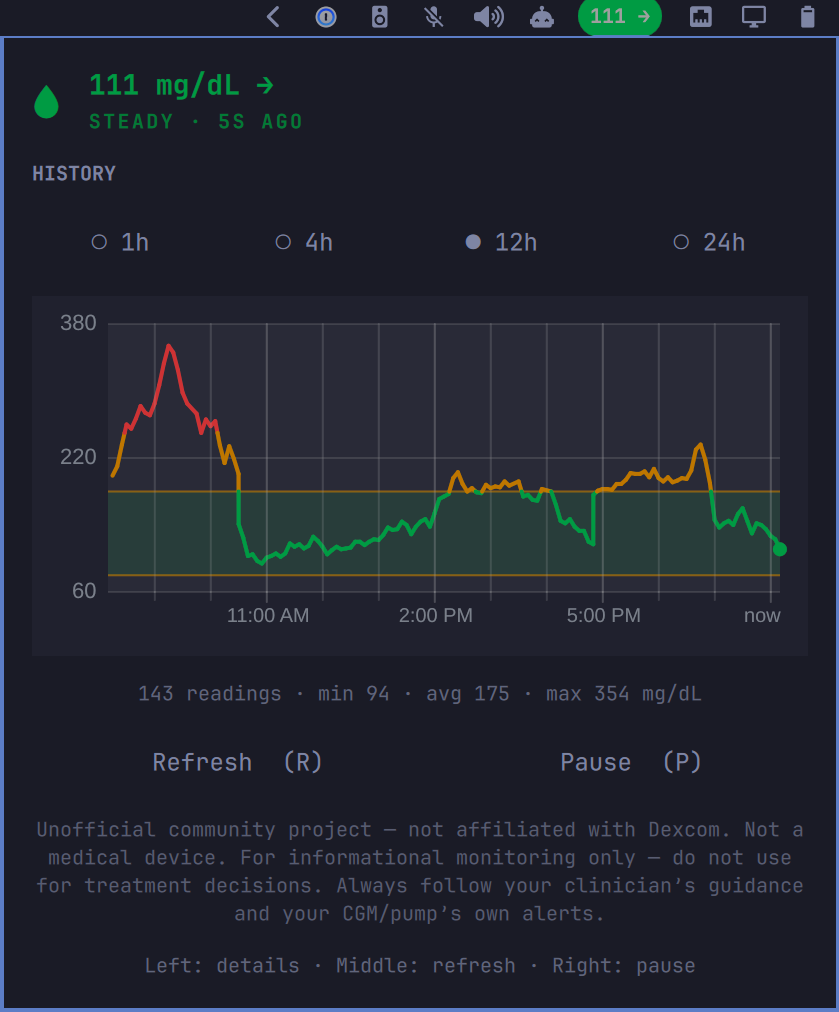
Within about a minute, the bar should show a glucose number and trend arrow (for example 111 → or 90 ↓).
If it still says offline or shows an error, see Something went wrong? below.
How to use it
| Action | What it does |
|---|---|
| Left-click the bar reading | Opens the detail panel (chart and ranges) |
| Middle-click | Refreshes now |
| Right-click | Pause / resume updates |
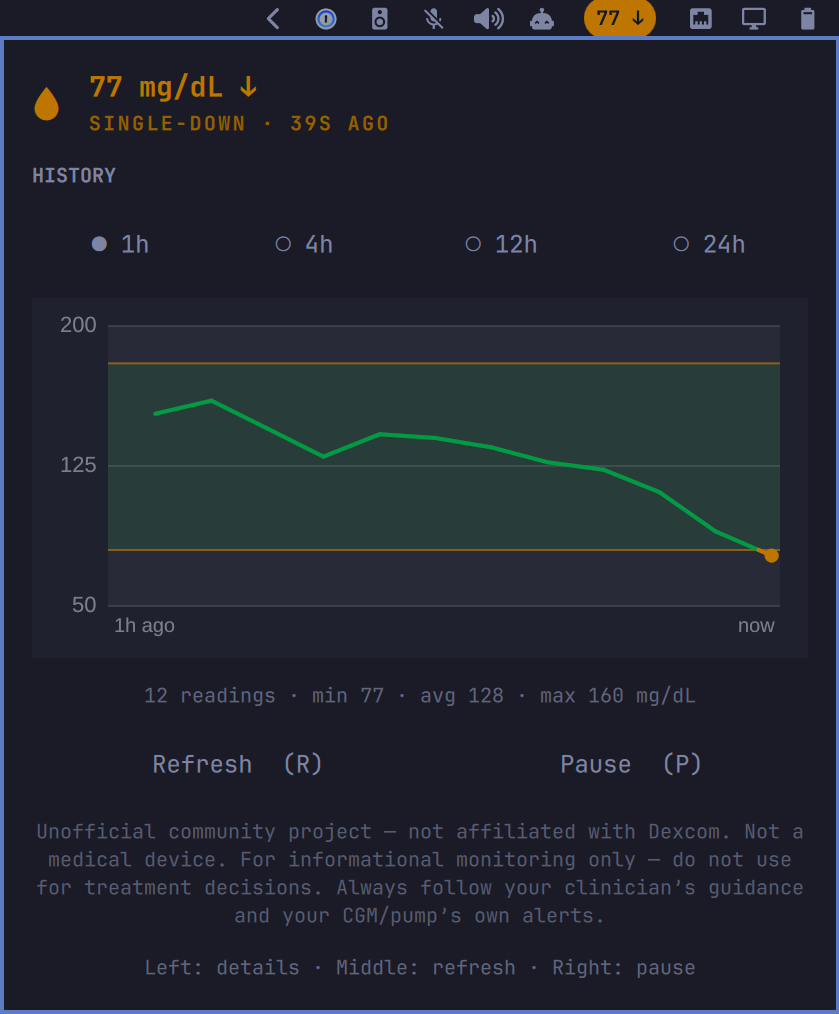
In the panel you can pick 1h / 4h / 12h / 24h history. The chart line is green in range, amber when high or low, and red for urgent highs/lows (based on your thresholds).
Common settings
There is no settings window yet. Change options with a short terminal command.
Show mmol/L instead of mg/dL (common outside the US):
omarchy bar set failsafe.dexcom glucoseUnit mmol/L
Switch back:
omarchy bar set failsafe.dexcom glucoseUnit mg/dL
How often it refreshes (seconds; default is 60):
omarchy bar set failsafe.dexcom refreshIntervalSec 60
Thresholds (low / high colors on the chart) are also adjustable; details are in DEVELOPMENT.md.
Update
omarchy plugin update failsafe.dexcom
Remove
omarchy plugin remove failsafe.dexcom --yes
Something went wrong?
Bar shows offline / error
- Confirm Share works in the official Follow / Share app with the same username and password
- Re-check
~/.config/omarchy/dexcom-share.jsonfor typos, and thatregionisusorous - Make sure you replaced the placeholder username/password text
- Wait one refresh cycle, or middle-click the widget to refresh now
I don’t see the widget on the bar
omarchy plugin enable failsafe.dexcom --section right
I use mmol/L but numbers still look like mg/dL
Run the glucoseUnit mmol/L command in Common settings again.
Important safety note
Not a medical device. For informational monitoring only — do not use this for treatment decisions. Always follow your clinician’s guidance and your CGM / pump’s own alerts.
Not affiliated with Dexcom, Inc. Dexcom® and Dexcom Share® are trademarks of their respective owners.
For developers
Local install, tests, full settings list, and technical notes: DEVELOPMENT.md
License
MIT