
Theme Extend
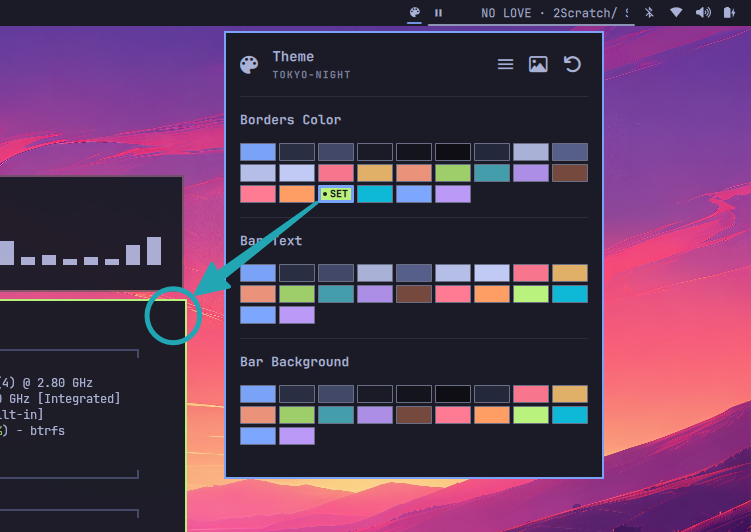
Bar widget for Omarchy that extends the active theme palette with direct color controls for the active Hyprland border, the bar text, and the bar background. It reads the current theme colors from Omarchy, updates the theme state, and keeps the UI synchronized with the active theme and the current overrides.
Features
- Borders Color: writes the selected color to
active_border_colorin the active theme'shyprland.luastate file. If the file does not exist, it creates a minimalhl.config(...)template with a default inactive border color. - Bar Text: writes the selected hex color to
[bar] textinshell.toml. - Bar Background: writes the selected hex color to
[bar] backgroundand also to[popups] backgroundinshell.tomlso popup surfaces stay consistent with the bar background. - Theme-aware palette: reads all swatches from the active theme's
colors.toml, deduplicates equal hex values, and marks the current selection with a visibleSETmarker. - Theme and background actions in the hero: includes the following buttons with tooltips:
Switch Theme— invokes the Omarchy theme switcher.Open Image Picker— invokes the Omarchy background selector.Reset Bar Colors— removes the plugin-managed bar overrides so the bar falls back to the active theme defaults.
- Contrast guard for bar colors: when a text color is selected, background swatches that fail WCAG AA contrast against it are disabled. A warning box appears and offers a one-click fix that picks a readable text color automatically.
- Keyboard navigation: supports left/right and up/down navigation within the swatch grids and activation with the keyboard.
- Automatic refresh: watches the active theme and refreshes the palette when Omarchy changes the active theme or when the shell config is updated.
- Tooltips by color role: each swatch shows the color name, and the disabled state explains the contrast issue against the current text color.
Install
omarchy plugin add https://github.com/MEPPERDONAS/Quattro-ExtentTheme.git --enable
Then place the widget in the bar:
omarchy bar put famas.theme-extend
The widget appears as a small palette icon in the bar. You can move it if needed:
omarchy bar move famas.theme-extend --section center
You can also validate it with:
omarchy plugin validate famas.theme-extend
Updating
omarchy plugin update famas.theme-extend
omarchy restart shell
Removing it
omarchy plugin remove famas.theme-extend
This removes the plugin and its bar entry. The files it edits in your Omarchy config remain in place, because they are part of your personal theme setup and not managed by the plugin itself.
Usage
Click the palette icon in the bar to open the panel. The UI is built around three sections:
- Borders Color — click a swatch to apply it to
active_border_colorin the active theme state. The matching swatch is highlighted when the written value matches the current selection. - Bar Text — click a swatch to set
[bar] textinshell.toml. - Bar Background — click a swatch to set
[bar] background, and the plugin also updates[popups] backgroundfor the popup surface. - Quick actions — use the hero buttons to switch themes, pick a background image, or reset managed bar colors.
Hover over any swatch to read the color name. If the selected background and text color do not meet the contrast threshold, the swatch becomes disabled and the warning card offers automatic remediation.
Modified Files
| Action | File |
|---|---|
| Borders color | ~/.local/state/omarchy/current/theme/hyprland.lua (active_border_color) |
| Bar text | ~/.config/omarchy/shell.toml ([bar] text) |
| Bar background | ~/.config/omarchy/shell.toml ([bar] background, [popups] background) |
The widget also reads the active theme name from ~/.local/state/omarchy/current/theme.name when available, and falls back to the resolved theme directory name if that file has not been written yet.
Note: the plugin only recognizes literal hex values in
shell.toml. If a value is written as a role name such asforeground, it is treated as unmanaged by this plugin and no swatch is shown as selected until you choose a new color from the panel.
Requirements
- Omarchy with
quickshell. - A Nerd Fonts-capable icon font for the hero and bar button icons.
- Commands
omarchy-theme-switcher,omarchy-theme-set,omarchy-theme-bg-switcher, andomarchy-theme-bg-setfor theme/background selectors.
Customization
The integration paths are defined as properties at the top of Panel.qml and can be adjusted if your setup differs:
omarchyStateDir— current Omarchy state directory.themeDir— current theme state directory.userShellPath— path to the user'sshell.toml.
License
This project is licensed under the MIT License. See LICENSE for details.