
Lunar Calendar for Omarchy
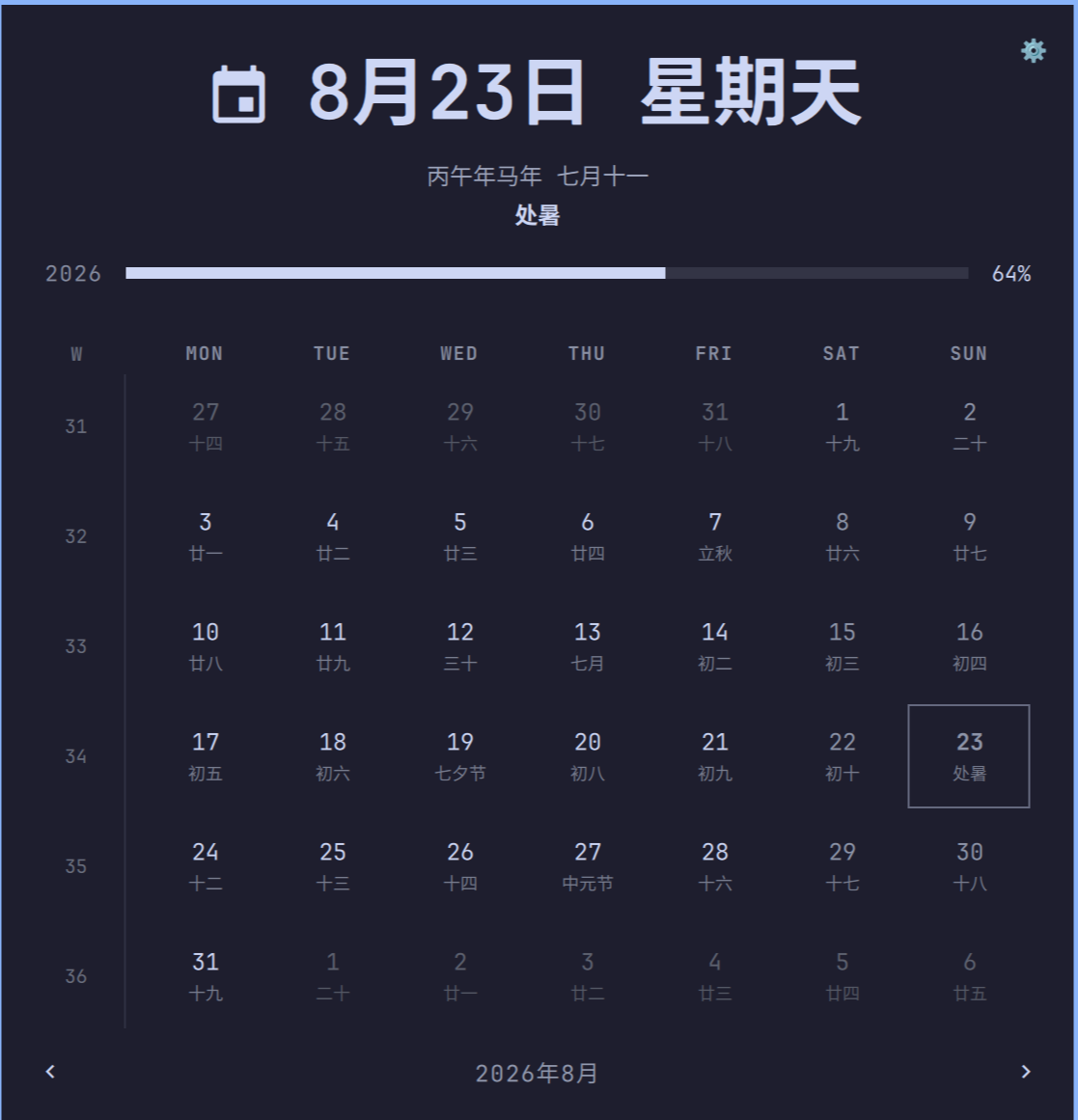
A drop-in replacement for the built-in Omarchy Clock bar widget that adds a Chinese lunar calendar: lunar date, jieqi (二十四节气 / 24 solar terms), and per-day lunar/festival captions in the month grid — in Simplified Chinese, Traditional Chinese, or English.
Everything the Clock widget already does (month grid with ISO week numbers, year-progress bar, memento-mori life bar, week-start toggle, right-click format cycling, middle-click timezone picker) still works exactly the same; this plugin only adds the lunar layer on top.
Features
- Lunar date and jieqi shown under the solar date, both in the bar's popup hero and as small captions under every day in the month grid.
- Bar label and hero date follow the plugin's own language setting instead of the system locale (so a Chinese UI language never falls back to English weekday/month names).
- Options panel (gear icon, top-right of the popup):
- Language — Simplified Chinese, Traditional Chinese, or English.
Defaults to whatever your system locale implies (
zh_CN-family -> Simplified,zh_TW/zh_HK/zh_MO-> Traditional, otherwise English). - Week starts on Monday — toggles the calendar between a Monday-first and Sunday-first week (same toggle the "W" column header already offered, just made visible as an explicit option).
- Show solar terms — toggles the jieqi caption on/off.
- Language — Simplified Chinese, Traditional Chinese, or English.
Defaults to whatever your system locale implies (
What this plugin does not do
It does not track China's shifting statutory-holiday schedule (法定节假日 / 调休). Those dates are set by government notice each year and can't be computed — keeping that data current would mean shipping a plugin that goes stale every January. If you want that, pair this with a separate holiday-data plugin/source.
Installation
omarchy plugin add https://github.com/GaryLiuGTA/omarchy_chinese_lunar_calendar.git --enable
Or clone and edit locally:
git clone https://github.com/GaryLiuGTA/omarchy_chinese_lunar_calendar.git \
  ~/.config/omarchy/plugins/garyliu.lunar-calendar
omarchy plugin enable garyliu.lunar-calendar --section center
If you're replacing the built-in Clock widget, disable it first so the bar doesn't show two clocks:
omarchy plugin disable omarchy.clock
Removal
omarchy plugin remove garyliu.lunar-calendar
This removes the plugin files; your shell.json bar layout entry for it can
be removed separately if you don't re-add another widget in its place.
Credits
The lunar calendar algorithm (the 1900–2100 lunar year-info table and the jieqi/solar-term calculation) is adapted from the MIT-licensed tigertall/chinese-calendar GNOME Shell extension, rewritten to run in plain QML JavaScript.
License
MIT — see LICENSE.