
Frigate
An Omarchy bar widget for Frigate cameras: one small icon in the bar, and the pictures in a panel behind it.
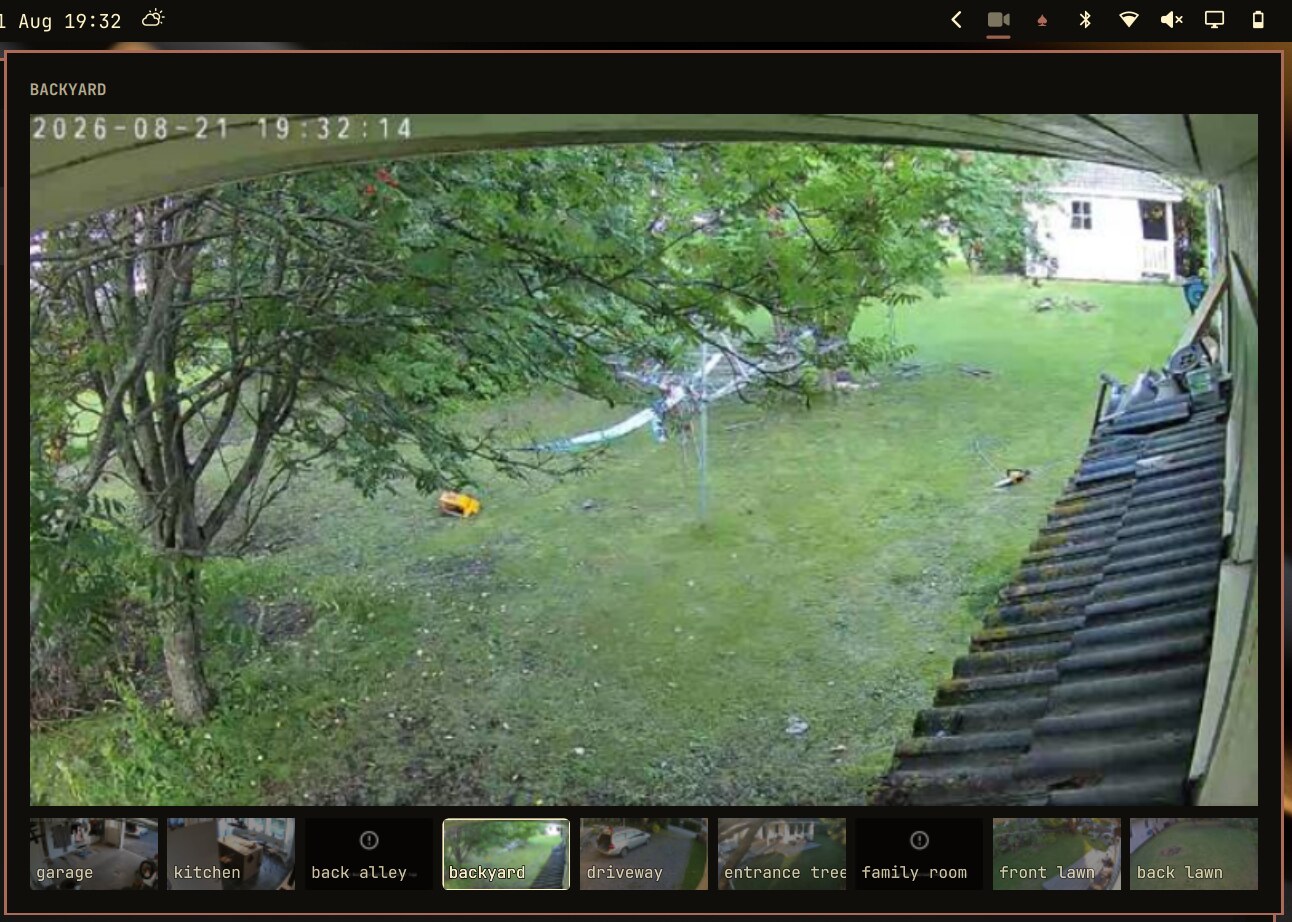
The bar shows a camera glyph and nothing else. It lights up, and the name of the camera slides in beside it, while Frigate reports a detection — so a camera that sees something is noticeable out of the corner of your eye without a video feed sitting in the bar all day.
Everything you would actually look at lives in the panel: the selected camera large and playing live, the other cameras as thumbnails underneath, and below those the frames filed the last time something was detected. Clicking any picture opens Frigate's own review page.
Stills come from Frigate's HTTP API (/api/<camera>/latest.jpg). Live video
comes from Frigate's go2rtc restream (rtsp://<host>:8554/<camera>). The
plugin never talks to the cameras themselves.
Detections come from Frigate's /api/events poll (MQTT is not required).
Cameras with object detect turned off in Frigate will still show in the
panel; they will not light the bar icon.
Install
omarchy plugin add https://github.com/gbyx3/omarchy-frigate.git --enable
From a local checkout:
./install.sh
# or: omarchy plugin add . --enable
Then tell it where Frigate is and write the UI password. The widget lands in
the right section of the bar; move it with omarchy bar move, or from the
bar's own settings panel.
Config files
Nothing in this repo is a live Frigate address, password, or proxy. Put those
in ~/.config/frigate/ (mode 600):
| File | What |
|---|---|
host |
hostname:8971 (authenticated Frigate UI) |
password |
Frigate UI password |
user |
optional, defaults to admin |
proxy |
optional SOCKS5 URL, e.g. socks5h://127.0.0.1:1080 |
verify_ssl |
optional, default on. false / 0 / no skips TLS checks on https (curl -k) |
mkdir -p ~/.config/frigate
(umask 077; printf '%s\n' "frigate.example:8971" > ~/.config/frigate/host)
(umask 077; printf '%s\n' "paste-your-password-here" > ~/.config/frigate/password)
The first non-comment line of each file is used. Environment variables
FRIGATE_HOST, FRIGATE_PASSWORD, FRIGATE_USER, FRIGATE_PROXY,
FRIGATE_VERIFY_SSL override the files. The widget's shell.json settings
override those when set.
Use a Frigate viewer account if you can. The widget only lists cameras, pulls stills, and reads go2rtc stream names.
Settings
Configurable from the bar's settings panel, or by hand in the widget's entry
in ~/.config/omarchy/shell.json:
| Setting | Default | What it does |
|---|---|---|
host |
(file / env) | Frigate's authenticated UI. Address or hostname, optional :port, no scheme. |
alertCameras |
(empty) | Camera names, comma separated, that may light the icon and file frames. Empty means all of them. |
notify |
true |
Raise a desktop notification, with the frame in it, on detection. |
viewerCommand |
xdg-open {path} |
What clicking that notification runs. |
panelWidth |
800 |
Panel width in the shell's spacing units. |
motionHoldMs |
45000 |
How long the icon stays lit after a detection. |
refreshMs |
1000 |
How often the large view gets a fresh still while the stream is connecting. |
captureThrottleMs |
25000 |
How long a camera that just filed a frame files nothing more. |
archiveKeep |
60 |
Frames kept per camera. |
rtspPort |
8554 |
go2rtc's plain RTSP port on the Frigate host. |
proxy |
(file / env) | SOCKS5 proxy. A host:port with no scheme is treated as SOCKS5. HTTP proxies cover stills only. |
verifySsl |
true |
Verify TLS certificates when Frigate is https. Set false only for a self-signed UI. |
eventsUrl |
http://{host}/review |
Where clicking a picture takes you. |
alertCameras is worth setting. A camera aimed at a room you sit in reports
detections all day, and an icon that is always lit is an icon you stop reading:
{ "id": "gbyx3.frigate", "alertCameras": "driveway, kitchen" }
Names are matched against Frigate's camera ids and the display names, ignoring case. The setting gates the bar icon and the archive both; every camera stays visible in the panel regardless.
What it costs to run
The large view plays the camera restream, and only while the panel is open. Thumbnails stay stills, refreshed one camera at a time.
With the panel closed, one watch process polls /api/events every two
seconds. Extra bar instances (one per monitor) follow that process instead
of starting their own.
The archive
Every detection on a camera you listed files one frame — the event snapshot
when Frigate has one, otherwise the latest still — in
~/.local/state/frigate-omarchy/events/<camera>-<unix-time>.jpg. The newest
four show up under the panel; clicking one puts it in the large view.
SOCKS5
Stills, detections and login go through the proxy with curl. Live video
cannot: Qt Multimedia will not speak SOCKS, and it will not be told to carry
RTSP over TCP. So with a SOCKS5 proxy the widget starts bin/frigate media-proxy only while the panel is open, which:
- Listens on
127.0.0.1and SOCKS5-CONNECTs each RTSP TCP session to go2rtc (:8554). - Serves
http://127.0.0.1:<port>/<camera>as MPEG-TS, remuxed by ffmpeg, which is what the panel actually plays.
Closing the panel stops the proxy and the player. A splice that goes quiet
for 20s (a dead SSH -D after sleep) is dropped so the tunnel can exit
and bind again.
Opening Frigate from the panel uses Chromium's --proxy-server when a SOCKS
proxy is configured, so the review page works the same way as stills.
ALL_PROXY / all_proxy are honoured if proxy is left empty.
An HTTP proxy still works for stills; it cannot carry the live view.
The command line
cd ~/.config/omarchy/plugins/gbyx3.frigate

./bin/frigate list                  # cameras, as JSON
./bin/frigate snapshot <camera-id>  # writes a JPEG, prints its path
./bin/frigate events                # the archive, newest first
./bin/frigate stream <camera-id>    # the RTSP or local MPEG-TS url
./bin/frigate live <camera-id>      # opens the stream in mpv
./bin/frigate open [camera-id]      # Frigate UI (proxied if SOCKS is set)
./bin/frigate watch                 # detections as NDJSON, until killed
--host, --rtsp-port, --proxy, --verify-ssl / --no-verify-ssl and --archive-keep go before the command.
To exercise the icon without waiting for a detection:
omarchy-shell gbyx3.frigate.test motion driveway
omarchy-shell gbyx3.frigate.test clear
Requirements
Omarchy with omarchy-shell (the Quickshell-based bar), and:
curl, jq |
talking to Frigate |
python3, ffmpeg |
SOCKS live view (media-proxy) |
imagemagick |
shrinking archived frames. Without it they are stored full size. |
libnotify |
the notification on detection |
mpv |
only for frigate live |
chromium |
only for proxied frigate open |
On Arch:
sudo pacman -S --needed curl jq python ffmpeg imagemagick libnotify mpv
Remove
omarchy plugin remove gbyx3.frigate
The archived frames are yours, not the plugin's, so they stay in
~/.local/state/frigate-omarchy/. Delete that directory, and
~/.config/frigate/, if you want them gone too.
License
MIT