
Genesis
A voice-controlled AI agent for Omarchy. Talk or type to Genesis: it runs fast local commands itself (shutdown, volume, lights, TV, …) and hands anything it doesn't recognize to your coding agent, which does the task rather than answering it.
Genesis is a voice layer only — it reimplements nothing. Everything it executes
is delegated to tools Omarchy already ships (omarchy-* commands, the built-in
media service, systemd timers) or to plugins (Home Assistant, Roku, Apple TV),
with Voxtype for speech-to-text and your coding agent for
AI.
Quick start
omarchy plugin add https://github.com/ronald2wing/Omarchy-Genesis.git --enable
This installs the plugin, starts its background service, and places a
microphone button in the bar (the manifest defaults it to the right section).
Click it to talk; right-click it for the popup menu. No config file is needed —
the defaults are sensible; copy config.example.json to
~/.config/genesis/config.json only if you want to customize.
This is the recommended click-to-talk setup. Leave the AI agent off (the default): fast and custom commands are deterministic and fully offline. Read AI agent before enabling it.
Requirements
- Omarchy 4 (Quattro) with the Quickshell plugin system. Omarchy 3.x is not supported.
- Voxtype for speech-to-text:
omarchy voxtype install(or Install → AI → Dictation in the Omarchy menu). - A default coding agent for AI requests:
omarchy default agent claude(alsocodex,gemini,grok,opencode,copilot,crush,omp,pi). - Home Assistant plugin (optional, for device control):
omarchy plugin add https://github.com/konradk/hass.git --enable. - Roku Remote / Apple TV Remote (optional, for TV control).
Everything else ships with Omarchy — a recorder (pw-record, parecord, or
arecord), jq, and python3 (for --lang python scripts). Text-to-speech
auto-detects espeak-ng/espeak/spd-say/flite and is silent if none is
installed.
How it works
Every request flows through a fixed pipeline — capture → transcribe → intent → execute — with each stage a standalone script in bin/. Service.qml only
orchestrates the stages and renders the overlay.
bin/intent decides what a request is, in order:
- Fast commands — deterministic, offline, instant. See the tables below. No AI, no terminal.
- Custom commands — phrases you (or another plugin) registered in the
commandsconfig. - AI agent — everything else goes to your default coding agent.
Triggers
| Trigger | How |
|---|---|
| Tap to talk | Click the bar microphone, speak, and it stops and runs automatically |
| Menu | Right-click the microphone — a popup under the icon (type a command, or open Manage) |
| Keyboard | Optional — add your own bind |
Listening starts and stops with a short beep (audio.feedback: false to mute).
Keybinds live in your own config:
o.bind("SUPER + F9", "Genesis", "omarchy-shell -q genesis toggle")
o.bind("SUPER + F8", "Genesis menu", "omarchy-shell shell toggle genesis '{}'")
o.bind("SUPER + F7", "Type a command", "~/.config/omarchy/plugins/genesis/bin/prompt")
bin/prompt is a lighter alternative to the menu: a bare text prompt (Walker, or
gum as a fallback) that submits the typed text as a command.
Commands
Many phrasings map to each action; these are representative.
System
| Say (examples) | Action |
|---|---|
| "shut down the computer", "power off", "turn the computer off", "shut it down" | shutdown (confirm) |
| "reboot", "restart the computer", "reboot the system" | reboot (confirm) |
| "log out", "sign out", "log off", "sign me out" | logout (confirm) |
| "lock the screen", "lock my pc" | lock |
| "suspend", "put the computer to sleep", "go to sleep" | suspend (confirm) |
| "take a screenshot", "screen capture" | screenshot |
| "open firefox", "launch spotify", "run kitty" | open an app |
| "turn the volume up", "louder", "raise the volume" | volume up |
| "turn the volume down", "quieter", "mute" | volume down / mute |
| "brightness up", "brighter" | increase brightness |
| "brightness down", "dimmer" | decrease brightness |
| "play music", "pause the song", "next song", "previous track" | media playback |
| "remind me in 15 minutes to pick up Jack" | set a reminder |
| "toggle night light" | night light |
| "stay awake", "allow idle" | idle behavior |
| "power mode performance" | power profile |
| "go to workspace 3" | switch workspace |
| "set theme to Tokyo Night" | change theme |
| "battery status", "what time is it", "what's playing" | status (notification) |
| "say hello world" | speak aloud (TTS) |
Smart home (delegated to the Home Assistant plugin)
Device control goes through the community hass plugin over IPC — Genesis keeps
no Home Assistant connection or token. Spoken names resolve to entity IDs via
the homeAssistant.entities alias map; only configured aliases resolve, so an
unknown device falls through to the AI agent.
| Say (examples) | Action |
|---|---|
| "toggle the living room lights" | toggle a device |
| "turn on/off the bedroom lights" | toggle a device |
| "activate movie mode" | run a scene |
Aliases resolve by exact match, then substring, then word-subset (order-free) —
so "turn on the lights in the living room" resolves living room lights.
Fine-grained commands ("set the lights to 50%") are handed to the AI agent.
TV (delegated to the Roku / Apple TV remotes)
Direct to device, no Home Assistant required. tv.backend selects roku,
apple-tv, or auto (default: whichever is installed, Roku first).
| Say (examples) | Action |
|---|---|
| "turn on/off the tv", "tv on/off", "power off the tv" | power |
| "play/pause the tv" | playback |
| "tv home", "home screen" | home |
| "tv up/down/left/right/select/back" | navigation |
AI agent
Disabled by default. Enabling it is a deliberate opt-in: requests the
commands don't match are handed to your default coding agent via
omarchy-agent-prompt, which launches the agent in its usual floating terminal
with approval prompts bypassed (--permission-mode bypassPermissions,
--yolo, --allow-all). That means anything the mic hears — a podcast, a
video, someone talking nearby — that doesn't match a rule becomes an
instruction an unrestricted agent will act on. Only enable this if you are
comfortable with that.
When enabled, every unmatched request still requires an on-screen confirmation first: Genesis shows what it heard and only launches the agent after you approve — a misheard or ambient phrase can't reach the agent silently.
To enable it, set agent.enabled: true in config.json. If no default agent is
set, Genesis notifies you to run omarchy default agent claude.
When enabled, Genesis also passes its built-in actions and your registered
custom commands to the agent as tools, so it can dynamically interpret a
request — "set the living room lights to 50 percent" — and invoke the matching
command with the arguments it extracts. The agent triggers a built-in action by
sending a phrase back through Genesis (omarchy-shell -q genesis text "<phrase>"), which preserves confirmation for destructive actions.
"summarize this repo"        →  omarchy-agent-prompt "summarize this repo"
"write a script to backup…"  →  omarchy-agent-prompt "write a script to backup…"
Custom commands & routines
Two user-extensible layers live in config.json: commands (phrase → plugin
IPC or shell command) and routines (schedule → command, run as systemd
timers). Both are created from the menu, the CLI, or by voice.
Commands
"commands": {
  "focus-mode": { "phrase": "toggle do not disturb", "name": "Focus mode", "target": "notifications", "method": "toggleDnd" },
  "movie-night": { "phrase": "movie time", "name": "Movie night", "run": "omarchy-shell roku sendKey PowerOn && omarchy-shell hass activate scene.movie" },
  "check-disk-space": { "phrase": "check disk space", "run": "import shutil; print(shutil.disk_usage('/home').free // 2**30, 'GB free')", "lang": "python" }
}
Each entry is keyed by a stable id (a slug of the name, or the phrase), so the
phrase can change without losing the entry.
phrase— the voice trigger that speech is matched against.target+method(+ optionalparams) — anomarchy-shellIPC call.run— a script inlang(defaultbash; alsopython,node,ruby).name(optional) — the display label shown in the menu.
Routines
"routines": {
  "good-morning": { "schedule": "08:00", "name": "Good morning", "run": "omarchy-notification-send \"Good morning\" \"Rise and shine\"" },
  "evening-scene": { "schedule": "Mon-Fri 18:00", "run": "omarchy-shell hass activate scene.evening" },
  "stand-up": { "schedule": "17:00", "run": "console.log('Stand up and stretch')", "lang": "node" }
}
Schedule forms: HH:MM (daily), Mon-Fri HH:MM (weekdays), Sun HH:MM
(weekly), Mon,Wed,Fri HH:MM (specific days), or a full systemd OnCalendar
expression. lang defaults to bash; a non-bash routine's code is written to a
companion file and run by the matching interpreter. One-off runs (transient, not
persisted) are routines once "5m" "…" (after a delay — systemd time span) and
routines at "15:00" "…" (at a wallclock time — systemd OnCalendar). Both take
--lang <bash|python|node|ruby>.
Managing
Create, edit, and remove commands and routines from the popup menu, the CLI, or by voice:
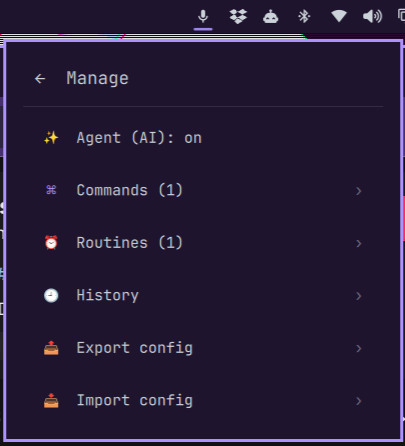
- Popup menu — right-click the microphone for a popup under the icon. Type a command (or hit 🎤 Voice to speak it), or open "Manage commands & routines" to add, edit, or remove entries, run one now (▶), toggle the AI agent, and review each entry's run history. The ✨ "Ask AI" buttons (on the lists and in the add forms) register a new command or routine — never just answer — and the ✨ "Ask AI to update" in an entry's edit form changes only that entry. Export and import config from the Manage screen.
- CLI —
bin/commands {set,run,remove,list,export,import}andbin/routines {set,once,at,run,remove,install,list,export,import}.commands runandroutines set/once/attake an optional--lang <bash|python|node|ruby>;routines run <schedule>runs a routine's command immediately. - Voice — "add a command to …", "update my joke command", or "set a
routine to …" hands the request to the coding agent, which calls the same
CLIs. Existing entries are listed with their current definitions so the
agent updates only the one you name; new entries get a short
--name.
~/.config/omarchy/plugins/genesis/bin/commands set "movie time" media play
~/.config/omarchy/plugins/genesis/bin/commands run --lang python "check disk space" "import shutil; print(shutil.disk_usage('/home').free)"
~/.config/omarchy/plugins/genesis/bin/routines set "Mon-Fri 09:00" "omarchy-notification-send \"Focus\""
commands export / routines export write their section as JSON (to stdout or a
file); commands import <file> / routines import <file> merge a JSON object
back in (same-key entries are overwritten, importing routines also reinstalls
the timers). Add --dry-run (routines import --dry-run <file>, or
config-import --dry-run '<json>') to preview what would be written and which
timers would be installed — nothing is changed.
Failures
If a custom command or routine errors, Genesis notifies you and blocks it —
saying the phrase again won't run it until you fix it. The popup menu marks a
failed last run with ❌ (✅ on success); editing one clears the error and
unblocks it. Errors live in ~/.local/state/genesis/errors.json; every action
is logged in ~/.local/state/genesis/log.json.
Confirmation
shutdown, reboot, logout, and suspend require confirmation: Genesis
shows a dialog and listens for a spoken "yes" for a few seconds. Click the
button or say "yes" to proceed; anything else cancels. Confirmation can only be
answered from the dialog itself — there is no IPC method that confirms
remotely.
Configuration
~/.config/genesis/config.json (see config.example.json for a complete
example):
agent.enabled— hand unmatched requests to the coding agent. Defaultfalse; see the AI agent section for the risk before enabling.homeAssistant.entities— spoken-name → entity-ID map (the token lives in thehassplugin, not here).tv.backend—roku,apple-tv,auto, oroff.commands— id →{ phrase, target, method, params }(IPC) or{ phrase, run, lang }(script;langdefaults tobash), with an optionalname.routines— id →{ schedule, run, lang }(+ optionalname), installed as systemd timers.audio.microphone/audio.feedback— mic device and the listen beep.confirmActions— actions that require confirmation (defaultshutdown reboot logout suspend).
For plugin authors
Genesis is a voice layer for any Quattro plugin. A registered command works two ways: as a literal voice phrase, and as a tool the AI agent can invoke with dynamically extracted arguments.
1. Expose an IPC target in your plugin:
IpcHandler {
  target: "myplugin"
  function toggleDoNotDisturb(): string { dnd = !dnd; return dnd ? "on" : "off" }
  function setLight(power: string): string { light.power = power; return "ok" }
}
2. Tell users what to add to their Genesis config:
"commands": {
  "toggle-dnd": { "phrase": "toggle do not disturb", "name": "Toggle DND", "target": "myplugin", "method": "toggleDoNotDisturb" },
  "key-light-on": { "phrase": "set the key light on", "target": "myplugin", "method": "setLight", "params": ["on"] }
}
Now "hey, toggle do not disturb" runs omarchy-shell myplugin toggleDoNotDisturb.
Genesis matches by phrase containment (longest phrase first, after its own
built-in commands), passes params as method arguments, and notifies the user
if your plugin isn't installed.
3. Drive Genesis from your plugin with
omarchy-shell -q genesis <method> (begin, end, toggle, text <s>,
state).
4. Register commands and routines by calling the same CLIs Genesis uses —
they write config.json atomically, so registrations persist and are
idempotent:
~/.config/omarchy/plugins/genesis/bin/commands set "toggle do not disturb" myplugin toggleDoNotDisturb
~/.config/omarchy/plugins/genesis/bin/routines set "08:00" "omarchy-shell myplugin refresh"
Removal is commands remove "<phrase>" and routines remove "<schedule>".
Re-running set/run overwrites the same entry, so calling it on every load is
safe.
Architecture
BarWidget.qml ──IPC──▶ omarchy-shell ──▶ Service.qml (service)
keybinds ──IPC──▶                          │  capture (pw-record)
                                           ▼
                                     bin/transcribe (voxtype)
                                           ▼
                                     bin/intent (rules → agent)
                                           ▼
              ┌────────────────────────────┴──────────────────────────────┐
              ▼                    ▼                                      ▼
     bin/execute (Omarchy)   omarchy-agent-prompt (AI)      plugins via IPC (hass/tv/…)
Service.qml is the always-running engine and renders the listening/confirmation
overlay. BarWidget.qml is a microphone button that drives it over IPC. bin/
holds the shell scripts for capture, transcription, intent matching, entity
resolution, and execution, so each stage stays testable on its own.
Uninstall
~/.config/omarchy/plugins/genesis/bin/routines remove   # drop installed timers first
omarchy plugin remove genesis
Development
bash tests/validate.sh      # manifest schema, bash -n, JSON
bash tests/intent.sh        # intent + entity-resolution regression tests
bash tests/routine.sh       # one-off scheduling (once/at) arg construction
bash tests/config.sh        # command/routine export + import
On a Quattro machine also run omarchy plugin validate . and
qmllint Service.qml BarWidget.qml. See SPEC.md for the behavior and
safety contract.