
Updater Widget
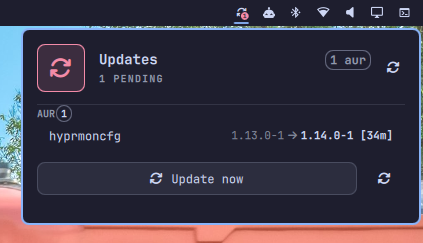
An Omarchy bar-widget that reviews pending updates before you run them. It checks three sources at once and shows you what is about to be updated, then runs the full Omarchy update flow only after you confirm.

Screenshots

Features
- Bar icon with a live badge showing how many updates are pending.
- Opens a panel in the top-right corner listing pending updates grouped by
source:
- Omarchy (
omarchy-update-available) - System (
checkupdates, falls back topacman -Qu) - AUR (
yay -Qua, only when foreign packages are installed)
- Omarchy (
- Update now button that launches
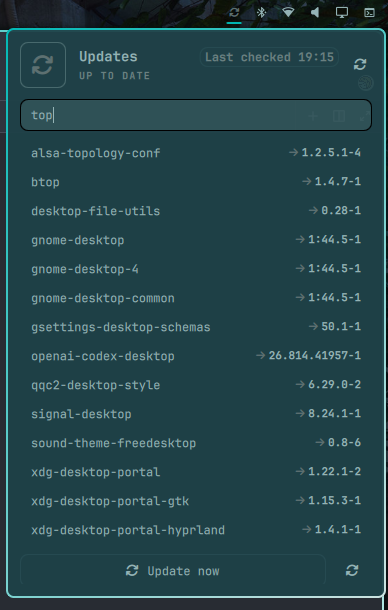
omarchy-launch-floating-terminal-with-presentation omarchy-update, so you still get the confirmation step before anything is applied. - Search field to look up any installed app (from
pacman -Q) by name, with live filtering, keyboard navigation of the results, and version display. - Full keyboard navigation (mouse or keyboard cursor), refresh button, and IPC control.
- Automatic background refresh (configurable interval, 15 minutes by default).
Requirements
- Omarchy with a running shell (tested on
4.0.0.alpha) python3(used by the collector script to build the JSON payload)checkupdates(frompacman-contrib) orpacmanyay(for AUR updates)
Installation
The plugin is developed in this directory and installed by copying it into Omarchy's user plugin folder.
-
Copy the plugin files:
mkdir -p ~/.config/omarchy/plugins/gennaro.updater cp manifest.json Updater.qml collect-updates.sh \ ~/.config/omarchy/plugins/gennaro.updater/ -
(Optional) Validate the plugin:
omarchy plugin validate ~/.config/omarchy/plugins/gennaro.updater -
Enable it and place it on the right side of the bar (top-right corner):
omarchy plugin enable gennaro.updater --section right -
Reload the shell so the widget appears:
omarchy-restart-shellNote:
omarchy-refresh-shellrewritesshell.jsonback to Omarchy defaults and can drop your custom bar layout, plugins, and widgets. Preferomarchy-restart-shell(or the plugin rescan via IPC) after installing.
Usage
- Left-click the bar icon: open/close the update panel.
- Right-click (or middle-click): force a refresh.
- Update now: runs the real update flow; Omarchy's confirmation dialog still runs first.
- Search installed apps: click the search field (or press
Enteron it with the keyboard cursor) and type a name. Results filter live, show the installed version, and can be navigated withDown/Up.Escleaves the field and returns to panel navigation. - Keyboard: arrows to navigate,
Enterto activate,Escto close,rto refresh,uto update.
IPC
The widget registers an IpcHandler under the target gennaro.updater:
omarchy shell gennaro.updater toggle     # open/close the panel
omarchy shell gennaro.updater refresh    # force a rescan
omarchy shell gennaro.updater update     # start the update flow
omarchy shell gennaro.updater query      # print the current state as JSON
Configuration
The refresh interval can be set per-widget in the Omarchy settings under the widget's entry:
refreshIntervalSec— seconds between automatic rescans (default900, clamped to a minimum of60).
You can also edit the inline entry in ~/.config/omarchy/shell.json:
{
  "id": "gennaro.updater",
  "refreshIntervalSec": 1800
}
Updating the widget
After changing the QML or the collector script, copy the files again and restart the shell:
cp manifest.json Updater.qml collect-updates.sh \
  ~/.config/omarchy/plugins/gennaro.updater/
omarchy-restart-shell
Uninstall
omarchy plugin disable gennaro.updater
rm -rf ~/.config/omarchy/plugins/gennaro.updater
omarchy-restart-shell
If you want the widget gone from the bar too, remove its entry from the
right array in ~/.config/omarchy/shell.json.
How it works
collect-updates.sh runs the three update checks plus pacman -Q for the
installed-app list, converts each output into a structured JSON document
(parsing name oldver -> newver lines into { name, old, new } objects and
name version lines into { name, version } objects), and prints it to
stdout. Updater.qml runs the script through a Process + StdioCollector,
parses the JSON, and drives the badge, the panel sections, the search filter,
and the cursor model from it. "Omarchy is up to date" lines are filtered out
so the widget only reports real pending updates. Search results are computed
client-side (case-insensitive substring match on the package name, first 50
matches shown) so typing is instant.
Troubleshooting
- The panel shows up to date even right after an install: the system is currently up to date; the widget still lists nothing until an update is actually pending.
- AUR section is empty although AUR packages exist: the collector only queries
yaywhenpacman -Qemreports foreign packages, and skips it otherwise. - The bar icon does not appear after enabling: run
omarchy plugin listto confirm the plugin isenabled, then restart the shell.