
SUB/WAVE for Omarchy
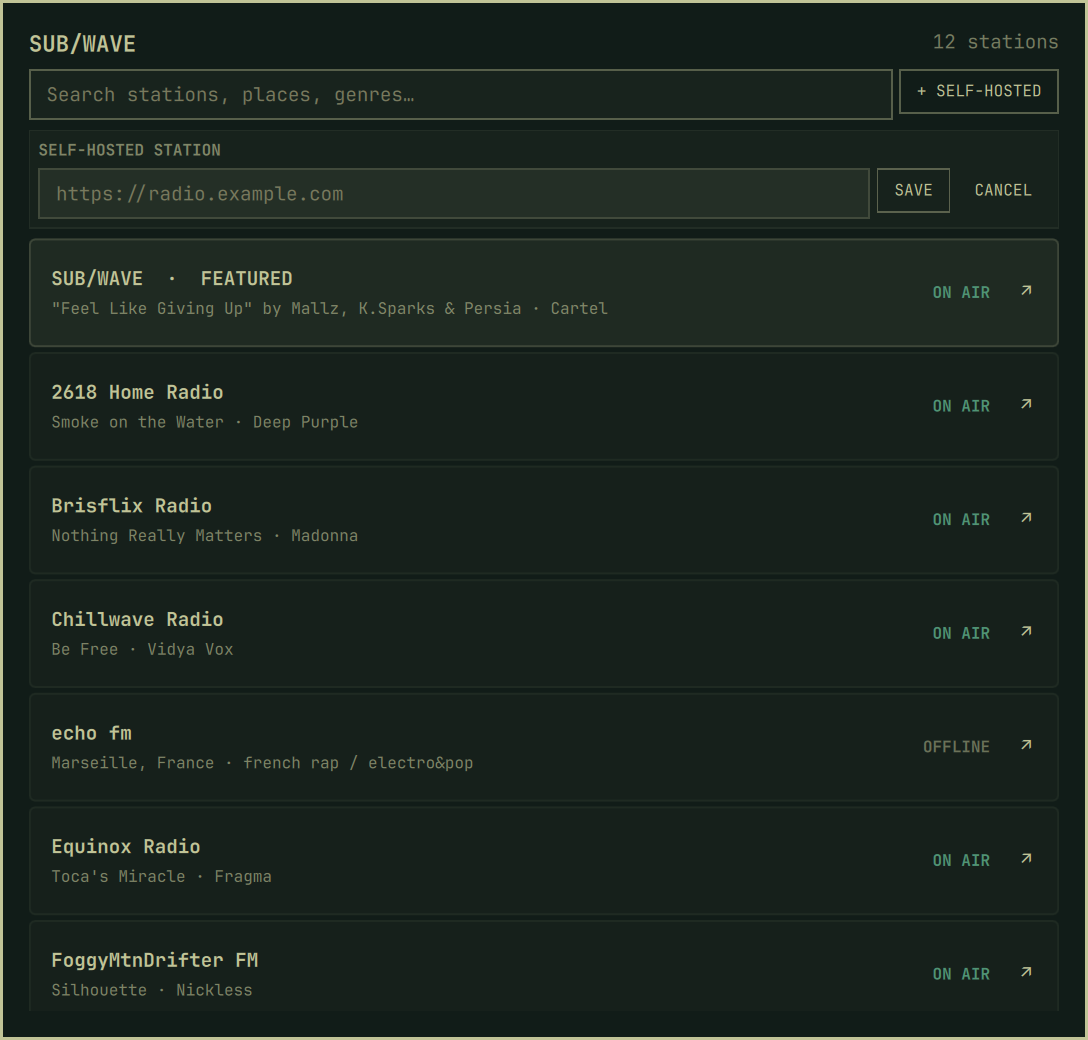
Listen to your own SUB/WAVE station and explore the public community directory without leaving the Omarchy shell. The plugin adds a theme-aware bar widget, a searchable station picker, and an MPV player that works with Omarchy's existing media controls.
What is SUB/WAVE?
SUB/WAVE is a self-hosted shared internet radio station: every listener hears the same live broadcast. An AI DJ selects music from the station's library and speaks between tracks, while the operator controls its sound, schedule, personas, and listener requests. This Omarchy plugin lets you tune into your own station or discover other public SUB/WAVE stations.
Install
omarchy plugin add https://github.com/getsubwave/omarchy-subwave.git --enable
Dependencies
The plugin requires Omarchy Quattro and these Arch packages:
curl jq mpv mpv-mpris socat
They provide the public station fetcher, JSON validation, guarded audio player, MPRIS integration, and local MPV control socket. The plugin does not install or modify system packages itself.
The community directory works immediately. To put your own self-hosted station first in the list, open the picker, choose + SELF-HOSTED, and save its bare public origin. You can configure the same setting from the terminal:
omarchy bar set getsubwave.radio stationUrl https://radio.example.com
Do not include /listen, /stream.mp3, credentials, query parameters, or a
fragment. The plugin derives the API and stream paths from the origin.
Controls
Bar
| Input | Action |
|---|---|
| Left click | Open or close the station picker |
| Middle click | Play or pause |
| Right click | Stop playback |
| Mouse wheel | Change volume in 5% steps |
Station picker
| Input | Action |
|---|---|
| Type | Search names, places, genres, operators, and descriptions |
| Up / Down | Move through stations |
| Enter | Play the selected station |
| ↗ button | Open that station in its web player without interrupting playback |
| Escape | Clear search, then close |
Selecting the station that is already playing closes the picker. Playback uses
the station's always-available /stream.mp3 mount. mpv-mpris exposes it to
the built-in omarchy.media widget, media keys, and compatible headset controls.
Data and privacy
The plugin fetches the normalized community directory from
https://www.getsubwave.com/stations.json. It asks each visible station's
public /api/now-playing endpoint for its current track and online state, and
connects MPV directly to the selected station's /stream.mp3 mount.
Remote responses are size- and record-limited before entering QML. Only credential-free HTTP(S) origins are accepted, remote strings are never evaluated as commands, and cache/status writes are atomic.
Version 1 supports public stations only. It does not accept or store listener passwords. Favorites, requests, and station administration remain in the station's web player.
Non-secret persistent data is stored in:
${XDG_DATA_HOME:-~/.local/share}/omarchy-subwave/
Player sockets, status, PID identity, and logs live in:
$XDG_RUNTIME_DIR/omarchy-subwave/
Remove
Stop the dedicated player before removing the plugin:
~/.config/omarchy/plugins/getsubwave.radio/subwave-player stop
omarchy plugin remove getsubwave.radio
The last station, volume, and directory cache remain under
~/.local/share/omarchy-subwave/. Remove that directory manually only if you
also want to delete those preferences.
Troubleshooting
Check the helper contracts directly:
~/.config/omarchy/plugins/getsubwave.radio/subwave-fetch catalog | jq 'length'
~/.config/omarchy/plugins/getsubwave.radio/subwave-fetch now-playing https://radio.example.com | jq .
~/.config/omarchy/plugins/getsubwave.radio/subwave-player status | jq .
MPV diagnostics are written to
$XDG_RUNTIME_DIR/omarchy-subwave/mpv.log. If the bar does not pick up a saved
plugin change, run:
omarchy-shell shell rescanPlugins
Malformed or oversized saved data is not overwritten automatically. Back up
the affected file under ~/.local/share/omarchy-subwave/ before repairing or
removing it.
Development
./tests/run
omarchy plugin validate .
qmllint -I /usr/share/omarchy/shell BarWidget.qml StationPicker.qml
The test suite uses temporary XDG directories and fake network/player boundaries; it does not tune a real station. The final QML checks require an Omarchy installation because they import the installed shell components.
License
MIT