

Omarchy Hardware Details Plugin (gladimdim.hardware.info)
An elegant, native hardware monitor and system inspection plugin for the Omarchy status bar.
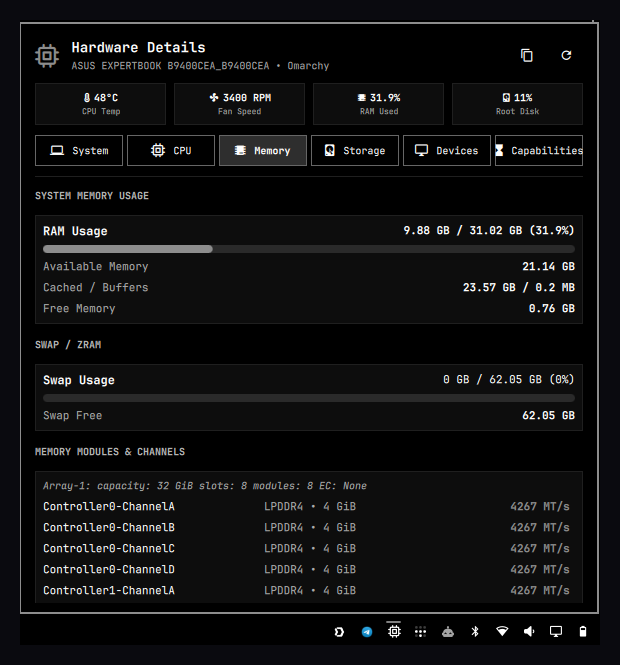
✨ Features
- Bar Tray Icon (
): Sits right in your dock/tray with tooltip indicators and click actions. - Hero Overview: Live CPU package temperature (with thermal thresholds), cooling fan RPM, memory usage percentage, and primary filesystem capacity.
- Instant JSON Export: Copy complete structured hardware reports directly to clipboard (
wl-copy) with a single click or keyboard shortcut. - Ultra-Fast & Lightweight: Probes dynamic metrics (load average, per-core clocks, memory, thermal sensors) in <3ms using direct sysfs / proc inspection, caching static DMI data.
- Full Keyboard Navigation: Switch tabs with
1–6or←/→arrow keys, refresh withr, copy withc, and dismiss withEsc.
🗂️ 6 Categorized Hardware Views
1. System & Motherboard
- Motherboard & BIOS: Manufacturer, board model, board revision, BIOS vendor, BIOS version, and release date.
- Chassis & OS: Product name, product family, chassis classification (Desktop, Notebook, etc.), hostname, distribution name, kernel release, and system uptime.
2. Processor / CPU
- CPU Specifications: Processor model, vendor ID, architecture (
x86_64), core/thread topology, sockets, base frequency, boost frequency, active scaling governor, and scaling driver. - Cache Hierarchy: Per-core and shared cache sizes (L1 Data, L1 Instruction, L2 Cache, L3 Shared Cache).
- Live Per-Core Frequencies: Real-time clock speed meters (MHz) for every individual logical core.
3. Memory / RAM
- System RAM Breakdown: Total, used, available, free, cached, and buffer memory with formatted visual meters.
- Swap / ZRAM: Total capacity, active usage, and free swap allocation.
- Memory Module Topology: Physical RAM channel breakdown (slot IDs, memory technology like LPDDR4/DDR5, capacity per stick, and configured MT/s transfer speeds).
4. Storage & NVMe SSD
- Physical Drives: Model name, interface/transport (
NVME,SATA,RAM), serial numbers, and NVMe composite temperature sensors. - Filesystem Mounts: Partition tree table (
/,/home,/boot, etc.) showing filesystem type (btrfs,vfat,ext4), total size, used space, free space, and capacity meters.
5. Peripherals & Devices
- Graphics / GPU: Discrete and integrated GPU controllers (e.g. Intel Iris Xe Graphics, NVIDIA, AMD Radeon).
- Network Interfaces: High-speed Wi-Fi adapters (Wi-Fi 6/6E/7) and Ethernet network controllers.
- Audio Subsystems: High Definition Audio codecs and DSP controllers.
6. Capabilities & Security
- Vector & SIMD Extensions: AVX-512 (Foundation, BW, DQ, VL, VNNI for AI/DL, VBMI), AVX2, AVX, FMA3, SSE4.2, SSE4.1, MMX badges.
- Hardware Cryptography: AES-NI, Vector AES (VAES), SHA-NI, Galois Field (GFNI), RDRAND, RDSEED, PCLMULQDQ.
- Virtualization & Privilege: Intel VT-x / AMD-V, EPT, VPID, Nested Virtualization (VNMI), SMEP, SMAP, CET Shadow Stack.
- Hardware Vulnerability Mitigations: Real-time kernel mitigation status for Spectre v1, Spectre v2, Meltdown, Retbleed, MDS, L1TF, GDS, Speculative Store Bypass, etc.
🚀 Installation
Option 1: Via Omarchy Plugin Manager (Recommended)
omarchy plugin add https://github.com/gladimdim/omarchy-hardware-info-plugin --enable
To place it specifically next to your system tray in ~/.config/omarchy/shell.json:
omarchy plugin enable gladimdim.hardware.info --after gladimdim.tray
Option 2: Manual Clone
git clone https://github.com/gladimdim/omarchy-hardware-info-plugin ~/.config/omarchy/plugins/gladimdim.hardware.info
omarchy plugin enable gladimdim.hardware.info
omarchy restart shell
🗑️ Removal & Uninstallation
To cleanly remove the plugin and all its configurations:
omarchy plugin remove gladimdim.hardware.info --yes
Or to temporarily disable it without deleting:
omarchy plugin disable gladimdim.hardware.info
⌨️ Controls & Shortcuts
| Action | Control |
|---|---|
| Toggle Panel | Left-click bar icon or omarchy-shell gladimdim.hardware.info toggle |
| Refresh Stats | Right-click bar icon or press r |
| Switch Tabs | Number keys 1–6 or ← / → arrow keys |
| Copy Hardware JSON | Press c or click the clipboard button |
| Close Panel | Press Esc or click outside |
📦 System Dependencies
Standard packages included on most Omarchy / Arch installations:
python3(data collector)inxi(RAM module & channel detection)lm_sensors(thermal and fan probe)util-linux(lscpu,lsblk)pciutils(lspci)wl-clipboard(clipboard JSON export)
After tagging a new release, re-verify the marketplace listing for the exact new commit. See AGENTS.md.
📄 License
MIT License © 2026 Dmytro Gladkyi