
Omalang — keyboard layouts in the Omarchy bar
Switch, add and remove keyboard layouts from the
Omarchy bar — with a centered
on-screen indicator flashing the new layout after every switch, including
switches made with the Hyprland keybinding (SUPER+SPACE).
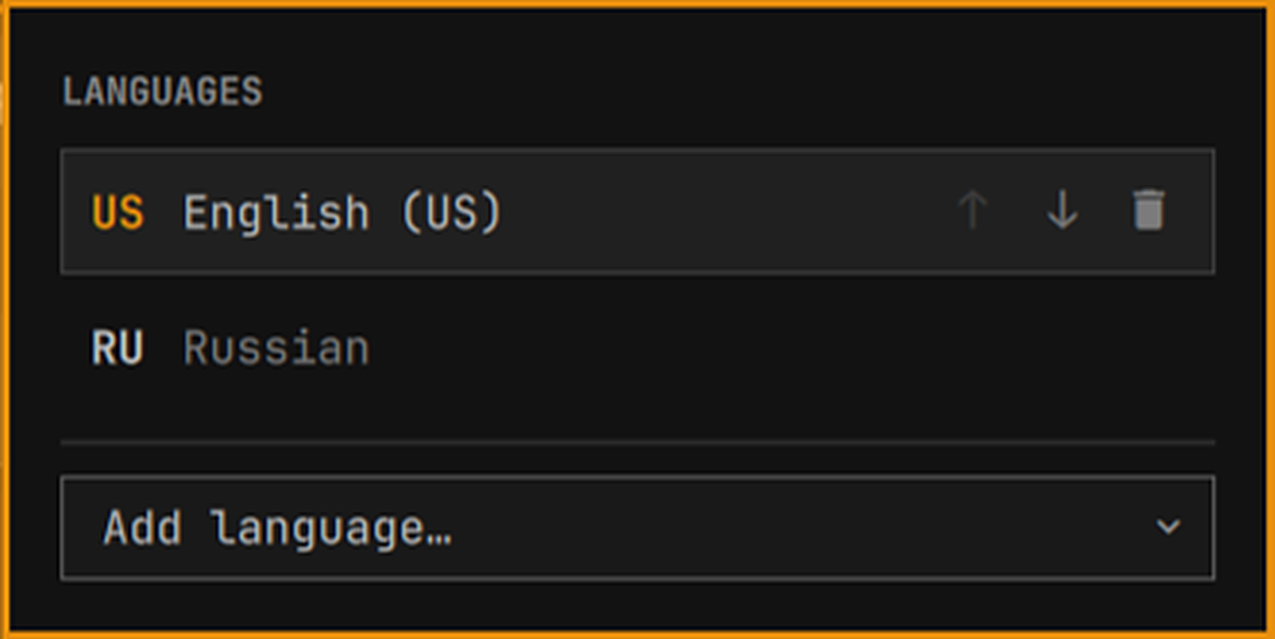
The bar shows the active layout's abbreviation (US, RU, …). The panel
lists your layouts with their full names; a search box over the complete
xkb layout catalog adds a new one. The layout list is not the widget's own
state: it lives in the kb_layout line of your Hyprland input config, the
same file Omarchy already uses for input overrides — so what the widget
shows is what the compositor actually runs, and changes survive restarts
with or without the widget.
Requirements
Everything is stock Omarchy — the widget adds no dependencies:
- Hyprland — layouts are read from
hyprctl devices, switched withhyprctl switchxkblayout, and the switch indicator listens on Hyprland's event socket. - xkeyboard-config — the layout catalog behind "Add language…" is
parsed from the system's xkb rules list
(
/usr/share/X11/xkb/rules/base.lst, falling back toevdev.lst).
No sudo, no daemons: the config edited is your own file in ~/.config.
Install
omarchy plugin add https://github.com/glafeara/omalang.git
omarchy plugin enable glafeara.languages right
plugin add is interactive by default; add --yes to that command to skip
its prompt. The explicit plugin id and right placement make
plugin enable non-interactive. The plugin itself is one QML file and one
shell script.
Using it
In the bar: the label is the active layout's abbreviation. Left click opens and closes the panel, right click cycles to the next layout.
In the panel: click a language to switch to it. The active one is
marked with a check. The row under the cursor shows three buttons: arrows
move the language up and down the list, the trash can removes it (the last
remaining language cannot be removed). Order is meaning — the first layout
is the default and SUPER+SPACE cycles in list order. "Add language…"
opens a search over every layout and variant the system's xkb catalog
knows — English (Dvorak), Russian (Phonetic) and friends are entries of
their own, so the same code can appear twice with different variants.
| Key | Action |
|---|---|
j / k, arrows |
move the cursor |
Enter, Space |
switch to the selected language |
J / K |
move the selected language down / up the list |
x |
remove the selected language |
a, / |
open the language search |
r |
refresh |
Esc |
close |
The indicator: after every layout switch — from the panel, the bar's right click, or the Hyprland keybinding — the new layout's abbreviation flashes in the middle of the focused monitor: where you are typing, not where the bar happens to live. It is drawn in the shell's popup card style and is visual only: its input region is empty, so it never steals a click or a keystroke from what you are typing. It flashes once per switch: Hyprland announces a switch once per keyboard and replays it when a device (re)appears — a connecting bluetooth headset included — and neither the replays nor the extra per-device announcements flash again. Virtual keyboards (fcitx5, ydotool) are ignored outright, and on a multi-monitor setup a single widget instance owns the flash, so two bars never stack two cards.
Switching is compositor-wide (switchxkblayout all), the same thing
the stock Omarchy keybinding does, so the widget and the keybinding never
fight over which device's layout counts.
Settings
| Key | Default | Range |
|---|---|---|
osdDurationMs |
750 |
200–5000, clamped by the widget itself |
showOsd |
true |
false disables the centered indicator |
omarchy bar set glafeara.languages osdDurationMs 1200
omarchy bar set glafeara.languages showOsd false   # no flash on switch
IPC
omarchy-shell glafeara.languages status          # "ru", "us(dvorak)"
omarchy-shell glafeara.languages list            # index, key, name; * marks active
omarchy-shell glafeara.languages next            # cycle to the next layout
omarchy-shell glafeara.languages set ru          # by code, key or index from list
omarchy-shell glafeara.languages open            # also: close, toggle
status and set speak the same keys, so set "$(… status)" round-trips.
A bare code matches the first entry using it; an index from list is
always exact.
What it touches
- Your Hyprland input config — the
kb_layoutline and, when variants are in play, thekb_variantline, edited in place and followed byhyprctl reloadso the change applies immediately.kb_variantis positional and parallel tokb_layout, so the two are always rewritten together — removing or reordering a layout never shifts a variant onto a neighbour. On Lua-config installs (Hyprland ≥ 0.56 withhyprland.lua) the file is~/.config/hypr/input.lua; older installs keep it in~/.config/hypr/input.conf. When the file has no livekb_layoutline — stock Omarchy ships it commented out and computes the list in the system defaults — the current list is read from the compositor (hyprctl getoption) and the first change appends a fresh assignment, extending the list you actually run rather than replacing it. Nothing else in the file is rewritten; inline comments never become part of the list; a value the parser does not fully understand refuses every edit instead of guessing; and an edit that would leavekb_layoutempty is refused. hyprctl devices/hyprctl switchxkblayout— read the active layout, switch it. Read-only apart from the switch itself./usr/share/X11/xkb/rules/{base,evdev}.lst— read-only, the layout catalog for "Add language…".
Everything runs as your user. No install or uninstall scripts, no services, no network, no telemetry.
Tests
tests/ holds a backend suite that runs against a fake hyprctl and
temporary config files — both the input.conf and the input.lua
dialects, since the sed edits differ — plus static checks pinning the
Panel↔backend contracts (index-based remove/move, ids, settings keys):
bash tests/run.sh
Uninstall
omarchy plugin remove glafeara.languages
That disables the widget and deletes the plugin directory. Your layout list stays in your Hyprland input config — it was yours before the widget, it stays yours after.
License
MIT — see LICENSE.