
OmaSwiss
English · 繁體中文

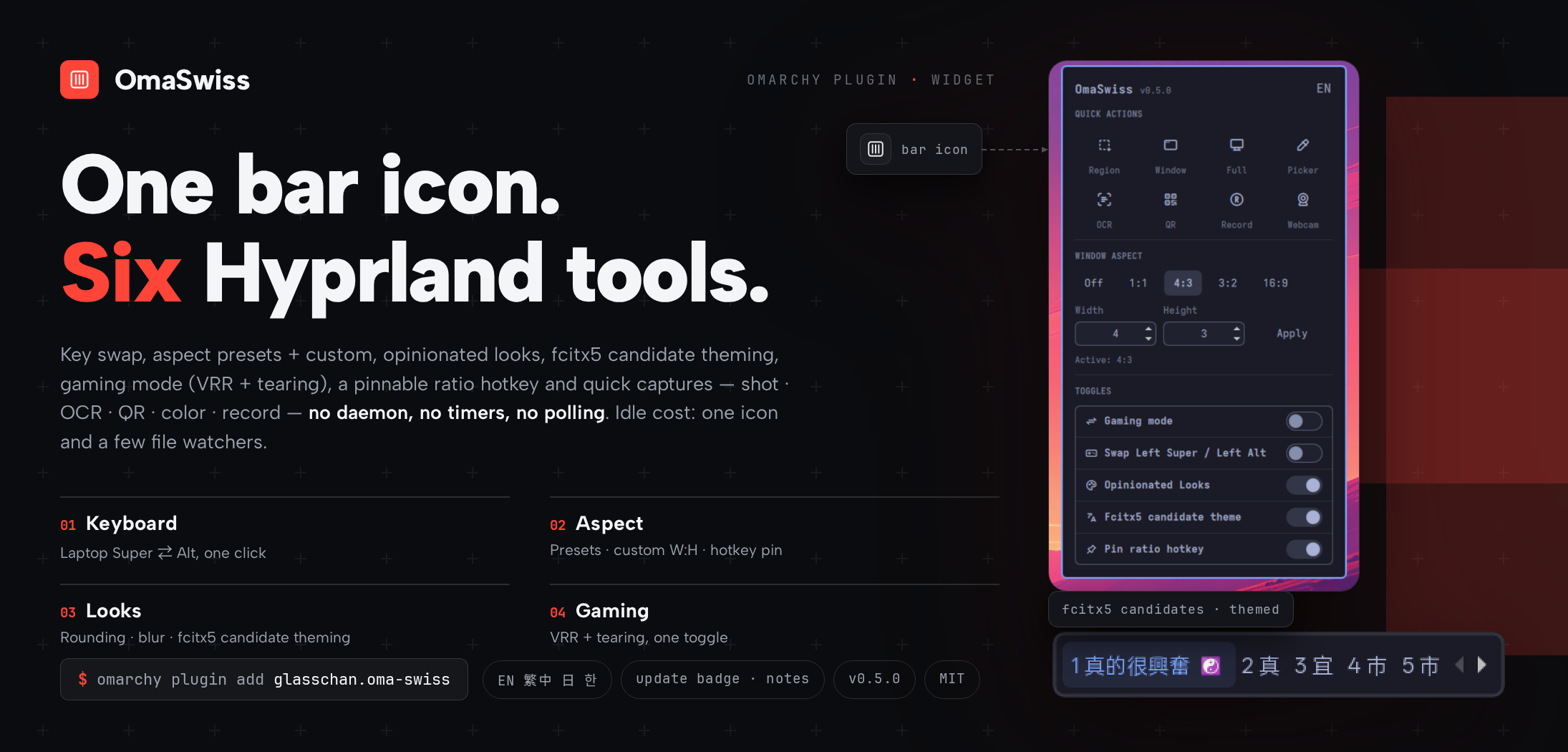
One bar icon. Six Hyprland tools.
Swap your laptop's Super and Alt keys, lock the lone window to any aspect ratio, restyle your desktop, tune for gaming, theme your input method's candidate window, and capture your screen — all from one popup that costs nothing while you're not using it.
Why you'll keep it installed
- One popup, no terminal. Every tool is a toggle, one left-click away. Right-click the bar icon to flip the Super⇄Alt swap instantly.
- Idle cost: one bar icon. No daemon, no timers, no polling. When the popup is closed, the plugin is effectively asleep.
- Survives updates and relogins. Toggles write the same state files
Omarchy itself uses, so your settings hold across reloads, reboots, and
omarchy update— and the Omarchy menu keeps working alongside. - Four UI languages. English, 繁體中文, 日本語, and 한국어 from one header menu. The Japanese and Korean translations are machine-assisted — improvements welcome via PR.
- Told when an update lands. A badge on the panel marks new GitHub releases, with the release notes in its tooltip; one click updates the plugin on git installs, and the Omarchy shell restarts itself briefly once the update lands, so the new version is guaranteed on screen. The check runs at most once a day — never on a timer.
The six tools
- Super ⇄ Alt swap — trade the left Super and Alt keys on the built-in laptop keyboard, whenever you want. External keyboards are never touched.
- Single-window aspect ratio — keep the lone window honest: 1:1, 4:3,
3:2, and 16:9 presets, or any custom
W:Hup to 64. Your ratio survives reloads and logins, and the stockSUPER+CTRL+BACKSPACEbinding works alongside it. - Opinionated Looks — rounded corners, a translucent 5px border, soft shadows, and vibrancy blur in one toggle. Switch it off and you're back to stock Omarchy, exactly.
- Gaming mode — variable refresh (VRR) and tearing allowed in one toggle, for the lowest input latency. Switch it off and the stock values return, exactly.
- Fcitx5 candidate theme — the fcitx5 input-method candidate window picks up the Omarchy palette with rounded corners, a translucent rim, and vibrancy blur, and retints itself on every theme change. Switch it off and fcitx5 returns to its defaults.
- Quick capture — region / window / fullscreen screenshots, a color picker, OCR (English + 中文), QR scan (decoded text lands in the clipboard), and screen recording start/stop with or without your webcam, one click each. Capture overlays need a clear screen, so the panel closes as the tool fires.
Day to day
- Left-click the bar icon: open the tools popup.
- Right-click: instant Super⇄Alt toggle.
- Middle-click: instant region screenshot (Esc cancels).
- Hover: a two-line hint lists what each mouse button does, localized with the panel.
- Pin the ratio hotkey (optional): while pinned,
SUPER+CTRL+BACKSPACEcycles off ⇄ your last ratio instead of the stock fixed 1:1 — set 16:9 in the panel and the hotkey follows. Unpinning restores the previous binding exactly, and the Omarchy menu's own ratio entry is never touched.
Every command also works from the shell, so you can bind it to anything:
omarchy-shell glasschan.oma-swiss toggle         # Super⇄Alt on/off
omarchy-shell glasschan.oma-swiss aspect 21 10   # any custom ratio
omarchy-shell glasschan.oma-swiss aspectOff      # ratio off
omarchy-shell glasschan.oma-swiss aspectToggle   # off <-> last ratio
omarchy-shell glasschan.oma-swiss pin            # pin/unpin the ratio hotkey
omarchy-shell glasschan.oma-swiss look           # looks on/off
omarchy-shell glasschan.oma-swiss gaming         # gaming mode on/off
omarchy-shell glasschan.oma-swiss fcitx          # fcitx5 candidate theme on/off
omarchy-shell glasschan.oma-swiss lang           # cycle UI language en→zh→ja→ko→en
omarchy-shell glasschan.oma-swiss panel          # open/close popup
omarchy-shell glasschan.oma-swiss open           # open the panel
omarchy-shell glasschan.oma-swiss close          # close the panel
omarchy-shell glasschan.oma-swiss status         # what's on right now
Project layout
Every tracked file in the repo, with its role:
.
├── .github/
│   └── workflows/
│       ├── ci.yml                    # CI: manifest validation + submission/hardening checks
│       └── release.yml               # CI: tag-checked release packaging (zip + sha256 + GitHub Release)
├── design/
│   ├── cover.html                    # Source for the preview.png cover (rendered with headless Chromium)
│   └── fcitx5-candidates.png         # Themed fcitx5 candidate strip embedded in the cover (2x NEAREST upscale)
├── docs/
│   ├── agents/                       # Notes for coding agents: issue tracker, triage labels, domain docs
│   │   ├── domain.md
│   │   ├── issue-tracker.md
│   │   └── triage-labels.md
│   └── fcitx5-candidate-theming.md   # Design brief + verification checklist for the fcitx5 toggle
├── scripts/
│   ├── check-hardening.sh            # CI tripwires for the security-baseline classes (quoting, deadlines, atomic writes)
│   └── check-submission.sh           # CI checks for the marketplace submission rules (README sections, LICENSE, preview limits)
├── AGENTS.md                         # Repo work contract: contracts, hardening rules, E2E checklist
├── BarWidget.qml                     # Entry point: all state and actions, the bar icon, the IPC surface
├── EvalQueue.qml                     # Single-slot queue so rapid hyprctl toggles land in order
├── LICENSE                           # MIT
├── README.md                         # This file
├── README.zh-Hant.md                 # Traditional Chinese readme, kept in parity with this file
├── ToolPanel.qml                     # The popup: a pure view injected with the BarWidget as hostWidget
├── fcitx5-theme.sh                   # The fcitx5 toggle's apply/unapply/generate script (theme, hook, classicui.conf)
├── manifest.json                     # Plugin manifest: id, version, entry point
├── panel.png                         # Raw panel screenshot (docs)
├── preview.png                       # 73:35 marketing cover at the top of the READMEs
├── tabler-icons.ttf                  # ~8 KB Tabler Icons subset (15 codepoints) for the bar and panel icons
└── .gitignore
And everything the plugin touches outside the repo once installed. Toggle flags and fcitx5 artifacts exist only while their feature is on — switching a toggle off removes its files, so nothing outlives the plugin:
| Path | Role | Exists |
|---|---|---|
~/.config/omarchy/plugins/glasschan.oma-swiss/ |
The deployed copy — what omarchy plugin add installs and the update badge updates |
while installed |
~/.local/state/omarchy/toggles/hypr/super-alt-swap.lua |
Swap flag file | while the swap is on |
~/.local/state/omarchy/toggles/hypr/single-window-aspect-ratio.lua |
Aspect flag file (its content is the chosen ratio) | while a ratio is set |
~/.local/state/omarchy/toggles/hypr/opinionated-looks.lua |
Opinionated Looks flag file | while looks are on |
~/.local/state/omarchy/toggles/hypr/oma-swiss-gaming-mode.lua |
Gaming-mode flag file | while gaming mode is on |
~/.local/state/omarchy/toggles/hypr/oma-swiss-hotkey.lua |
Ratio-hotkey pin flag file | while the hotkey is pinned |
~/.local/state/omarchy/toggles/hypr/oma-swiss-fcitx5.lua |
fcitx5 flag file (its one line is also the live Hyprland blur rule) | while fcitx5 theming is on |
~/.local/state/glasschan.oma-swiss/lang |
UI language | after the first language change |
~/.local/state/glasschan.oma-swiss/last-aspect |
Last ratio set (drives the panel prefill and the pinned hotkey) | after the first ratio is set |
~/.local/state/glasschan.oma-swiss/update-check |
Update-check cache (at most one network touch per day) | after the first panel open |
~/.local/state/glasschan.oma-swiss/update-notes |
Release notes for the pending update | only while an update is pending |
~/.config/omarchy/hooks/theme-set.d/fcitx5 |
fcitx5 retint hook, calling the deployed copy's script | while fcitx5 theming is on |
~/.local/share/fcitx5/themes/omarchy/ |
The generated fcitx5 theme | while fcitx5 theming is on |
~/.config/fcitx5/conf/classicui.conf |
fcitx5's theme setting (Theme=omarchy); your own file is backed up once to classicui.conf.pre-oma-swiss |
while fcitx5 theming is on (the backup is kept) |
Install / Remove
omarchy plugin add <this repo's git URL>    # install
omarchy plugin remove glasschan.oma-swiss   # remove
Before removing, switch every toggle off in the panel. Each toggle leaves a small state file that re-applies your setting at login — switching it off deletes the file, so nothing outlives the plugin. Switch the Fcitx5 candidate theme off before removing in particular: while on, it installs a theme-retint hook that points into the plugin directory, and removing the plugin with the toggle still on would leave that hook calling a missing script.
Dependencies
None to install — everything ships with Omarchy v4: Hyprland 0.56+,
omarchy-capture-screenshot (slurp), omarchy-capture-text (OCR),
omarchy-capture-qr (zbar), omarchy-capture-screenrecording and
omarchy-capture-screenrecording-with-webcam (gpu-screen-recorder), and
hyprpicker.
jq (present on a stock Omarchy install) is used, when available, to show
release notes for pending updates — the update check works without it.
The Fcitx5 candidate theme toggle is optional and degrades gracefully:
it needs a stock fcitx5 install with omarchy-fcitx5.service active (a
stopped service is never force-started) and the stock
omarchy-theme-color. With ImageMagick's magick present it renders the
rounded 9-patch background; without it, a square bordered fallback is
generated instead.
MIT.