
omarchy-fcitx5-theme
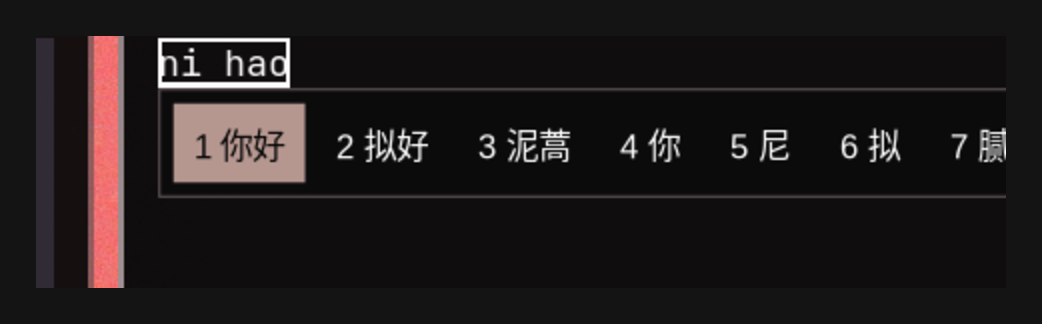
Keep the fcitx5 input-method candidate box automatically in sync with the Omarchy system theme.
Run omarchy theme set <theme> and the candidate panel restyles instantly — no manual steps needed.
How it works
This repo is an Omarchy shell plugin (service kind), registered in the plugin market:
omarchy theme setwrites the current theme's palette to~/.local/state/omarchy/current/theme/colors.toml- The plugin's service component watches that file with a
FileView(Quickshell file watcher) - On change, it invokes a built-in generator that derives a matching fcitx5 candidate-box theme
from the theme's
colors.toml(~/.local/share/fcitx5/themes/omarchy-<theme>/theme.conf) - It writes
Theme=into~/.config/fcitx5/conf/classicui.confand restarts the fcitx5 app
The generator is idempotent: fcitx5 is only restarted when the theme actually changed, so it can safely be invoked repeatedly by hooks, services, or timers.
Installation
Option 1: Plugin install (primary, recommended)
omarchy plugin add https://github.com/gmaxxxie/omarchy-fcitx5-theme.git --enable
The plugin ships with the full feature set: watch + generate + apply.
Option 2: Full install (plugin + fallback hook)
git clone https://github.com/gmaxxxie/omarchy-fcitx5-theme && cd omarchy-fcitx5-theme
./install.sh
Additionally installs a theme-set hook as a fallback: when omarchy theme set runs in an
environment without the shell (e.g. SSH, scripts), the hook still syncs the candidate-box theme.
Uninstall
omarchy plugin remove gmaxxxie.fcitx5-theme # removes the plugin only
For a full cleanup (fallback hook, generated themes, config restore), run ./uninstall.sh
from this repo:
- It removes only the themes generated by this extension, detected by the
Generated from Omarchy theme:marker inside eachtheme.conf. Unrelated user themes that merely share theomarchy-*name pattern are left untouched. - It restores the classicui theme that was active before this extension was installed
(recorded at first run in
~/.local/state/omarchy-fcitx5-theme/state), falling back to fcitx5's default theme when the previous value can't be recovered. - It removes the
theme-sethook and the state file, then restarts fcitx5 so the restored theme takes effect.
Theme mapping
| Element | Mapping (colors.toml) |
|---|---|
| Panel background | background (dark themes) / lighter_background (light themes) |
| Candidate text | foreground |
| Selected candidate background | accent, deepened to luma ≈ 85 when the selected text is white |
| Selected candidate text | white, or darker_background when the accent is light (luma ≥ 150) |
| Panel border | selection (falls back to muted) |
| Menu separator | bright_foreground (falls back to border color) |
The panel and highlight keep Omarchy's hard square edges: Color= background with
BorderWidth=1, and the border colour comes from the theme's selection. The generator
no longer writes [AccentColorField], which used to let a desktop accent portal
(GNOME/KDE) repaint the border, highlight and separator with the system accent colour and
lose the theme palette.
Both light and dark themes are supported: light themes (mode = "light") get a light panel
with dark text, and the selected candidate is drawn as white text on a deepened accent so it
stays readable no matter how light the accent is.
Manual usage
# Regenerate for the current theme
~/.config/omarchy/plugins/gmaxxxie.fcitx5-theme/fcitx5-classicui-theme.sh current

# Generate for a specific theme
~/.config/omarchy/plugins/gmaxxxie.fcitx5-theme/fcitx5-classicui-theme.sh tokyo-night
You can fine-tune the generated theme file by hand (font size, padding, etc.), then restart fcitx5:
omarchy restart xcompose
Note: re-running the generator overwrites manual edits.
FAQ
Q: The candidate box didn't change?
Restart fcitx5 with omarchy restart xcompose.
classicui reads the theme only at startup, and fcitx5-remote -r reloads config without swapping
themes. A plain systemctl --user restart omarchy-fcitx5.service is not enough when fcitx5 was
started outside the unit (e.g. D-Bus activated): the unit's instance exits because the stray
process still owns org.fcitx.Fcitx5, so the old theme keeps being served. omarchy restart xcompose stops the unit, kills the stray instance, then starts the unit.
Q: The plugin is enabled but switching themes has no effect?
Check whether the service component is loaded: omarchy plugin list should show
gmaxxxie.fcitx5-theme enabled third-party service.
If it's missing, run omarchy-shell shell rescanPlugins and re-enable it.
Q: My rime config in custom/ isn't taking effect?
~/.local/share/fcitx5/rime/custom/ is only a template repository (librime does not scan
subdirectories); the effective <schema>.custom.yaml must live in the rime root directory
(same level as wanxiang.schema.yaml).
File structure
omarchy-fcitx5-theme/
├── manifest.json                # Plugin manifest (service)
├── Service.qml                  # Service component: file watch + generator invocation
├── fcitx5-classicui-theme.sh    # Core generator (idempotent, standalone-runnable)
├── install.sh                   # Full install (plugin + fallback hook)
├── uninstall.sh                 # Full uninstall
├── preview.png                  # Preview
├── LICENSE                      # MIT
├── README.md                    # This file (English)
└── README.zh-CN.md              # 简体中文