
UI Sounds
Theme-aware window, workspace, and Quake-console sounds for Omarchy.
https://github.com/user-attachments/assets/c0058d10-2226-4c89-8c99-6435877340ea
This is an Omarchy shell plugin, not a theme and not a standalone daemon. That is the distribution channel Omarchy already has: a git repo with a manifest.json, installed by omarchy plugin add.
Install
Get it from the Omarchy Plugins marketplace, or install it directly:
omarchy plugin add https://github.com/gobijan/omarchy-ui-sounds.git --enable
Update and remove:
omarchy plugin update gobijan.ui-sounds
omarchy plugin remove gobijan.ui-sounds
The plugin is a service plus a center-bar mute toggle. Enabling it is enough. It listens to Hyprland events inside omarchy-shell and plays short effects through PipeWire's pw-play, so there is no extra systemd unit.
The space-invader toggle sits with the other center-bar toggles (Do Not Disturb, Night Light, Stay Awake). Hover the middle of the bar to peek at it while sounds are on; while muted it stays visible with a slash through it, the same way Silence Notifications does. Click to mute or unmute. Move it with:
omarchy bar move gobijan.ui-sounds --section center --after omarchy.indicators
Why a plugin, not a theme
| Channel | What it installs | Why not this |
|---|---|---|
omarchy theme install |
colors, backgrounds, app tints | Themes do not run code |
omarchy plugin add |
QML that lives in the shell | This. Events + playback belong here |
AUR / install.sh |
extra daemons and units | Works, but duplicates what the shell already hosts |
Themes can still ship the samples. The plugin is what plays them.
Theme sound packs
Drop files named after the event into a theme. omarchy theme install already clones a theme repo into ~/.config/omarchy/themes/<slug>/, so a theme author only needs this extra directory:
your-theme/
  colors.toml
  backgrounds/
  sounds/
    openwindow.wav
    closewindow.wav
    qconsoleopen.wav
    qconsoleclose.wav
    workspace.wav
    fullscreen.wav
    unfullscreen.wav
    float.wav
    unfloat.wav
    minimize.wav
    urgent.wav
    bell.wav
Lookup order:
~/.config/omarchy/themes/<theme>/sounds/- the active theme's staged copy
- a named pack (
pack=quake→packs/quake/in the plugin, or~/.config/omarchy/sounds/packs/quake/) - a generated pack tinted from that theme's
colors.toml ~/.config/omarchy/sounds/default/
Formats: wav, ogg, oga, mp3, flac, opus. Generated clicks are 44.1 kHz mono WAV.
If a theme has no sounds/ directory, the plugin synthesizes a pack from the theme accent so switching themes still changes the clicks.
Config
~/.config/omarchy/sounds/config is created on first run. Edits apply immediately.
enabled=true
volume=0.45
startup_grace_ms=600
pack=
event.urgent=false
event.bell=false
| Key | Default | What it does |
|---|---|---|
enabled |
true |
Master on/off. The center-bar toggle, the Toggle menu, and omarchy-shell ui-sounds toggle flip this. |
volume |
0.45 |
Playback level from 0 (silent) to 1 (full). This is independent of the system output slider. 0.45 is present without jumping over music. |
startup_grace_ms |
600 |
Milliseconds after the plugin starts during which no sounds play. Covers the burst of Hyprland events when the shell comes up, so login does not machine-gun clicks. |
pack |
empty | Which sample set to use after theme overlays. Empty / theme / auto follows the Omarchy theme palette. Named packs live in packs/<name>/. |
event.<name> |
on, except urgent and bell |
Per-event mute. false skips that event even if a file exists. |
Setting enabled=false here makes the loaded service fully inert: it disconnects
from Hyprland and stops its audio processes. Omarchy's plugin registry has a
separate meaning for an "enabled": false field on an entry in
~/.config/omarchy/shell.json: that field does not unload a service. If the
plugin id is present in plugins[], Omarchy considers the plugin loaded. Use
omarchy-shell ui-sounds disable for the inert playback state, or remove
gobijan.ui-sounds from plugins[] (or add it to disabledPlugins[]) to stop
loading the service entirely, then restart the shell.
Playback is suspended while Omarchy is idle or locked and whenever Quickshell
has no real output (a screen must have a non-empty, non-FALLBACK name and
non-zero size).
Compositor chrome such as org.omarchy.screensaver, lock windows, and desktop
portal pickers is ignored on both window-open and matching window-close events.
When the compositor and default audio sink are healthy, four voices per event cue
rapid interactions immediately, let their effects overlap, and route them through
the current PipeWire default.
Disabling playback, locking/idling, losing outputs, or an audio failure stops the
pool; failures start a 10-second backoff before probing the default sink again.
Events you can set with event.<name>:
| Event | When it plays |
|---|---|
openwindow |
A window opens |
closewindow |
A window closes |
qconsoleopen / qconsoleclose |
Omarchy's special:scratchpad console slides down or retracts. The initial terminal window does not also trigger openwindow. |
workspace |
You switch workspaces |
fullscreen / unfullscreen |
A window enters or leaves fullscreen |
float / unfloat |
A window is floated or tiled |
minimize |
A window is minimized |
urgent |
A window requests attention (chat, browser). Off by default; some apps spam this. |
bell |
An app rings the system bell. Off by default; terminals can fire it often. |
Shipped packs:
| Pack | Character | Source | License |
|---|---|---|---|
(empty) / theme |
clicks tinted from the active theme | generated | MIT |
quake |
LibreQuake menu, item, and talk sounds | LibreQuake | BSD-3-Clause |
90sfps |
90s-FPS homage (synthesized, not ripped) | this plugin | MIT |
kenney |
clean modern UI clicks | Kenney Interface Sounds | CC0 |
digital |
arcade lasers and power-ups | Kenney Digital Audio | CC0 |
chip |
8-bit menu blips | Juhani Junkala 512 SFX | CC0 |
scifi |
airlock doors, lasers, force fields | Kenney Sci-fi Sounds | CC0 |
Original id Software Quake samples are not shipped. quake is the legal remake from LibreQuake. Each pack has ATTRIBUTION.txt.
Example: turn urgent alerts on, Quake pack, a bit louder:
volume=0.55
pack=quake
event.urgent=true
Control
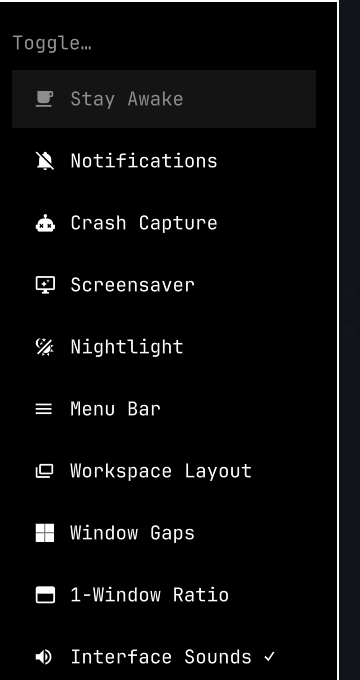
Center-bar space-invader toggle (hover the middle of the bar; stays shown, slashed, while muted), or Super menu → Trigger → Toggle → Interface Sounds:
omarchy-shell ui-sounds help
omarchy-shell ui-sounds status
omarchy-shell ui-sounds packs
omarchy-shell ui-sounds themes
omarchy-shell ui-sounds events
omarchy-shell ui-sounds pack quake
omarchy-shell ui-sounds pack kenney
omarchy-shell ui-sounds pack theme
omarchy-shell ui-sounds play openwindow
omarchy-shell ui-sounds toggle
omarchy-shell ui-sounds generate
help, status, packs, themes, and events print a list. json is the machine-readable snapshot. pack list is the same as packs. An unknown pack or event name prints the list instead of failing silently.
Set alwaysShow on the bar widget to keep the invader visible even when sounds are on:
omarchy bar set gobijan.ui-sounds alwaysShow true --json
Local development
omarchy plugin add /path/to/omarchy-ui-sounds --enable --yes
omarchy plugin validate /path/to/omarchy-ui-sounds
node tests/test_sounds.js
omarchy plugin add clones the repo into ~/.config/omarchy/plugins/gobijan.ui-sounds/. After that, edit the checkout there or update from the origin.
Requirements
Omarchy with omarchy-shell (Quickshell) and PipeWire's pw-play. Both ship with current Omarchy.
License
MIT. See LICENSE.