
Framework LED Matrix Helper
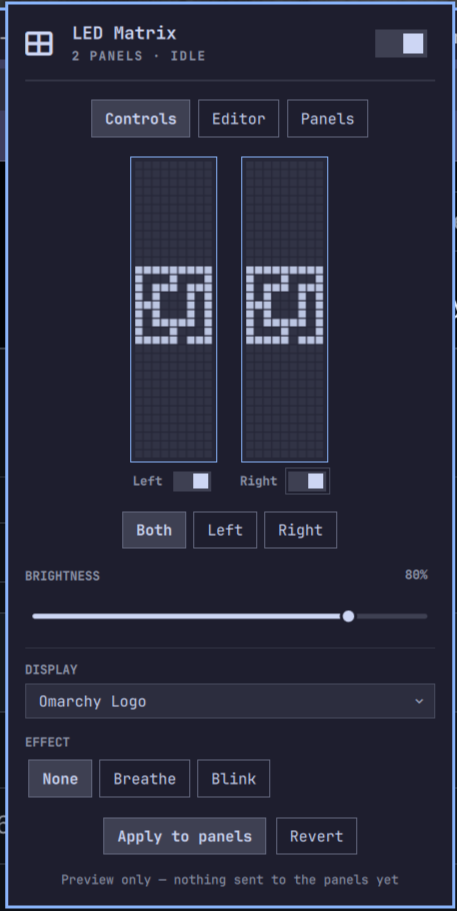
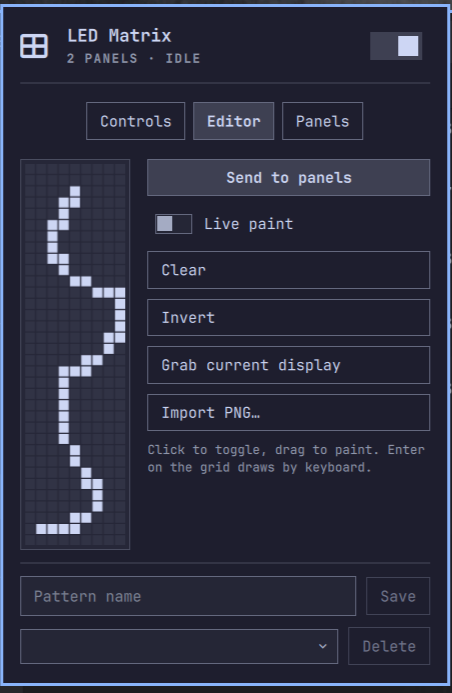
A control center for the Framework 16 LED Matrix input modules, living in the Omarchy bar. Everything you set — patterns, text, animations, effects — shows on a live emulation of both panels first, so you see exactly what you'll get before applying it to the hardware. A built-in pixel-art editor lets you draw, save, and share your own patterns as plain PNGs. Rounded out with per-panel power and identity, full keyboard navigation, and in-place firmware updates.

| Controls | Editor | Panels |
|---|---|---|
 |
 |
 |
Features
- Live panel preview — an emulation of both LED matrices in the popup
renders every choice before it touches hardware: patterns, text (including
how it splits across panels), animations ticking live, effects pulsing,
brightness and sleep state. Selections show on the preview first; Apply
sends them to the panels, Revert (or
x) discards. - Display picker — firmware patterns (logo, gradients, lotus, zigzag, all-on), free text, and streaming animations (clock, random EQ, mic EQ, bouncing Omarchy logo). One picker, because exactly one thing owns the grid at a time.
- Effects — breathing/blinking brightness modulation that composes with any static display, and is automatically unavailable while a streaming animation owns the grid.
- Per-panel targeting — control both panels or just the left/right one; text longer than 5 characters spans across both panels. Each panel has its own on/off switch under its preview (implemented as brightness-0 so running animations on the other panel are undisturbed).
- Text positioning — nudge text pixel-by-pixel within the panel bounds (arrow buttons, or Enter on the Position row for an hjkl/arrow nudge mode); shifted text is sent as rendered frames using the firmware's own font.
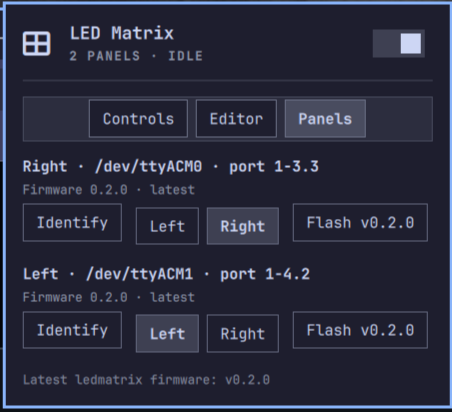
- Stable left/right identity — panels enumerate in random order per boot; assign each USB port a side once (with a brightness-pulse Identify helper) and the plugin keeps the order correct automatically.
- Pattern editor — draw your own 9×34 patterns on an Editor tab: click to
toggle, drag to paint, or a keyboard draw mode (hjkl/arrows + Space). Send
to the panels directly, optionally live-painting as you draw. Save patterns
by name — they appear in the Display picker as
★ nameand are stored as plain 9×34 PNGs in~/.local/share/godlewski.framework-led-matrix-helper/patterns/, directly usable withinputmodule-control --image-bw— exporting/sharing a pattern is just copying the file. Importing works too: the Import PNG… button opens the desktop file chooser and accepts any 9×34 PNG (grayscale, RGB, palette, or alpha — drawn in any editor); dropping files into the patterns folder orbin/led-matrix-ctl import-pattern <file> [name]work as well. - Firmware flashing — download a
.uf2from Framework's official releases (a button opens the page), pick the file, and the plugin flashes it in place (RP2040 UF2 flow) with streamed progress. The plugin never fetches or chooses firmware itself. Before anything touches the bootloader the image is read once from a regular file (bounded, no symlinks/FIFOs), structurally validated (UF2 block magics, RP2040 family ID), and its SHA-256 checked against Framework's published v0.2.0ledmatriximages (standard, EVT, 10k) — a crafted RP2040 image with the right headers is still refused. Custom-built firmware is out of scope for the plugin; copy it to theRPI-RP2drive yourself. - Stays lit — the firmware normally fades panels out 60 seconds after the last command, so static patterns would vanish; the widget keeps what you applied visible with a lightweight keepalive (sleeping panels via the power switch still saves power as before).
- Bar conveniences — scroll the bar icon to change brightness, right-click to sleep/wake, full keyboard navigation (j/k/h/l, Enter, Esc, Tab) matching the first-party Omarchy panels.
Requirements
- Framework 16 with one or two LED Matrix input modules
inputmodule-control(AUR), pluspython3(in the Omarchy base install)
Missing something? The widget guides you. When a dependency is absent the
bar icon shows a setup state whose panel explains what's missing and offers
an Install dependencies button (runs yay in an Omarchy floating
terminal). Manual equivalent: yay -S inputmodule-control. If serial access
is denied on your setup, also install inputmodule-udev from the AUR.
Install
omarchy plugin add https://github.com/godlewski/omarchy-framework-led-matrix-helper --enable
Or clone into ~/.config/omarchy/plugins/godlewski.framework-led-matrix-helper
and run omarchy plugin enable godlewski.framework-led-matrix-helper.
Usage
Click the bar icon (or omarchy-shell shell toggle godlewski.framework-led-matrix-helper) to open the panel.
- Controls tab — pick the target panel(s), set brightness, choose what to display, and add a breathing/blinking effect.
- Panels tab — identify which physical panel is which, assign Left/Right to their USB ports, and update firmware.
IPC
omarchy-shell godlewski.framework-led-matrix-helper toggle|open|close|sleep|wake|refresh
Useful for keybindings, e.g. sleeping the panels before a presentation.
Settings
Stored in the widget's ~/.config/omarchy/shell.json entry (managed from the
Panels tab; no manual editing needed): leftPort / rightPort (USB port
paths for side identity) and swapped (derived automatically once ports are
assigned).
Removal
omarchy plugin remove godlewski.framework-led-matrix-helper
State/caches you may also delete:
~/.local/state/godlewski.framework-led-matrix-helper/,
~/.cache/godlewski.framework-led-matrix-helper/.
Development
Agent/contributor docs live in CLAUDE.md, with deeper references in
.claude/skills/ (shell UI kit, hardware/CLI semantics, dev loop).
Credits
The panel emulation embeds the 5×6 pixel font, lotus bitmap, and pattern
algorithms from Framework's
inputmodule-rs
(MIT © Framework Computer Inc), which also provides the inputmodule-control
CLI and firmware this plugin drives. The bouncing-logo animation and logo
bitmap are ported from Omarchy (MIT).