
omarchy-linear
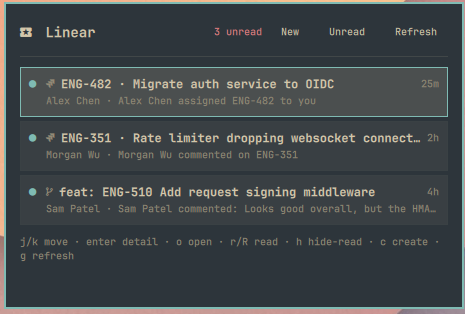
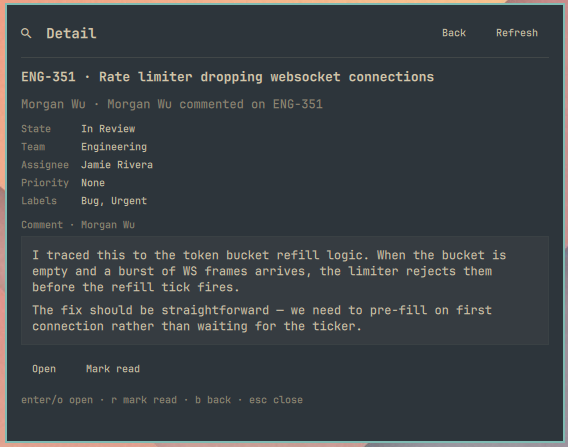
Linear inbox for Omarchy Quattro — a Quickshell bar widget with list, detail, mark-read, and create-issue.
Installs as plugin id gpdenny.linear.
Inbox
Detail
Features
- Unread count pill on the bar (polls every 120s by default)
- Keyboard-friendly inbox panel (
j/k, Enter for detail) - Mark one (
r) or all visible (R) as read - Open the notification URL in your browser (
o) - Detail view for issues, PRs, projects, and comments
- Create issue form with team picker (
c) - Themed with Omarchy
Color/Styletokens (no hard-coded palette)
Dependencies
- Omarchy Quattro (
omarchy-shell/ Quickshell) - A Linear personal API key with read + write scope
- Network access to
https://api.linear.app - Optional:
xdg-open(open notifications),wl-copy(copy after create)
License: MIT (see LICENSE).
Install
omarchy plugin add https://github.com/gpdenny/omarchy-linear.git --enable
# or add-only, then place in bar layout via shell.json / bar settings
Toggle from IPC / a keybind:
omarchy-shell shell toggle gpdenny.linear '{}'
Remove
omarchy plugin remove gpdenny.linear
That disables the widget and deletes the plugin checkout. Optional leftovers you can delete by hand:
- API key file — default
~/.config/linear-api-key - Plugin state —
~/.local/state/gpdenny.linear/
The plugin does not modify other Omarchy or Hyprland config without your explicit action.
API key
Create a key at Linear → Settings → Security & access.
Provide it via (checked in this order by the widget):
- A file — default
~/.config/linear-api-key(mode600) — recommended LINEAR_API_KEYenvironment variable (set via~/.config/uwsm/env+ logout, orhyprctl eval 'hl.env("LINEAR_API_KEY", "…")'thenomarchy restart shell)
echo 'lin_api_...' > ~/.config/linear-api-key
chmod 600 ~/.config/linear-api-key
Never put the key in shell.json. The widget setting apiKeyPath only stores a path.
Settings
| Key | Default | Meaning |
|---|---|---|
pollIntervalSec |
120 |
Unread / inbox poll interval |
apiKeyPath |
~/.config/linear-api-key |
API key file |
hideRead |
true |
Hide read notifications in the panel list |
Example bar layout entry:
{ "id": "gpdenny.linear", "pollIntervalSec": 120, "hideRead": true }
Toggle in the panel with the Unread/All header button or press h. The choice is remembered under ~/.local/state/gpdenny.linear/hide-read.
Keybindings (panel)
| Key | Action |
|---|---|
j / k |
Move selection |
| Enter | Open detail (list) / open URL (detail) / submit (create) |
o |
Open in browser |
r / R |
Mark read / mark all visible read |
h |
Toggle hide-read filter |
c |
Create issue |
g |
Refresh |
| Esc | Back / close |
After create: o open, u copy URL, y copy identifier, b copy branch.
Develop
# Validate manifest (on Quattro)
omarchy plugin validate .

# Optional CLI GraphQL helper (reads key file, body on stdin)
echo '{"query":"{ viewer { id } }"}' | ./scripts/linear-gql.sh ~/.config/linear-api-key
Demo mode
Skip the live Linear API and load the same mock fixtures as omarchy-linear-notifications --demo.
One-off (current session):
hyprctl eval 'hl.env("LINEAR_DEMO", "1")'
omarchy restart shell
Persistent (survives logout):
# add to ~/.config/uwsm/env, then log out and back in
export LINEAR_DEMO=1
Clear with hyprctl eval 'hl.env("LINEAR_DEMO", "")' and omarchy restart shell (and remove the UWSM line if you added one).
With demo mode on, no API key is required. Inbox, mark-read, teams, and create-issue all use local fake data.
State (last selected team) lives in ~/.local/state/gpdenny.linear/.
License
MIT