
Idle
An Omarchy Quattro plugin that lets you configure idle timeouts on AC power and shorter ones on battery.
| Default | Settings |
|---|---|
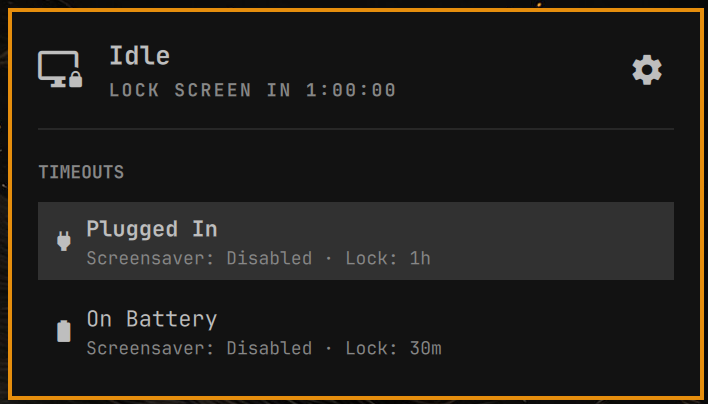 |
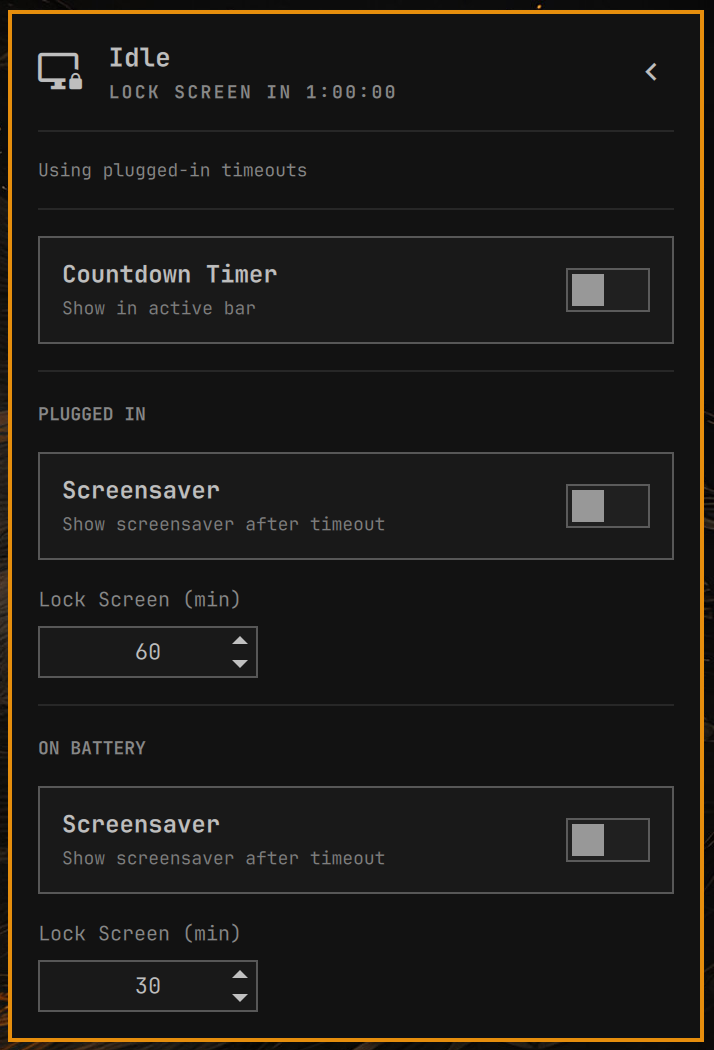 |
Omarchy itself only has single idle.screensaver and idle.lock values.
This plugin keeps a bar icon in the top right and a headless service inside
omarchy-shell. The service watches UPower and writes those values from:
idle.screensaverOnAc/idle.lockOnAcwhen plugged inidle.screensaverOnBattery/idle.lockOnBatterywhen on battery
Lock and screensaver defaults match Omarchy: 300 seconds (5 minutes) to lock, 150 seconds to screensaver, for both plugged-in and battery until you change them in the panel.
Enabling the plugin is consent for it to update idle.screensaver and
idle.lock when the power source changes. It does not start a second
Quickshell process.
Install
omarchy plugin add https://github.com/h-dong/omarchy-idle.git --enable
The icon lands in the bar's right section. Move it with:
omarchy bar move h-dong.idle --section right
If you already had the service enabled before the bar icon existed:
omarchy bar put h-dong.idle --section right
Usage
The bar shows an icon for the next screensaver or lock. Click it to open the
panel. Use the gear for settings: a bar countdown toggle (off by default),
screensaver toggles, and lock times. When the bar countdown is on, it shows
as a leading minus, like -1:00:00. Escape goes back, then closes the
panel. Plug in or unplug and the matching timeouts apply automatically. Stay
awake hides the countdown because neither event will fire.
Configure
The panel writes seconds into ~/.config/omarchy/shell.json:
{
  "idle": {
    "screensaverEnabledOnAc": true,
    "screensaverEnabledOnBattery": true,
    "showCountdownOnBar": false,
    "screensaverOnAc": 150,
    "screensaverOnBattery": 150,
    "lockOnAc": 300,
    "lockOnBattery": 300
  }
}
Turning screensaver off keeps the saved delay and skips the screensaver until lock. While it is on, screensaver can match lock; it is applied one second before lock so they do not fire together.
If a change does not apply immediately, run omarchy restart shell.
Update
omarchy plugin update h-dong.idle
Remove
omarchy plugin remove h-dong.idle
Removal disables the service, removes the bar icon, and deletes
~/.config/omarchy/plugins/h-dong.idle/. It also
restores Omarchy's stock idle.screensaver (150 seconds) and idle.lock
(300 seconds) and drops this plugin's extra idle.* keys.
License and dependencies
MIT. See LICENSE.
This plugin does not need extra packages, sudo, pkexec, installers, or a
second Quickshell process. It uses Quickshell's bundled UPower integration,
which ships with Omarchy.
Plugins run as unsandboxed code inside omarchy-shell. Review third-party
plugin code before enabling it.
Development
omarchy plugin validate .
qmllint -I "$OMARCHY_PATH/shell" ./Service.qml ./Panel.qml