
Ristretto
An Omarchy shell plugin that gives you direct control over power-saver behaviour, from the bar: when the screensaver starts, when the session locks, and when the machine suspends.
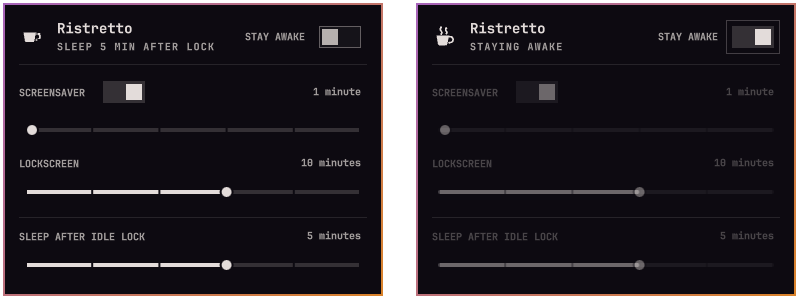
Omarchy has no suspend-on-idle of any kind — under a Wayland compositor,
logind's IdleAction never fires because nothing publishes idle state to it.
Ristretto adds it at the only workable layer, the shell: a delay that starts
counting when the session locks because you went idle, and suspends the
machine when it runs out. A lock you trigger yourself — a keybinding, the
menu, or omarchy lock — never leads to suspend.
What it does
- Screensaver delay — how long after going idle the screensaver appears: 1, 2, 3, 5, 10 or 15 minutes.
- Lockscreen delay — how long after going idle the session locks: 2, 3, 5, 10, 15 or 30 minutes. Always strictly above the screensaver delay; moving either slider nudges the other when they would collide.
- Sleep after idle lock — how long after an idle-driven lock the machine suspends: 1, 2, 3, 5 or 10 minutes, or never. A pending countdown is cancelled by unlocking, by changing the delay, or by switching stay awake on — anything that says "not now" means not now.
- Screensaver switch — Omarchy's native
screensaver-offflag, which has a CLI (omarchy toggle screensaver) but no other UI. - Stay awake switch — the native
omarchy.idlestay-awake state as a labelled control. While it is on, no idle cycle runs: no screensaver, no lock, no sleep — and the cup in the bar steams, so the state is readable at a glance without opening the panel.
Everything reads and writes Omarchy's own config and services, so changes
take effect immediately, survive a shell restart and omarchy update, and
stay in sync with their CLI equivalents in both directions.
Requirements
Ristretto uses the installed Omarchy shell, Quickshell, and Python 3.
- Omarchy 4.0.1 through 4.0.3, Quickshell 0.3.1. The scoped host path is
live-tested on Omarchy 4.0.3; legacy host behavior is covered by contracts
and mocked probes for the earlier versions. Older hosts expose live service
bindings. On Omarchy 4.0.3, the plugin watches its own entry in
shell.jsonand uses IPC plus timestamped host logs for idle and lock observations. Unavailable observations disable suspend safely. Newer host versions require compatibility validation before use. - Python 3 for scoped-host delay edits. The helper updates only the
shared idle timing pair in
~/.config/omarchy/shell.json; no root is needed. - User journal access for scoped idle observation. Start the shell through Omarchy so its output reaches the journal; a standalone shell with no journal stream cannot establish idle origin.
- systemd-logind for the suspend itself —
systemctl suspendfrom the active session, no root and no polkit prompt.
Install
omarchy plugin add https://github.com/HalmyLyseas/omarchy-ristretto --enable
The cup appears in the bar's right section. Installing changes nothing about what your machine does: the suspend delay ships as never until you pick a value.
Usage
Click the cup (or run omarchy-shell halmylyseas.ristretto open) to open the
panel. Everything is also reachable from the keyboard: arrows or hjkl move
a cursor between controls, Left/Right nudge the focused slider, Space
or Enter flip a switch, Esc closes.
The hero subtitle states what the machine will actually do — SLEEP 5 MIN AFTER LOCK, SLEEP NEVER, or STAYING AWAKE — so the armed behaviour is
readable at a glance. Unknown host state is shown as IDLE STATUS UNAVAILABLE
or SLEEP UNAVAILABLE; shared controls wait for fresh state.
One caveat worth knowing: video players and browsers that implement the Wayland idle-inhibit protocol pause the whole idle pipeline while they play, but not every app does — Zoom's Linux client, for one, does not, so a long hands-off call will idle, lock, and eventually sleep. That is what the stay awake switch is for; the steaming cup reminds you it is on.
Configuration
The panel is the intended interface, but everything it writes lands in plain
config you can edit or script. The delays live in ~/.config/omarchy/shell.json
under idle (seconds — shared with Omarchy itself):
"idle": { "screensaver": 180, "lock": 300 }
Hand-edited values are respected, not repaired: the panel approximates an off-scale value on its sliders without writing anything back, and if an edit leaves the lock delay at or below the screensaver delay, the panel shows a warning — moving either slider fixes the pair.
Ristretto's own settings live in its bar-layout entry in the same file:
| Key | Default | Meaning |
|---|---|---|
sleepAfterIdleLock |
-1 |
Seconds between an idle lock and suspend. Accepted range is 60 seconds to 24 hours (86400); anything below 60 or non-numeric means never, and anything above 24 hours is clamped down to it. -1 (or any value under 60) means never. |
dryRun |
false |
When set to true (accepted spellings: true, "true", 1, "1"), replaces the real suspend with a journal line and a notification, and the panel shows a DRY RUN badge. Every other value, including an unset key, means off. Config-only; meant for testing timing without suspending the machine. |
# set a value from the CLI
omarchy-shell shell setBarWidget halmylyseas.ristretto sleepAfterIdleLock 300 '{}'
The service logs every decision to the journal, prefixed ristretto:
journalctl --user -f | grep "qml: ristretto"
Removal
omarchy plugin remove halmylyseas.ristretto
This disables the plugin and deletes its folder. Note that disabling (or
removing) splices the plugin's entry out of shell.json, so its settings —
the sleep delay included — do not survive a disable/enable cycle; the idle
delays are Omarchy's own and are left as you set them.
Verify
bash test/all               # unit, contract, writer, and real QML probes
omarchy plugin validate .    # manifest + security-baseline checks
The tests need Node, Python 3, Quickshell, and the installed Omarchy shell
components. bash test/ci-local [--no-cage] adds lint and validation and
runs the QML probes under a headless compositor by default. All mutating
commands in the probes are mocked; temporary files hold test configuration.
For a live lock or suspend test, state the expected timing and user-visible behavior, then pause at least 20 seconds before starting the disruptive action. Restart the shell after code deployment. Obtain explicit approval before any test that can lock, blank, or suspend the session.
Developing
Design decisions, host-API traps, and the testing workflow are in docs/developers.md.
Licence
See CHANGELOG.md for version history and unreleased changes.