
Voxtype Enhance
0.1.1
- Adapted model, language, output, status, and border colors to Omarchy popup theme tokens for readable contrast across themes.
Voxtype Enhance is an Omarchy experience-enhancement plugin for Voxtype voice input. It adds a native top-bar microphone control and a compact settings panel for speech models, language, and output behavior.
Screenshot
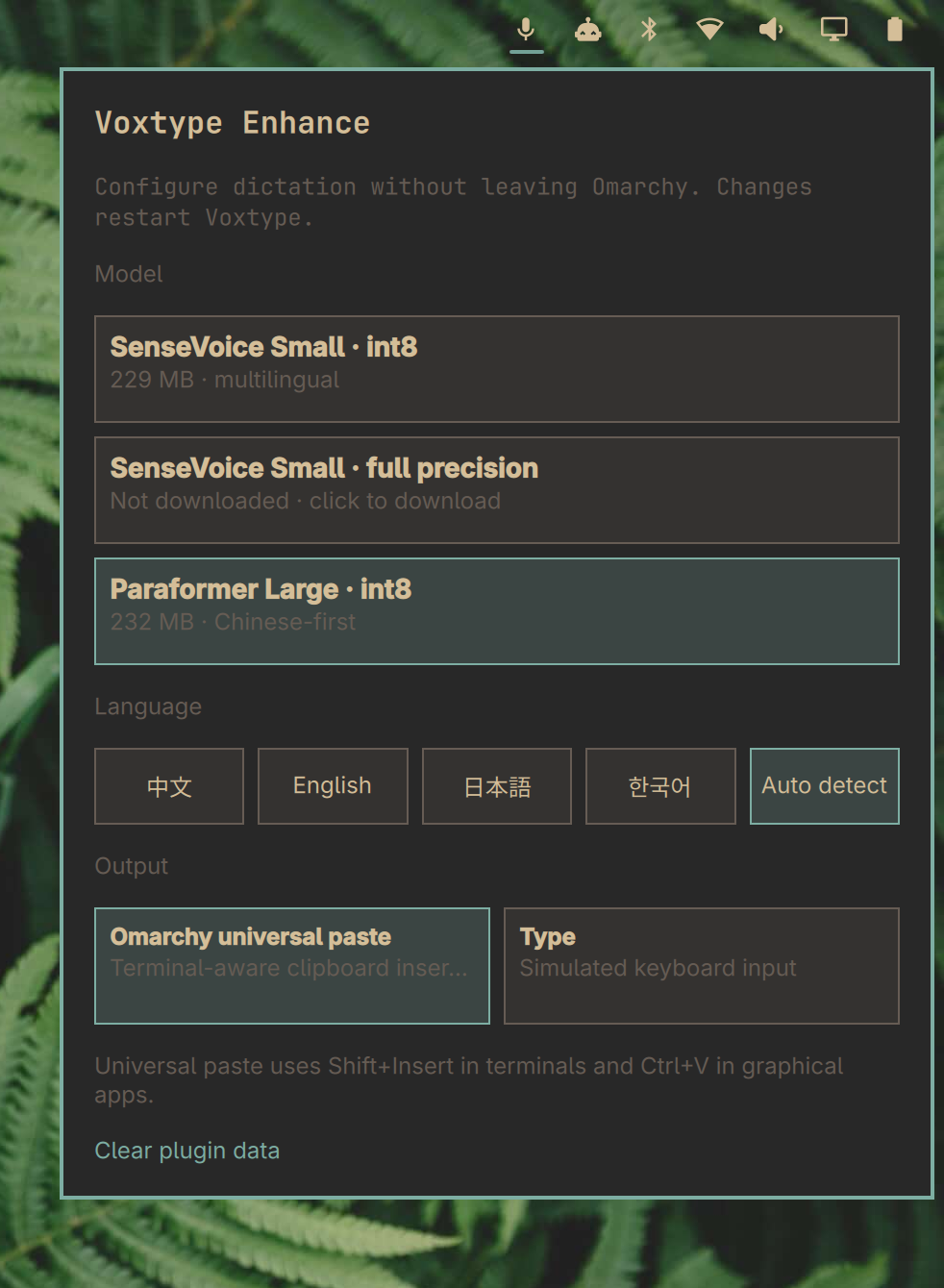
English: The settings panel is opened from the microphone icon in the top bar. It shows the available speech models, language choices, and output modes.
中文: 点击顶栏麦克风图标即可打开输入法设置面板。面板提供语音模型、识别语言和输出方式设置。
日本語: トップバーのマイクアイコンから音声入力設定パネルを開けます。音声モデル、認識言語、出力方式を設定できます。
Features
- Native Omarchy top-bar microphone indicator.
- The microphone icon gently breathes from its theme color toward yellow while Voxtype is recording, then returns to its normal appearance during transcription and when idle.
- Recording animation can be enabled or disabled from the Voxtype settings panel.
- Three Sasayaki-compatible offline speech models, with engine selection handled automatically.
- Automatic model download, installation, file-size checking, and SHA-256 verification.
- Chinese, English, Japanese, Korean, and automatic language choices.
- Omarchy universal paste:
Shift+Insertin terminal/TUI windows andCtrl+Vin graphical applications. - Voxtype's native Type output as an alternative.
- Real-time download progress shown directly inside the selected model card.
- Language and output controls stay hidden until at least one model is downloaded.
- Clear plugin data action for resetting model downloads and plugin-managed settings.
- No replacement recorder, speech recognizer, clipboard daemon, or extra Quickshell service.
Installation
Install Voxtype first through Omarchy's AI / Dictation setup, then install the plugin:
omarchy plugin add https://github.com/iamcheyan/omarchy-voxtype-enhance.git --enable
The plugin provides a bar-widget entry point. If the microphone icon is not automatically placed in the top bar, add Voxtype Enhance to the right side of the bar layout.
The settings panel includes an optional middle-mouse dictation toggle. It is
off by default to avoid conflicts with existing user bindings. When enabled,
the first click on middle mouse (mouse:274) starts Voxtype recording and the
second click stops it and transcribes. The binding consumes the middle-button
event, so applications do not receive it as the usual primary-selection paste.
F9 and the existing keyboard shortcuts remain available.
Models
The panel shows model names rather than engine names. Selecting a model downloads missing files, verifies them, installs them into Voxtype's model directory, and then switches the engine:
| Panel option | Internal engine | Voxtype model | Size |
|---|---|---|---|
| SenseVoice Small · int8 | sensevoice |
small-int8 |
229 MB |
| SenseVoice Small · full precision | sensevoice |
small |
894 MB |
| Paraformer Large · int8 | paraformer |
paraformer-zh |
232 MB |
Only the model confirmed as active in Voxtype is highlighted. A downloaded model
that is not active is labelled downloaded, not active; a failed engine switch
shows the Voxtype/systemd error and restores the effective selection. Downloads
use the pinned Sasayaki Hugging Face sources and SHA-256 manifests. Already
verified files are skipped. Progress is streamed line-by-line while files are
being downloaded, so the model card reflects the current transfer instead of
remaining at the initial 0% state.
SenseVoice and Paraformer require an ONNX-capable Voxtype binary. The default
Voxtype installation uses the standard Whisper binary. When an ONNX model is
selected without ONNX support, the plugin stops before downloading and explains
what is missing and provides an Enable ONNX support (administrator approval required)
action in the panel. On x86_64, the user can explicitly approve the fixed command
pkexec voxtype setup onnx --enable. On aarch64/ARM, the plugin instead offers
to download and SHA-256 verify Voxtype's pinned official ARM ONNX release, then
installs it under /usr/local/bin and uses a per-user systemd override; it does
not replace the package-owned /usr/bin/voxtype. Only after the user approves
the privileged install does the model download resume. Cancelling leaves the
existing setup unchanged.
If Voxtype itself is missing (for example when only the plugin was installed),
any panel action that changes settings first offers to install Omarchy's
voxtype-bin package through the fixed command
pkexec pacman -S --noconfirm --needed voxtype-bin. Cancelling the
authentication prompt leaves the system unchanged; read-only status queries
never trigger an installation.
On NixOS, the plugin never invokes pacman. Install Voxtype declaratively in
the NixOS configuration first, for example with voxtype-onnx, then rebuild
the system. The panel reports this route instead of attempting an imperative
package install.
Models are stored under:
~/.local/share/voxtype/models/
Output modes
The plugin intentionally exposes two output modes:
Omarchy universal paste
Voxtype writes the complete transcription to the Wayland clipboard. The plugin then detects the focused Hyprland window using the same terminal-tag policy as Omarchy's clipboard.lua:
- Omarchy terminal/TUI windows receive
Shift+Insert; - graphical applications receive
Ctrl+V.
This avoids terminal applications interpreting Ctrl+V as a special action, such as an image-paste command. The final shortcut is sent through Hyprland's hl.dsp.send_key_state dispatcher with explicit key press and release events.
Before output, the plugin records the previous clipboard hash. It sends the shortcut only when Voxtype has produced new non-empty text, so pressing the recording key without speaking does not paste stale clipboard content.
Type
Voxtype's native simulated keyboard-input mode. This can be useful in applications where direct typing is preferred, but mixed-language text may interact with Fcitx5/Rime character by character.
Settings and reset
The panel updates ~/.config/voxtype/config.toml only after the user selects a setting. Changes restart the existing user-level voxtype.service so Voxtype loads the new engine or output configuration.
The Clear plugin data link removes only the three model directories managed by this plugin and restores SenseVoice int8, Chinese, and Omarchy universal paste. It does not remove Whisper models, recordings, hotkeys, or unrelated Voxtype data. After clearing, choose a model to download it again.
The plugin does not install a system service. When Voxtype is already installed, model selection
does not require privileges. Exactly three operations elevate through pkexec;
all are visible, user-initiated, and run fixed commands:
pkexec voxtype setup onnx --enable— switch to the ONNX-capable binary;- the pinned official ARM ONNX binary — offered only after explicit approval on aarch64/ARM, installed outside the package manager and verified by SHA-256;
pkexec pacman -S --noconfirm --needed voxtype-bin— offered only when the Voxtype binary is missing entirely.
When no model is downloaded, the panel hides the Language and Output controls until the first model has been verified successfully. This prevents settings from being applied while Voxtype has no usable transcription model.
Dependencies
The following are provided by Omarchy, Voxtype, or the normal desktop setup:
- Omarchy Quickshell;
- Voxtype and its user service;
- Python 3 standard library;
- Hyprland and
hyprctlfor universal paste; wl-copyfor clipboard output;- Voxtype's normal output dependencies, such as
wtype.
Model downloads require network access only when a selected model is not already installed.
Uninstallation
Before disabling or removing the plugin, switch Output to a non-universal mode once
so the plugin removes its pre_output_command and post_output_command hooks from
~/.config/voxtype/config.toml:
python3 scripts/voxtype-config.py set mode type
Then disable or remove the plugin using Omarchy's plugin manager. Removing the
plugin removes the top-bar control and plugin files. It does not remove Voxtype,
user recordings, or downloaded models; use Clear plugin data before removal if
those model files should also be deleted.
Validation
From the plugin repository root:
omarchy plugin validate .
/usr/lib/qt6/bin/qmllint -I /usr/share/omarchy/shell \
  bar/widget.qml VoxtypePanel.qml
python3 -m py_compile scripts/*.py
python3 -m unittest discover -s tests -v
License
MIT. See LICENSE.
中文说明
Voxtype Enhance 是一个 Omarchy 体验增强插件,用于增强 Voxtype 语音输入。它在顶栏提供麦克风图标和设置面板,让用户可以管理语音模型、识别语言和输出方式。
主要功能:
- 顶栏麦克风状态图标;
- 三个 Sasayaki 兼容的离线语音模型;
- 选择模型后自动下载、校验、安装并切换 engine;
- 中文、英文、日文、韩文和自动识别;
- 终端使用
Shift+Insert、普通应用使用Ctrl+V的万能粘贴; - Voxtype 原生 Type 输入模式;
- 实时模型下载进度显示;
- 未下载模型时隐藏语言和输出设置;
- 清除模型并恢复插件默认设置。
安装 Voxtype 后执行:
omarchy plugin add https://github.com/iamcheyan/omarchy-voxtype-enhance.git --enable
点击顶栏麦克风图标打开设置面板。用户不需要了解模型对应的 engine,选择模型后插件会自动处理。插件不会修改录音快捷键,仍然使用 Voxtype 原来的快捷键。
如果缺少 ONNX 支持,面板会显示 Enable ONNX support (administrator approval required) 操作。点击后会请求管理员权限,ARM 平台会下载并校验对应的 ONNX 版本,完成后自动继续模型下载。模型下载过程中会实时显示进度;在模型下载完成前,语言和输出设置会暂时隐藏。
万能粘贴会根据当前窗口判断输出方式:Omarchy 标记为终端的窗口使用 Shift+Insert,其它图形应用使用 Ctrl+V,以避免 CodeX 等终端程序把 Ctrl+V 解释成图片粘贴操作。
点击面板底部的 Clear plugin data 会删除插件管理的三个模型,并恢复 SenseVoice int8、中文和万能粘贴。不会删除 Whisper 模型、录音、快捷键或其它 Voxtype 数据。
日本語
Voxtype Enhance は、Voxtype の音声入力体験を Omarchy 向けに強化するプラグインです。トップバーのマイクアイコンから、音声モデル、認識言語、出力方式を設定できます。
主な機能:
- トップバーのマイク状態表示;
- Sasayaki 互換の 3 つのオフライン音声モデル;
- モデル選択時の自動ダウンロード、検証、インストール、engine 切り替え;
- 中国語、英語、日本語、韓国語、自動認識;
- ターミナルでは
Shift+Insert、GUI アプリではCtrl+Vを使う Omarchy universal paste; - Voxtype 標準の Type 入力;
- リアルタイムのモデルダウンロード進捗表示;
- モデル未ダウンロード時は言語と出力設定を非表示;
- ダウンロード済みモデルと設定を初期化するリセット機能。
Voxtype を先に Omarchy からインストールし、次のコマンドでプラグインを追加します。
omarchy plugin add https://github.com/iamcheyan/omarchy-voxtype-enhance.git --enable
トップバーのマイクアイコンをクリックして設定パネルを開きます。モデルの engine を意識する必要はありません。モデルを選ぶと、必要なファイルのダウンロードと設定変更が自動的に行われます。録音ショートカットは変更せず、Voxtype の既存設定を使用します。
Universal paste はフォーカス中のウィンドウを判定し、Omarchy のターミナルでは Shift+Insert、通常の GUI アプリでは Ctrl+V を送信します。これにより、CodeX などの TUI が Ctrl+V を画像貼り付けとして扱う問題を避けられます。
ONNX が必要な場合は、パネルの Enable ONNX support (administrator approval required) をクリックしてください。管理者権限を確認した後、ARM では対応する ONNX 版 Voxtype をダウンロード・検証し、モデルのダウンロードを自動的に再開します。モデルが未ダウンロードの間は、言語と出力設定を表示しません。
パネル下部の Clear plugin data をクリックすると、プラグインが管理する 3 つのモデルを削除し、SenseVoice int8、中国語、Universal paste の初期設定に戻します。Whisper モデル、録音データ、ショートカット、その他の Voxtype 設定は削除しません。