Omarchy Keybinds
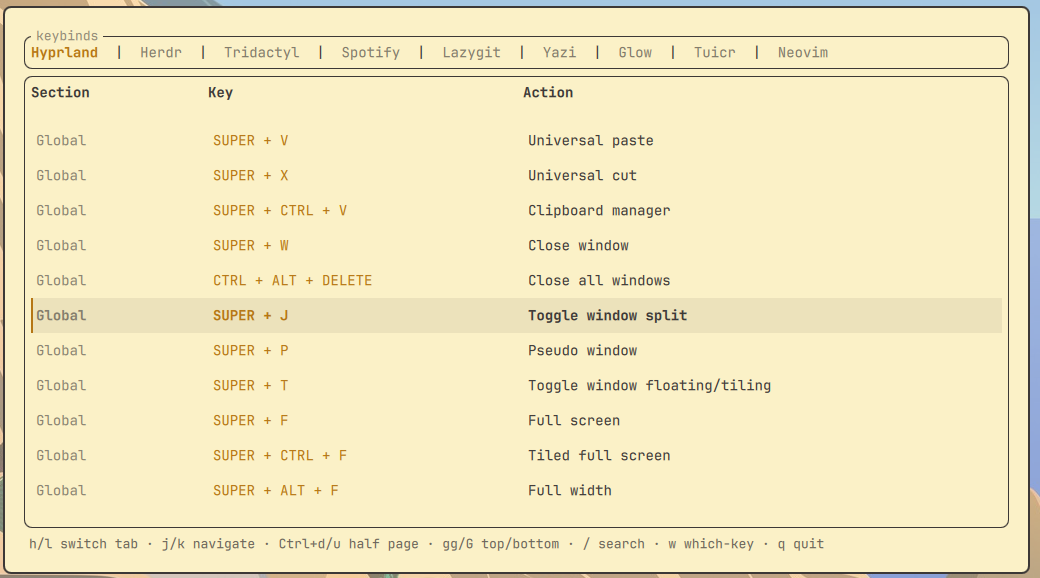
Native Omarchy keybinding reference for the tools you actually use. One tab per app, opening on the tab matching whatever window was focused, with free-text search across all of them.
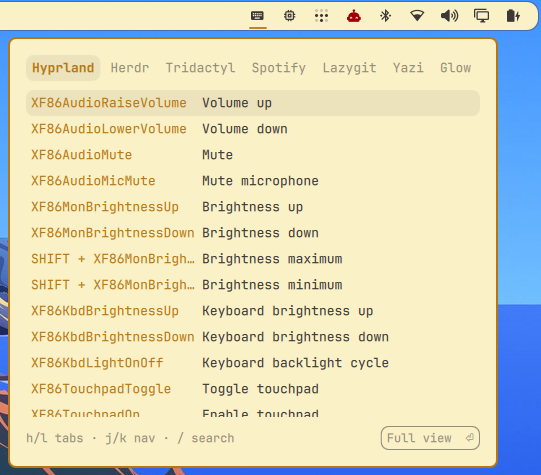
Two surfaces, sharing one service so the binds are read once:
- a bar widget — click the icon for a compact keys-and-actions popup you can still tab through and search
- a full overlay — adds the sections column and the rest of the keys,
reached from the popup with
Enter, the Full view button, or a right-click on the bar icon
A hardcoded list of keybindings is a second copy of a fact the config already knows, and second copies drift. The tabs that can be read live are read live, straight from the compositor or a headless dump, never a table someone has to remember to update.
Sources
| Tab | Source |
|---|---|
| Hyprland | live — hyprctl binds -j, grouped by submap |
| Neovim | live — headless dump of vim.api.nvim_get_keymap(), loaded in the background |
| Herdr | bundled defaults + live overrides from ~/.config/herdr/config.toml |
| Tridactyl | bundled (config lives in browser sync storage, no local file to read) |
| Spotify (spotify_player) | bundled |
| Lazygit | bundled |
| Yazi | bundled (defaults are compiled into the binary) |
| Glow | bundled |
| Tuicr | bundled |
Bundled tables are hand-copied from each tool's documented defaults and live
in data/*.json, read by the plugin itself. Nothing outside Hyprland,
Quickshell, and an optional nvim is involved.
Reading Hyprland through hyprctl rather than parsing ~/.config/hypr/*.conf
means binds pulled in through any include show up too, along with the submap
each belongs to.
Tabs only appear for tools you actually have: each bundled table names the
binaries it belongs to, and one which at startup decides. Hyprland and Neovim
name none and always show.
Keys
| Key | Action |
|---|---|
h / l, ← / →, Tab |
previous / next tab |
j / k, ↑ / ↓ |
move selection |
Ctrl+d / Ctrl+u |
half page down / up (overlay) |
gg / G |
top / bottom |
/ |
search the active tab |
w |
which-key narrowing: type the chord to filter by it (overlay) |
@name |
jump to a tab by name or alias, e.g. @vim scroll (overlay) |
Enter, Full view button |
open the full overlay (popup) |
Esc |
leave search or which-key, then close |
q |
close |
Both surfaces use the same modal scheme as the terminal build: normal keys
navigate and / opens search, so h/j/k/l stay reachable.
Search matches multiple words in any order, as substrings or fuzzily, so "tab next", "next tab", and "nxt tb" all find "Next tab".
Install
omarchy plugin add https://github.com/harbefas/omarchy-keybinds
omarchy bar put harbefas.keybinds --section right
omarchy restart shell
Install without --enable and let bar put do the enabling. Passing --enable
first registers the plugin on its own, and bar put then reports success while
leaving it off the bar. If that already happened, remove the plugin's entry from
plugins[] in ~/.config/omarchy/shell.json and run bar put again.
That is all it takes to use it: click the bar icon for the popup, right-click for the full view.
A shortcut, if you want one
Nothing is written to your Hyprland config, so there is no keybind unless you add one, and you may not want one at all since the bar icon works on its own.
Both surfaces answer IPC, so bind whichever key you prefer. On Omarchy Quattro
the bindings live in ~/.config/hypr/bindings.lua:
-- the popup, which hands off to the full view with Enter
o.bind("SUPER + SHIFT + H", "Keybinds", "omarchy-shell harbefas.keybinds.widget toggle")

-- or the full view directly
o.bind("SUPER + SHIFT + K", "Keybinds full", "omarchy-shell shell summon harbefas.keybinds")
On setups still using ~/.config/hypr/bindings.conf:
bindd = SUPER SHIFT, H, Keybinds, exec, omarchy-shell harbefas.keybinds.widget toggle
SUPER + SHIFT + H is only a suggestion. The popup mentions it for the first
few opens and stops once any binding references the plugin.
Without the bar icon
omarchy plugin enable harbefas.keybinds
omarchy-shell shell summon harbefas.keybinds
Requirements
Hyprland, Quickshell, timeout, and head, all of which Omarchy already
provides. nvim is optional: without it the Neovim tab says so and every other
tab still works.
The Neovim keymaps are dumped in the background on the first open of a shell session and read straight off a bounded stdout pipe — nothing is written to disk.
Terminal version
keybinds-tui is the same idea as a ratatui TUI, for people not running Omarchy. The two share no code and neither needs the other installed; the bundled tables started from the same research.
Remove
omarchy plugin remove harbefas.keybinds
The plugin writes no files at all outside its own directory.
License
MIT
Preview
The bar popup, the everyday surface:
The full overlay, one press away: