
Vault
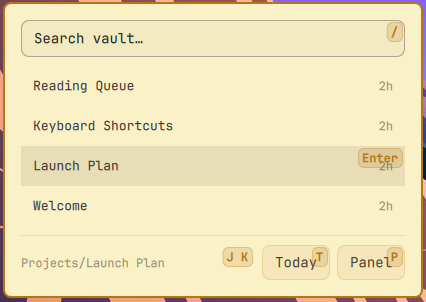
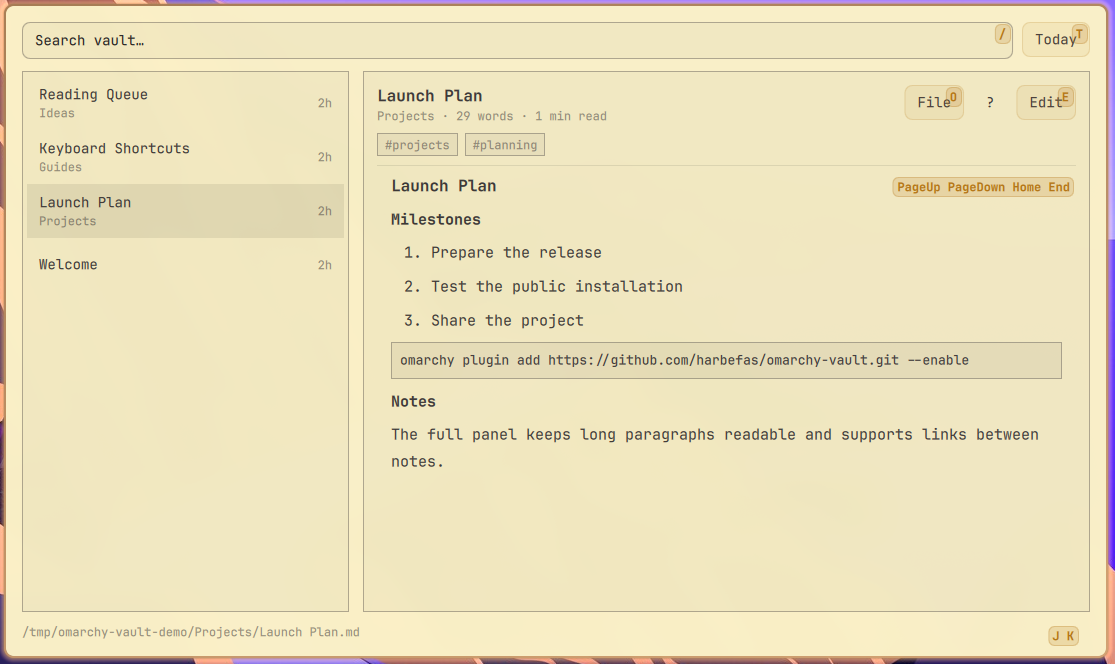
Vault is a native Omarchy plugin for browsing, searching, reading, and editing Markdown files from a local vault. It provides a compact bar widget and a full panel with keyboard navigation, Markdown rendering, and direct editing.
Requirements
- Omarchy with Quickshell plugin support
find,rg,head, and a writable Markdown vault
The default vault path is ~/amphora. Set an absolute vaultPath in the
plugin settings to use another directory.
Installation
omarchy plugin add https://github.com/harbefas/omarchy-vault.git --enable
The plugin can also be installed from a local checkout:
omarchy plugin add /path/to/omarchy-vault --enable
After installation, place the widget in the bar through Omarchy's plugin settings. The full panel can be opened from the widget or with the configured panel shortcut.
To open the compact widget from anywhere, add this optional binding to
~/.config/hypr/bindings.lua:
o.bind("SUPER + ALT + V", "Vault quick view", "omarchy shell -q harbefas.vault.widget toggle")
Then reload the shell:
omarchy restart shell
Usage
- Click a note or press
Enterto open it. - Use
j/kor the arrow keys to move through notes. - Press
/to search. - Press
Enterto open the selected note in the full panel. - Press
eto edit the current note andEscto return to reading. - Press
n(orCtrl+N) to create a note. A name likePessoal/Ideiascreates the folder along with the file. - Press
d(orCtrl+D) to open today's daily note, creating it from the vault's section template when it does not exist yet. - While editing,
Ctrl+B,Ctrl+I,Ctrl+K, andCtrl+Linsert bold, italic, a Markdown link, and a[[wikilink]]. - Press
qorEscto leave the current surface.
If the open note changes on disk while an edit is unsaved, autosave stops and
the panel offers Reload or Keep mine instead of picking a side.
Markdown content is rendered in the reader. Edits are written directly to the selected file only after the explicit save action.
Removal
omarchy plugin remove harbefas.vault
Removing the plugin does not delete or modify any Markdown files in the vault.
Preview
Compact widget:
Full Markdown panel:
License
MIT. See LICENSE.
EditorMutations.js comes from Omawrite,
also MIT licensed.