
Omacast
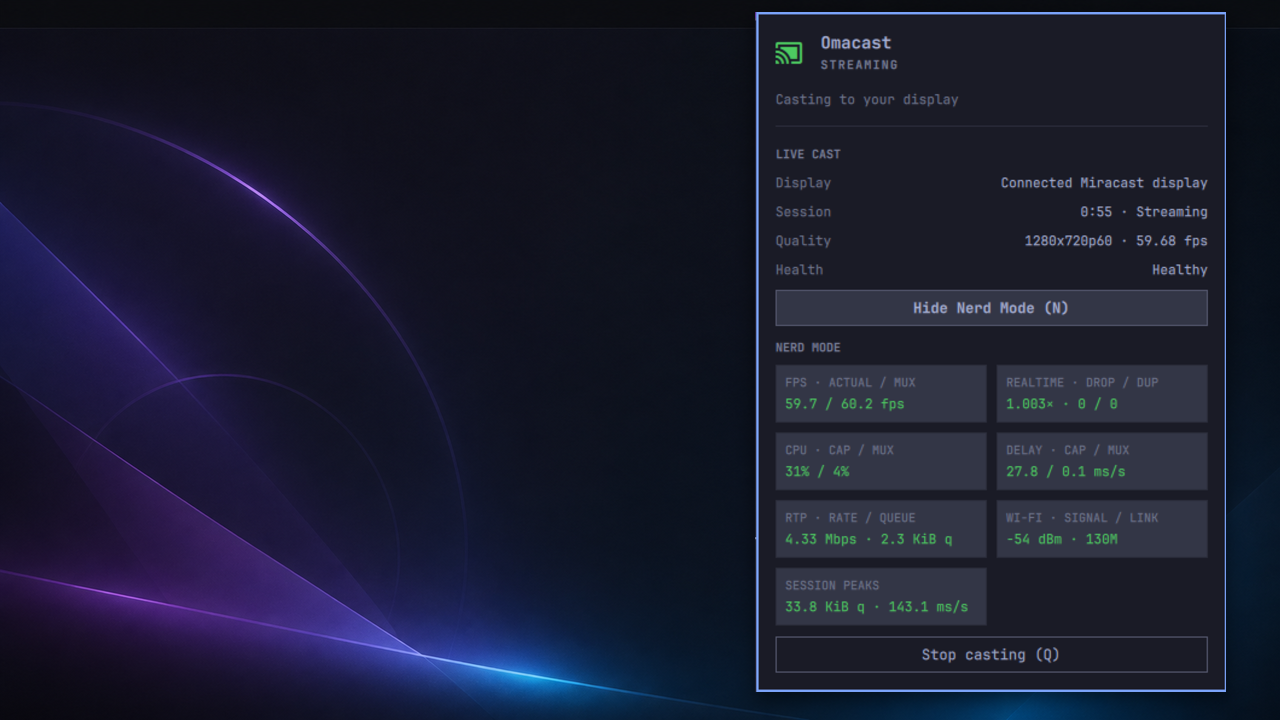
Omacast mirrors an Omarchy/Hyprland desktop and its audio to a Miracast display. It is keyboard-first, runs from the Omarchy bar, and has been validated with a stock Fire TV Stick in Display Mirroring mode.
Super+Alt+C → choose a TV → Enter
Features
- Direct Wi-Fi Display casting with no cloud service or receiver app.
- A receiver-tested 1280×720 at 60 fps profile with audio.
- Nearby receiver discovery using the advertised Wi-Fi Display sink role.
- Clear idle, connecting, streaming, and recovery states in the bar.
- Optional Nerd Mode with frame rate, load, RTP, queue, radio, and timing data.
- Supervised sessions that restore temporary networking changes after Stop or failure.
- Casting continues until stopped and inhibits idle/sleep while active.
- Passwordless per-cast setup after the companion package installs its narrow,
prepare-only Polkit action.
Requirements
- Omarchy 4 with Hyprland.
- A VAAPI-capable H.264 encoder.
- A Wi-Fi adapter with Wi-Fi Direct/P2P support.
- A Miracast receiver. Fire TV Stick is the currently validated target; other correctly advertising WFD sinks are discoverable but not yet broadly hardware-validated. The current release has also completed a direct cast to one older Samsung WFD sink, but broad receiver compatibility is not claimed.
Broad receiver and hardware support is not claimed yet. Omacast currently ships desktop mirroring only; window casting and alternate quality modes are not part of version 0.1.7.
Install on Omarchy
Omacast has two parts: the bar plugin and an Arch companion package containing the pinned FluxCast engine and guarded networking helper.
Download the package and SHA256SUMS from the
v0.1.7 release,
then verify and install it:
sha256sum --check SHA256SUMS
gh attestation verify fluxcast-omarchy-cast-*.pkg.tar.zst --repo hardiepiennar/omacast
sudo pacman -U ./fluxcast-omarchy-cast-*.pkg.tar.zst
Version 0.1.7 keeps engine API 3, guard API 17, and companion revision 91. Existing users with the v0.1.6 companion package do not need to reinstall it.
Install and enable the plugin:
omarchy plugin add https://github.com/hardiepiennar/omacast --enable
Bind Super+Alt+C
Add the following to ~/.config/hypr/bindings.lua:
o.bind("SUPER + ALT + C", "Cast desktop", "omarchy-shell shell toggle hardie.omarchy-cast")
This leaves Omarchy's stock Super+C Universal Copy shortcut intact.
Reload Hyprland:
hyprctl reload
hyprctl configerrors
The bar icon works without this optional keybinding.
Use
- Put the TV in Display Mirroring mode.
- Press Super+Alt+C or click the Omacast bar icon.
- Choose the TV with ↑/↓ and press Enter, or click it.
- Press N for Nerd Mode, Q to cancel or stop, and R to rescan when idle.
Mirroring exposes everything visible on the selected display, including notifications. Omacast does not bypass DRM; protected browser video may appear black depending on the browser and service.
Remove
Stop any cast, then remove the plugin and companion package:
omarchy plugin remove hardie.omarchy-cast
sudo pacman -Rns fluxcast-omarchy-cast
Remove the optional Super+Alt+C binding manually if you added it. Omacast retains a bounded local diagnostic history after uninstall. To move that history and old preferences to the desktop Trash:
gio trash ~/.config/omarchy-cast ~/.local/state/omarchy-cast
Development
Build the companion package from a trusted clone with:
cd packaging/arch
makepkg -si
Run the local checks with:
scripts/test
scripts/validate-plugin
bin/omacast doctor
bin/omacast media-probe --profile safe
See architecture and roadmap, the research log, and the FluxCast patch stack for implementation and acceptance details.
The local authorization and developer-tool trust boundaries are documented in SECURITY.md.
Development disclosure
Omacast was developed through a human-directed, AI-assisted process using OpenAI GPT-5.6 Sol. Product decisions, release authorization, and receiver acceptance were performed by the maintainer. This does not imply endorsement, certification, or support by OpenAI.
License
Omacast and its tracked FluxCast modifications are licensed under GPL-3.0-or-later.