
Password Store for Omarchy
pass, the standard unix password manager, in the Omarchy bar.
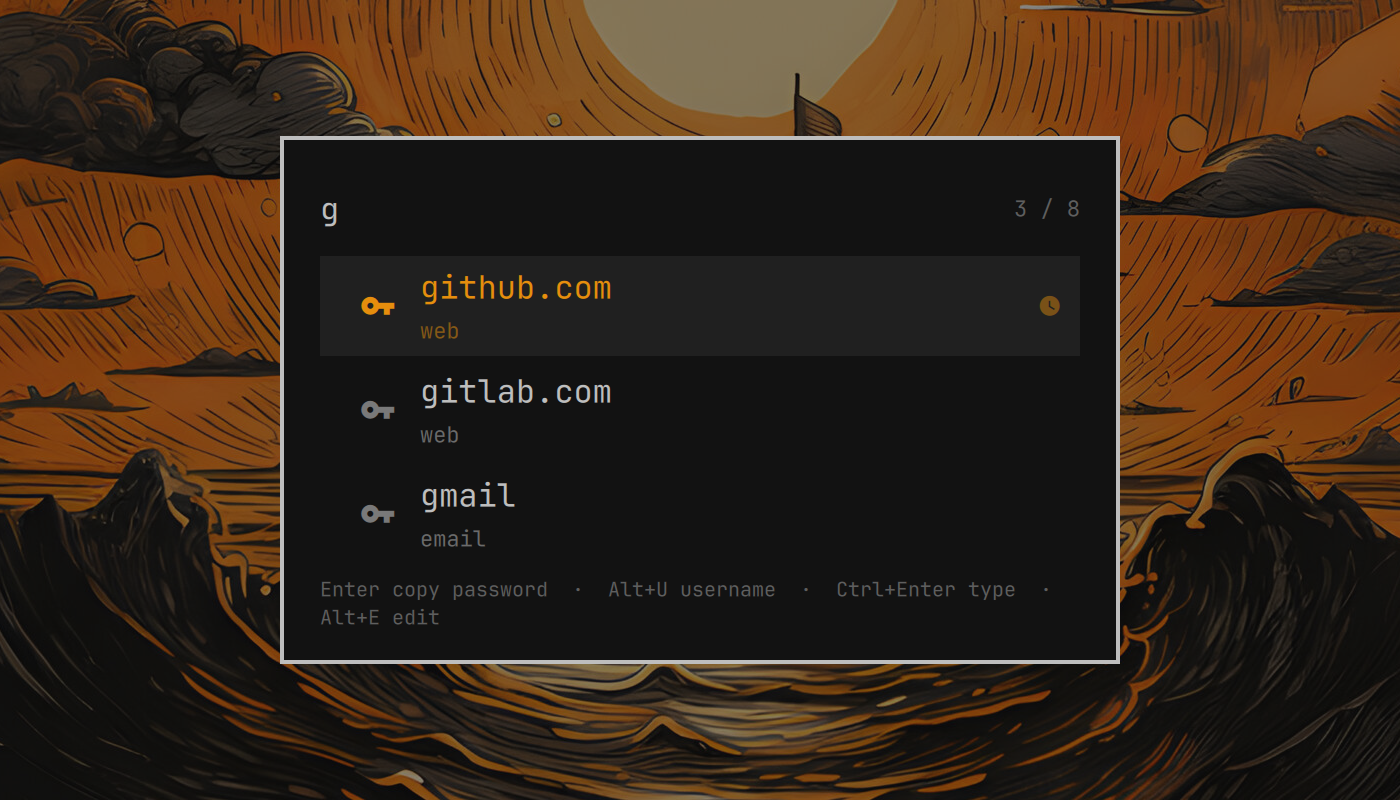
- A key on the bar. Click it (or
omarchy-shell shell toggle hegjon.passwordstorefrom a keybinding) and type to search your store;ghbfindsweb/github.com. Entercopies the password,Alt+Uthe username,Alt+Oa fresh OTP code (with pass-otp).Ctrl+Entertypes the password into the window you came from,Ctrl+Shift+Enterthe username.Alt+Eopens the entry in a terminal withpass edit.- Recently used entries float to the top of an empty search.
- Nothing is decrypted by the widget. Every action is handed to
passitself, so gpg-agent prompts as it would from a terminal and the clipboard is cleared after 45 s exactly aspass -cdoes.
Install
omarchy plugin add https://github.com/hegjon/omarchy-passwordstore.git --enable
omarchy restart shell
If the bar widget is enabled but not visible, place it explicitly:
omarchy plugin enable hegjon.passwordstore --section right
omarchy restart shell
Update or remove:
omarchy plugin update hegjon.passwordstore --yes
omarchy plugin remove hegjon.passwordstore
Removing the plugin leaves your password store untouched (it is only ever read
through pass). If you want no trace left, also delete the recently-used list,
~/.local/state/omarchy-passwordstore/, and any keybinding you added below.
Needs pass (omarchy pkg add pass), wl-clipboard and jq (both part of
Omarchy), and wtype for the typing actions. pass-otp is optional; the OTP
action only appears when it is installed.
A keybinding is the natural way to reach it. In ~/.config/hypr/bindings.lua
(SUPER+P is Omarchy's pseudo-window toggle by default, hence the unbind):
hl.unbind("SUPER + P")
o.bind("SUPER + P", "Password store", "omarchy-shell shell toggle hegjon.passwordstore")
The bar widget is still needed even if you only ever use the keybinding: its bar entry is where the settings live.
Keys
| Key | Action |
|---|---|
| any printable | Extend the search. Backspace, Ctrl+Backspace, Ctrl+U edit it |
↑ ↓ Ctrl+J/K/N/P |
Move the cursor; PageUp/Down, Home, End jump |
Enter |
Copy the password (pass show -c) |
Alt+U / Alt+Enter |
Copy the username |
Alt+O |
Copy an OTP code (pass otp -c) |
Ctrl+Enter |
Type the password into the focused window |
Ctrl+Shift+Enter |
Type the username |
Alt+E |
pass edit in a terminal |
F5 |
Re-read the store (it is also re-read every time it opens) |
Esc |
Clear the search, then close |
| mouse | Left click copies the password, right click the username, middle click an OTP |
The username is the value of the first login: / user: / username: /
email: line of the entry (configurable), or failing that the bare second
line, which is where pass's conventions put it.
Settings
Change them from the bar's widget settings, or with omarchy bar set:
omarchy bar set hegjon.passwordstore storeDir ~/.password-store-work
omarchy bar set hegjon.passwordstore clipTimeSec 30
omarchy bar set hegjon.passwordstore allowTyping false --json
| Key | Default | Meaning |
|---|---|---|
storeDir |
(empty) | Store location. Empty means $PASSWORD_STORE_DIR or ~/.password-store, as pass does. |
clipTimeSec |
45 |
Seconds until the clipboard is cleared (PASSWORD_STORE_CLIP_TIME). |
usernameKeys |
login,user,username,email |
Field names that hold the username, matched case-insensitively. |
allowTyping |
true |
Enable Ctrl+Enter / Ctrl+Shift+Enter (needs wtype). |
notifyOnCopy |
true |
Notify when something was copied, naming the entry and its username. Failures are always notified. |
How it works
The plugin has two parts: an overlay (PasswordstoreOverlay.qml, the card,
summoned with omarchy-shell shell toggle hegjon.passwordstore) and a
bar-widget (PasswordstoreWidget.qml, the key on the bar, which also holds
the settings). Two small scripts do the work, and both can be run by hand:
passwordstore-list [--store DIR] [--recent FILE]prints the names of the*.gpgfiles in the store as JSON. It never decrypts anything.passwordstore-action <action> <entry> [...]runs one action:copy-password,copy-username,copy-otp,type-password,type-usernameoredit. Secrets travel over pipes, never argv, and the popup has already closed when it runs, so a typed password lands in the window you were in.
Recently used names are kept in $XDG_STATE_HOME/omarchy-passwordstore/recent
(~/.local/state/…), outside the store so they are never committed with it.
Development
test/lint runs qmllint, test/test-manifest checks the manifest,
test/test-list and test/test-action exercise the scripts against a
throwaway store and stand-in pass/wl-copy/wtype, so no gpg key is needed.
License
MIT