
UniFi for Omarchy
Watch your UniFi network from the Omarchy bar: every access point, switch and gateway on a site with its online state, model, address and how many clients hang off it, plus wired/wireless client totals. The bar icon carries a badge with the number of offline devices, and a notification fires when a device drops or comes back. Under the gateway it shows what is flowing through the WAN — download and upload right now, each with a graph of the last twelve hours — plus CPU, memory, load and uptime, and the WAN: public address and upstream gateway, ISP, and each WAN link's latency, uptime and 24-hour availability, so a failed-over or dead backup link is visible. It is read-only.
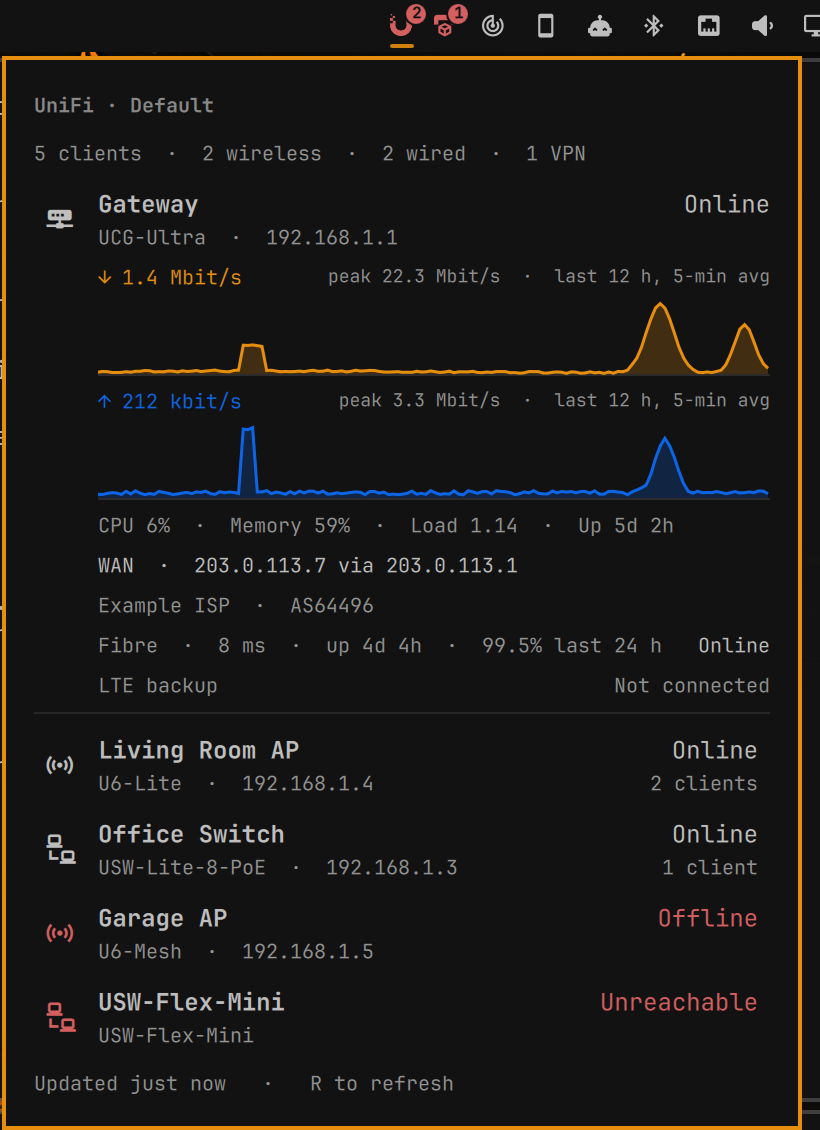
It talks to the UniFi Network application's official Integration API (Network 9.0 or newer) with an API key, so it works with UniFi OS consoles (UDM, UCG, Cloud Key Gen2+) and self-hosted controllers alike, on your LAN or over a VPN.
Install
omarchy plugin add https://github.com/hegjon/omarchy-unifi.git --enable
omarchy restart shell
If the widget is enabled but not visible, place it explicitly:
omarchy plugin enable hegjon.unifi --section right
omarchy restart shell
Update or remove:
omarchy plugin update hegjon.unifi --yes
omarchy plugin remove hegjon.unifi
Requires curl, jq and secret-tool (package libsecret), all present on a
stock Omarchy system.
Setup
- In the UniFi Network application go to Settings → Control Plane → Integrations and create an API key.
- Click the widget and press Set up, or run
~/.config/omarchy/plugins/hegjon.unifi/unifi-loginin a terminal. - Enter the controller address (your default gateway is offered, which on a UniFi network is usually the console), say whether to accept its self-signed certificate (the default is to allow it), and paste the key. If the controller has more than one site you then pick one from a list.
The address and site are kept in ~/.local/state/omarchy/unifi/config; the
key goes into the keyring under the plugin id and is never written anywhere
else or passed on a command line. unifi-login --status shows what is
configured, unifi-login --forget removes it all.
The controller URL is normally the console root: the plugin appends
/proxy/network/integration/v1. If your deployment serves the API somewhere
else, give the full URL ending in /integration/v1 and it is used as given.
The API this plugin uses is documented by the controller itself at
https://<console>/unifi-api/network. The one exception is the twelve-hour
traffic graph: the documented API only reports the current rates, so the
graph reads the five-minute WAN buckets from the classic report endpoint
(…/api/s/<site>/stat/report/5minutes.gw) that the UniFi UI's own charts
use, and the WAN lines read the classic stat/health (link names come from
the documented /wans). Both are undocumented; if they stop answering, the
graph falls back to the samples the widget collects itself while the shell
runs, and the WAN lines simply disappear.
Settings
Under the widget's settings in the bar:
- Show the connected client count on the bar icon
- Show the gateway's WAN graph, CPU, memory and uptime
- Refresh interval while the panel is open, and the background poll interval
- Notify when a device goes offline / comes back online, with a per-device cooldown
Middle-click the icon, or press R in the panel, to refresh. IPC:
omarchy-shell hegjon.unifi open|close|toggle|refresh.
Development
test/test-manifest, test/test-normalize (fixtures under test/fixtures/)
and test/lint (qmllint; needs an Omarchy machine). See CLAUDE.md.
License
MIT. Not affiliated with, endorsed by, or supported by Ubiquiti Inc.; UniFi is their trade mark.