
Omahub
← All plugins
H

Timed Shutdown

by Henri Dumortier

Schedule a shutdown from the Omarchy bar. Pick 15 minutes, 30 minutes, 1 hour, or 2 hours, or enter any custom duration in seconds.

Security review

Potentially dangerous behavior detected · 4 findings

Deterministic scan — not a security guarantee

High
Risk level
High
Analyzed commit
e7a419e
Scanned
1 month ago
  • high persistence Service.qml:207

    Registers scheduled or boot-time system tasks.

    systemd-run and unit stop share one generation queue: a stop waits
  • high persistence tests/model.test.js:158

    Registers scheduled or boot-time system tasks.

    systemd-run",
  • high persistence Model.js:298

    Registers scheduled or boot-time system tasks.

    systemd-run",
  • Docs persistence README.md:94

    Registers scheduled or boot-time system tasks.

    systemd-run` / `systemctl` argv (no shell), and

Automated analysis only — not a security guarantee.

AI advisory review

No obvious issues detected

Language-model assessment · ~deepseek/deepseek-v4-flash-latest — advisory only

Low
AI risk level
Low
Recommendation
install
Model
~deepseek/deepseek-v4-flash-latest
Analyzed commit
e7a419e
Reviewed
1 month ago

The plugin is a straightforward timed-shutdown utility that schedules a user systemd timer to run the standard omarchy shutdown binary. The deterministic scan flags are expected for any plugin that uses systemd-run/systemctl and do not indicate malicious behavior. The code is well-structured, uses argv arrays without a shell, and includes defensive checks on state file loading.

  • The plugin intentionally schedules system shutdown, which is a destructive action by design, but it only does so after explicit user action and with clear UI feedback.
  • The state file is read via a Python helper that is carefully bounded (regular file, size limit, nonblocking), reducing symlink/FIFO attack surface.
  • The shutdown binary path is derived from OMARCHY_PATH environment variable, which could theoretically be overridden, but this is a standard pattern and not a vulnerability in this context.
How this check works

This review combines the deterministic scan (the rule-based results above) with an independent look at the plugin's code by a language model. The model reads a trimmed sample of the repository's files, the manifest, and the README, then gives a plain-language risk level and a recommendation: install (no notable danger), review (look closer first), or avoid (clearly dangerous).

It runs on the same analyzed commit as the deterministic scan and is strictly advisory — it is not a security guarantee and never blocks a plugin by itself. A human moderator still reviews plugins before they are listed.

AI advisory only — automated analysis, not a security guarantee.

Install
$ omarchy plugin add https://github.com/Henri1130/omarchy-timed-shutdown --enable
System #bar #power-management #system

Timed Shutdown

An Omarchy bar plugin that shuts this computer down after a countdown.
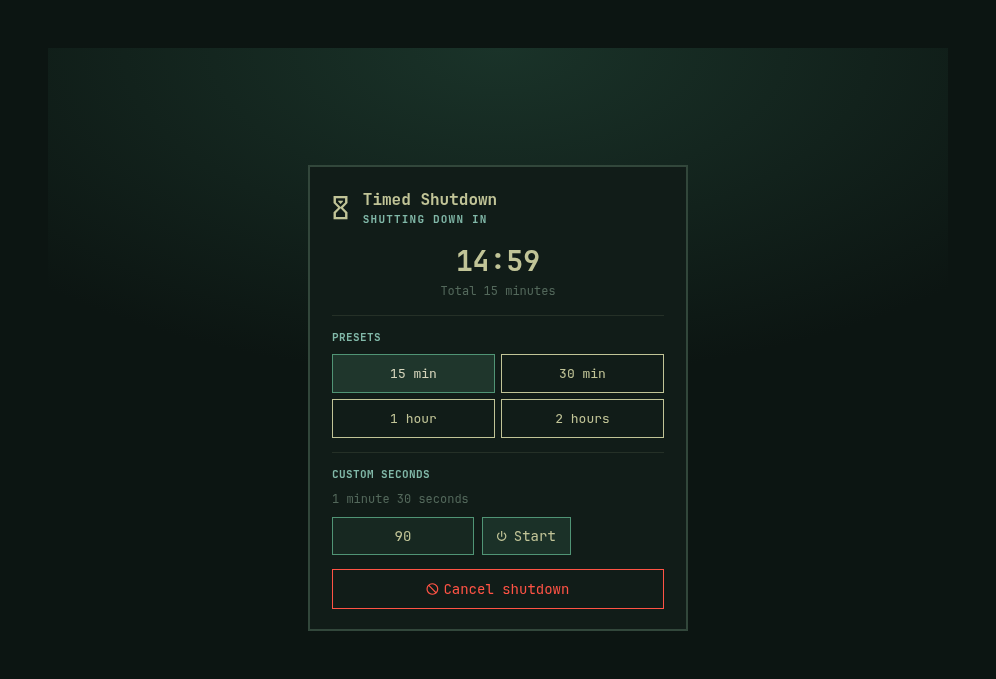
Timed shutdown panel

[!IMPORTANT] This plugin is for Omarchy 4 (Quattro), where the desktop shell and bar use Quickshell.

What it does

  • 15 minutes, 30 minutes, 1 hour, and 2 hours as one-click presets
  • Any custom duration in seconds (1–86400)
  • Live countdown on the bar and in the panel
  • Cancel from the panel, or with a right-click on the bar icon
  • A user systemd timer still fires if the shell restarts
  • Disable notifications is on by default; turn it off in the panel for start, 60s/10s, and cancel alerts

When the timer ends it runs omarchy system shutdown, which closes windows and then powers off.

Install

Review the repository, then add the plugin:

omarchy plugin add https://github.com/Henri1130/omarchy-timed-shutdown.git

Accept the prompt to enable the plugin during installation.

For an unattended install from a repository you already trust:

omarchy plugin add https://github.com/Henri1130/omarchy-timed-shutdown.git --enable --yes

Use

Left-click the timer icon in the bar. Choose a preset, or type a duration in seconds with the number row or numpad and press Start. The field arrows still step the value. Cancel shutdown stops a running timer; you can also right-click the bar icon.

From a terminal:

omarchy-shell henri.timed-shutdown start 90
omarchy-shell henri.timed-shutdown status
omarchy-shell henri.timed-shutdown cancel
omarchy-shell henri.timed-shutdown.panel toggle

Update

omarchy plugin update henri.timed-shutdown

Or update all Git-managed plugins:

omarchy plugin update --all

Disable

omarchy plugin disable henri.timed-shutdown

Uninstall

omarchy plugin remove henri.timed-shutdown

Validate from source

omarchy plugin validate .
node --test tests/model.test.js

Security

This plugin runs unsandboxed inside omarchy-shell when enabled. Review its source before installing it.

It does:

  • Schedule and cancel a user systemd timer named henri-timed-shutdown. The backup timer is systemd-run / systemctl argv (no shell), and always runs /usr/share/omarchy/bin/omarchy-system-shutdown. Start and cancel are serialized: cancel waits for every in-flight scheduler to exit, a stale schedule cannot keep a timer while inactive, and a newer start is applied only after an older stop finishes.
  • Run omarchy-system-shutdown when the countdown reaches zero
  • Send desktop notifications for start, 60s/10s warnings, and cancel
  • Read and write $XDG_RUNTIME_DIR/henri.timed-shutdown.json so a shell reload can restore an in-progress countdown. Restore opens that path nonblocking, requires a regular file, and reads at most 4KiB.

It does not access the network or change Hyprland config.

License And Warranty

Licensed under the MIT License.

The software is provided as is, without warranty of any kind, express or implied. See the license for the complete warranty and liability disclaimer.