
Peripheral Battery Indicator
Battery levels for your wireless mouse, keyboard, headset & controllers, right in the Omarchy bar. A single battery-bluetooth icon sits in the bar and turns amber then red as something runs low; click it for a popup listing every device with its charge, and get a desktop notification before a device dies. Hover the bar icon for a quick "Mouse 15%" without opening the popup.
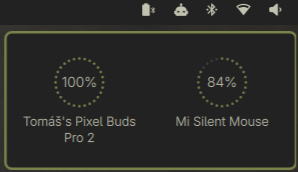
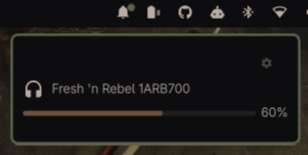

Features
- One tidy bar icon —
battery-bluetoothglyph, tinted amber at warning and red at critical. No clutter of per-device chips. Hover it for the neediest device's name and charge without opening the popup. - Click-through popup — click the icon for the full list. Two layouts,
switchable via the
displayStylesetting: Gauge (dot-ring cards with the charge % centered inside, plus a charging bolt) or List (compact rows with a name and a thin linear bar). Click anywhere else to dismiss. - Two-tier notifications — normal urgency at the warning threshold, critical urgency below that; re-armed on recharge, with an optional repeat while still low so you don't miss it.
Install
omarchy plugin add https://github.com/hlasensky/omarchy-peripheral-battery.git --enable
Plugins land disabled until you review them; --enable opts in. It drops
into the bar's right section — move it with omarchy bar move hl.peripheral_battery --section <left|center|right>.
Update
omarchy plugin update hl.peripheral_battery
Uninstall
omarchy plugin remove hl.peripheral_battery
This disables the widget, removes it from the bar (shell.json), and deletes
the plugin from ~/.config/omarchy/plugins/.
Requirements
upower(ships with Omarchy).- A C compiler (ships with Omarchy) to build the Steam Controller 2 helper once.
- The device must report battery to UPower. Most USB-dongle and Bluetooth
peripherals do; some BT headsets need the experimental BlueZ battery plugin.
The 2026 Steam Controller is also supported directly over USB or its puck
when
steam-devicesgrants access to Valve HID devices. - A Nerd Font as the bar font (Omarchy default) — the icons are Nerd Font glyphs.
Settings
Edit the widget's entry in ~/.config/omarchy/shell.json (find it under
hl.peripheral_battery); the shell hot-reloads on save, no restart needed.
omarchy launch config-editor ~/.config/omarchy/shell.json
| Key | Type | Default | What it does |
|---|---|---|---|
displayStyle |
enum | Gauge | Popup layout: Gauge (dot-ring cards) or List (compact rows with a linear bar) |
lowThreshold |
integer | 20 | % at/below which a device is "warning" |
criticalThreshold |
integer | 10 | % at/below which a device is "critical" |
hideLaptopBattery |
boolean | true | Hide the laptop's own battery |
notifyOnLow |
boolean | true | Desktop notification on low |
notifyRepeatMinutes |
integer | 0 | Re-notify every N minutes while still low (0 = once) |
deviceTypes |
multiselect | mouse, keyboard, headset, gamepad | Which device types to show |
How it works
UPower uses one of two data paths, picked automatically at startup:
- Path A (native): imports
Quickshell.Services.UPowerand iteratesUPower.devices. Event-driven, zero polling. - Path B (fallback): if that module isn't present, enumerates
upower -eand parses eachupower -i <path>block. A 30s timer backs it up.
Alongside those paths, a read-only native HID probe handles the 2026 Steam
Controller (28de:1302) and puck (28de:1304), which do not currently publish
battery data through UPower. It consumes the controller's battery status report
without taking the device away from Steam. The auditable C helper is compiled
once into ~/.cache/omarchy-peripheral-battery/; subsequent refreshes execute
the small native binary directly.
The bar widget (bar-widget) and the data source (service) are both declared
in manifest.json.
License
MIT — see LICENSE.