
omarchy-headsetcontrol
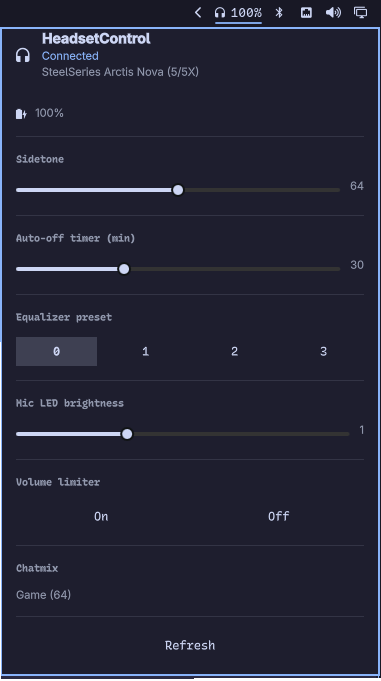
A headset widget for the Omarchy bar. One icon shows whether a supported headset is connected and how much battery it has left; one panel drives everything HeadsetControl exposes — sidetone, lights, equalizer presets, auto-off timer, mic LED brightness, chatmix, Bluetooth options and more.
It is a front-end for HeadsetControl, which the widget shells out to in JSON mode. Sections appear only when the connected headset actually reports the capability: no sidetone support, no sidetone slider; no battery chip, no percentage.
Install
omarchy plugin add https://github.com/hrzlgnm/omarchy-headsetcontrol.git
omarchy plugin enable hrzlgnm.headsetcontrol
Plugins land disabled so you can read the code before it runs — it runs
unsandboxed inside omarchy-shell, like every Omarchy plugin. Setup ›
Plugins does the same thing from the menu.
The icon appears at the right end of the bar. Move it with
omarchy bar move hrzlgnm.headsetcontrol --before omarchy.clock, or any
other placement.
Update
omarchy plugin update
Updates every installed git-managed plugin, including this one. To update just this plugin, pass its id:
omarchy plugin update hrzlgnm.headsetcontrol
Sidetone and EQ levels are saved in the widget's settings and survive an update; the bar widget itself hot-reloads after the new files land.
Uninstall
omarchy plugin remove hrzlgnm.headsetcontrol
Removes the plugin and its bar widget. Settings left behind in
~/.config/omarchy/shell.json are harmless but can be deleted by hand if
you want a clean slate.
Requirements
- Omarchy with its Quickshell desktop.
- The
headsetcontrolCLI — from your distro's packages or the HeadsetControl releases. - A supported headset, connected over USB or Bluetooth.
Using it
The bar icon is dim when no headset is detected and bright when one is. With a battery, it shows the percentage next to the headset glyph.
| Action | Result |
|---|---|
| Left click | Open the panel |
| Right click | Refresh device state |
Inside the panel:
- Header — headset name and connection state, plus a battery row with level and status (charging / discharging).
- Sidetone — slider from 0 to 128. Right-click it to mute (0).
- Lights — turn the headset LEDs on or off.
- Auto-off timer — minutes of inactivity before the headset powers itself down (0 is off).
- Equalizer preset — one of four presets (0–3).
- Voice prompts — enable or disable spoken prompts.
- Mic LED brightness — 0 to 3.
- Volume limiter — on or off.
- Chatmix — the current game/chat balance (read-only).
- Notification sound — 0 or 1.
- Bluetooth — power-on behaviour and call volume.
- Refresh — re-query the device.
Device state is polled in the background every pollingInterval seconds and
whenever the panel opens. Right-click the bar icon to force a refresh.
Settings
Configure these in Setup › Plugins, or in the widget's entry in
~/.config/omarchy/shell.json.
| Setting | Default | What it does |
|---|---|---|
pollingInterval |
30 |
Seconds between background polls. 0 disables polling; the panel still refreshes when opened |
barShowPercentage |
true |
Show the battery percentage next to the bar icon |
lastSidetone |
64 |
Level the sidetone slider starts at |
lastEqPreset |
0 |
Preset the equalizer starts selected at |
Sidetone and EQ changes write their level back into the widget's settings, so they survive a restart.
Scripting
The widget answers on the shell's IPC bus under the target
hrzlgnm.headsetcontrol:
omarchy-shell hrzlgnm.headsetcontrol toggle
omarchy-shell hrzlgnm.headsetcontrol refresh
omarchy-shell hrzlgnm.headsetcontrol checkConnected
omarchy-shell hrzlgnm.headsetcontrol setSidetone 80
omarchy-shell hrzlgnm.headsetcontrol setLights true
omarchy-shell hrzlgnm.headsetcontrol setInactiveTime 15
omarchy-shell hrzlgnm.headsetcontrol setVoicePrompt false
omarchy-shell hrzlgnm.headsetcontrol setEqualizerPreset 2
omarchy-shell hrzlgnm.headsetcontrol setEqualizer "150 200 300 300 400 500 600 800 1000 1200 1400 1600 2000 2400 3000 4000 5000 6000 8000 12000 14000 16000 20000"
omarchy-shell hrzlgnm.headsetcontrol setMicMuteLedBrightness 2
omarchy-shell hrzlgnm.headsetcontrol setVolumeLimiter true
omarchy-shell hrzlgnm.headsetcontrol setBtPowerOn true
omarchy-shell hrzlgnm.headsetcontrol setBtCallVolume 60
omarchy-shell hrzlgnm.headsetcontrol sendNotification 1
License
MIT. See LICENSE.