
Deploys
Apps you deploy over ssh, in the Omarchy bar: whether each one answers, which revision is live, and how far that is behind what you pushed.
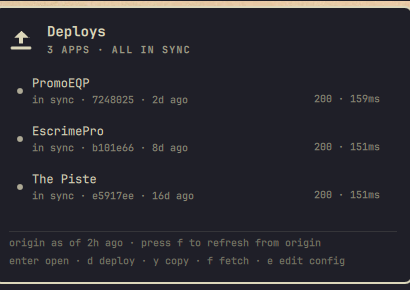
What it shows
One row per app:
- Health: status code and latency from the app's health URL.
- Live revision: the commit checked out on the server, read with
git rev-parse. - Drift: commits on
origin/<branch>that are not deployed yet, and local commits that are not pushed yet. - Age of the deployed commit.
The bar turns urgent only when an app fails its health check. Undeployed commits get the count badge instead, because that is the normal state between a push and a deploy.
The panel reports how old its idea of "pushed" is (origin as of 2h ago). It does not fetch on every poll. f fetches and refreshes.
Assumption
The revision on the server is read from the git checkout at the configured path. That is the deployed revision when the deploy script resets that checkout to the branch and builds from it, which is how bin/deploy-style Docker Compose deploys work. If your build comes from somewhere other than the checkout, the number is the checkout's, not the running image's.
Configuration
The bar's settings schema has no array type, so apps are listed in ~/.config/omarchy/deploys.json:
{
  "apps": [
    {
      "name": "PromoEQP",
      "url": "https://promoeqp.com",
      "health": "/up",
      "ssh": "root@promoeqp.com",
      "path": "/opt/promoeqp-rails",
      "repo": "~/Projects/promoeqp-rails",
      "branch": "main",
      "deploy": "/opt/promoeqp-rails/bin/deploy"
    }
  ]
}
| Field | Meaning |
|---|---|
name |
Label in the panel |
url |
Base URL, and it must begin with http:// or https://. Omit to skip the health check |
health |
Path appended to url. Defaults to /up. Empty string checks url itself |
ssh |
ssh target for the read-only revision check, matching [A-Za-z0-9._@%+:-]. Omit to skip it |
path |
Git checkout on the server. May not contain shell metacharacters |
repo |
Local clone, for the drift comparison. ~ is expanded |
branch |
Branch to compare against. Defaults to main |
deploy |
Command run on the server by d. Omit to disable deploying |
Every field is optional. An app with only name and url is a plain health check.
Press e to open the file. Point configPath in the widget's settings somewhere else if you prefer.
Keys
| Key | Action |
|---|---|
j / k or arrows |
move the cursor |
enter |
open the app in the browser |
d |
deploy the selected app (asks first) |
y |
copy the selected app's deploy command |
f |
fetch from origin, then refresh |
r |
refresh without fetching |
e |
open the config file |
esc |
close |
In the confirmation dialog, left/right/tab pick a button and enter activates it. It opens with Cancel selected.
On the bar icon: left click opens the panel, right click refreshes. In the panel, right click on a row deploys it, middle click copies its deploy command.
ssh
Revision checks run ssh -o BatchMode=yes -o ConnectTimeout=5, so they need key-based auth that works without a prompt, and the host key already in known_hosts. Unknown hosts are reported, not accepted automatically.
The only remote command is:
git -C <path> rev-parse HEAD; git -C <path> log -1 --format=%cI
Every app is probed in parallel, so refresh time does not scale with the number of servers.
What it does not do
- Nothing remote is written or restarted except by
d, which runs your own deploy command in a visible terminal so the output and any failure are on screen. - Deploying asks first, and the dialog opens with Cancel selected.
- No polling of origin. A stale comparison is labelled stale rather than presented as current.
- Values from the config are checked before use rather than trusted.
sshjoins its command arguments and hands them to the remote login shell, so the remote path is quoted for that shell and refused outright if it carries shell metacharacters; an ssh target may not begin with a dash and the option list is terminated before it, becausessh -F<file>would otherwise load a config file of someone else’s choosing, and a deploy command is quoted for the remote shell rather than restricted, since being shell syntax is its purpose; a url must name an http scheme before it reaches either curl or the browser, because curl reads a leading dash as options andomarchy-launch-browserpasses its argument straight to the browser binary, where--gpu-launcher=<command>runs that command; and a revision must be 40 hex characters, so nothing else is displayed as one. The poll is unattended, so none of these can wait for the deploy confirmation. - Nothing from git, curl or ssh is rendered as markup. All external text is stripped of angle brackets, cleared of control characters and length-clamped as it enters the model, and every
Textitem is pinned toText.PlainText. QML's defaultAutoTextwould treat a commit subject or error containing<img src="http://host/x">as rich text and make the shell fetch it.
Settings
| Setting | Default | Meaning |
|---|---|---|
refreshIntervalSec |
300 |
how often to re-probe |
showCount |
true |
show the count of apps needing attention beside the bar icon |
configPath |
empty | app list location, when not ~/.config/omarchy/deploys.json |
Requirements
| Dependency | Needed for |
|---|---|
Omarchy Quattro (omarchy-shell) |
the plugin host |
jq |
the status helper |
bash, coreutils |
date, awk, sed |
git |
local drift comparison |
openssh |
reading the deployed revision |
curl |
health checks |
wl-clipboard |
y |
Install
omarchy plugin add https://github.com/ianswope/omarchy-deploys.git --enable
Remove
omarchy plugin remove ianswope.deploys
That disables the widget, drops it from the bar layout and deletes ~/.config/omarchy/plugins/ianswope.deploys. The app list at ~/.config/omarchy/deploys.json is left in place; delete it separately if you want it gone.
Checking what the panel sees
~/.config/omarchy/plugins/ianswope.deploys/bin/omarchy-deploys-status | jq
Takes a config path as the first argument and 1 as the second to fetch first. It creates and restarts nothing.
License
MIT. See LICENSE.