
Keyring
The secret service in the Omarchy bar: whether the keyring is unlocked, when it was unlocked, and which running applications started before that happened.
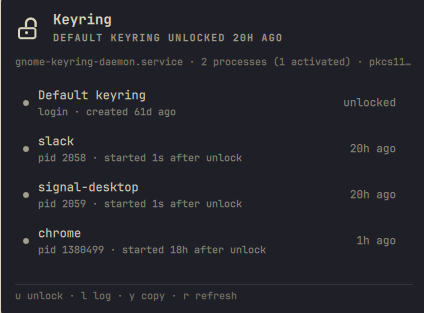
Why the unlock time matters
An application that keeps passwords in the keyring — a browser, a chat client, a sync daemon — usually asks for them once, at startup. If it starts before the keyring is unlocked, nothing fails loudly. Chrome falls back to an unencrypted store, and other apps simply behave as though the account was never set up. You find out later, by being logged out of everything at once.
The lock state alone does not show this. By the time you look, the keyring is unlocked and everything appears fine; the damage was done in the first few seconds of the session. What matters is the order: whether each app started before or after the unlock.
PAM records the unlock in the journal, so the moment is recoverable rather than something the widget has to be running to observe:
sddm-helper[1646]: gkr-pam: unable to locate daemon control file
sddm-helper[1646]: gkr-pam: stashed password to try later in open session
sddm-helper[1646]: gkr-pam: unlocked login keyring
That is the race in three lines. The panel compares each application's start time against the last of them.
What it shows
- Each collection and whether it is locked.
- When the login keyring was unlocked, from this boot's journal.
- Every configured application that is running, and whether it started before or after that unlock.
- Which unit owns the secret service, and how many daemon processes exist.
The bar turns urgent only when a keyring is locked or no secret service is running. An app that started early is a warning, not an alarm: it is already done, and the fix is to restart that app.
Health
| State | Level |
|---|---|
| No secret service on the bus | critical |
A collection other than session is locked |
critical |
| PAM stashed the login password but never unlocked | critical |
| A running application started before the unlock | warn |
| A daemon that is neither the bus owner nor a D-Bus activation | warn |
Daemon running without its secrets component |
warn |
| PAM had to stash the password and unlocked a moment later | info |
| The system journal is not readable | info |
Two things deliberately do not warn. A second daemon process is normal: the systemd user unit and D-Bus activation both start one, and the activated one discovers the first and defers, so counting processes would flag a healthy machine. And an unreadable system journal is reported as unknown rather than as a fault, because reading it needs group membership not every user has.
The per-session collection is not listed. It cannot be locked and is discarded at logout, so a row for it only raises a question it does not answer.
Keys
| Key | Action |
|---|---|
j / k or arrows |
move the cursor |
enter |
unlock a locked keyring, otherwise copy the row |
u |
unlock |
l |
this boot's keyring log |
y |
copy the selected row |
r |
refresh |
esc |
close |
On the bar icon: left click opens the panel, right click refreshes. In the panel, middle click copies a row.
The padlock in the bar is drawn open or closed, so the state is in the glyph rather than in a colour the theme owns.
Settings
| Setting | Default | Meaning |
|---|---|---|
refreshIntervalSec |
60 |
how often to re-read state |
showCount |
true |
show the count of things needing attention beside the bar icon |
consumers |
empty | applications to check, by process name, comma separated |
consumers is matched against the process name, not the command line. pgrep -f slack also matches the status helper itself, whose own arguments contain the word. The built-in list covers the common credential-storing desktop applications.
Privileges
Reading is entirely unprivileged: one D-Bus GetAll per collection, the journal, and /proc.
Unlocking runs gnome-keyring-daemon --unlock in a visible terminal. That command prompts for the login password itself, so this plugin never reads, forwards or stores it.
The owner of the service is found by asking the bus who owns the name, never by calling the service, because a call would ask the bus to activate it — a side effect a reporter has no business causing. Every call carries NO_AUTO_START regardless.
Why the helper stays running
The status helper is started once and held open, and it answers one request with one line. It is not run per refresh, and that is deliberate.
gnome-keyring keeps a record of each caller — the caller's PKCS#11 session — keyed on the caller's unique bus name. It creates that record from an idle callback and drops it when the caller leaves the bus. Reading a Collection property over a connection that is about to close races both of those, and losing the race kills the daemon:
gkd_secret_service_get_pkcs11_session: assertion 'client' failed
secret_objects_lookup_gck_object_for_path: assertion 'session' failed
GLib-GIO:ERROR:../glib/gio/gdbusconnection.c:4765:invoke_get_property_in_idle_cb: assertion failed: (error != NULL)
With no record for the caller, secret_objects_lookup_gck_object_for_path returns NULL without setting the GError — its g_return_val_if_fail skips the block that would have — and GLib aborts the process over the missing error. Once the client lookup misses, the abort is certain; there is no surviving path.
This plugin used to read each property with its own busctl get-property: connect, read one property, exit. Seven of those a minute is precisely the shape of the race, and on 2026-08-20 it aborted gnome-keyring-daemon after fifteen hours — which locked the login keyring and took every saved password with it until it was unlocked by hand. A keyring monitor that locks the keyring is not much of a monitor.
Two things now keep it from happening, either of which would be enough:
- One connection for the life of the helper. The caller record is created once and never removed while the process lives, so the getter has a session to find.
GetAllrather than aGetper property. GLib'sGetAllhandler passes noGErrorto the getter and simply omits a property the service could not produce, so it cannot reach the assertion a failedGettrips. The fragile path is not on that call at all.
The bug is gnome-keyring's, not this plugin's, and it is still there for anything else that reads a collection property from a short-lived process. Reporting it upstream is worth more than working around it, but working around it is what a bar widget can do.
What it does not do
- Nothing is unlocked, locked, created or deleted except by
u, which runs in a terminal you can see. - No secret is ever read. The plugin looks at lock state and metadata only.
- Both terminal commands are fixed strings. Nothing from D-Bus, the journal or the process table is interpolated into either one, so no outside value reaches a shell or an argument vector.
- Values that do become arguments are checked first. A process name must not begin with a dash, because
pgrepwould read it as an option, and the option list is terminated with--regardless. - Nothing is rendered as markup. Collection labels and journal text are stripped of angle brackets, cleared of control characters and length-clamped as they enter the model, and every
Textitem is pinned toText.PlainText. QML's defaultAutoTextwould treat a label containing<img src="http://host/x">as rich text and make the shell fetch it.
Requirements
| Dependency | Needed for |
|---|---|
Omarchy Quattro (omarchy-shell) |
the plugin host |
python |
the status helper |
python-gobject |
the D-Bus reads, over GDBus |
systemd (journalctl) |
the unlock time |
procps-ng |
pgrep |
| a secret service | gnome-keyring, or anything else owning org.freedesktop.secrets |
wl-clipboard |
y |
Any implementation of the secret service is read the same way. Unlocking is not portable: gnome-keyring-daemon --unlock belongs to gnome-keyring, so on another provider the unlock key names the provider instead of running a command that does not apply.
Install
omarchy plugin add https://github.com/ianswope/omarchy-keyring.git --enable
Remove
omarchy plugin remove ianswope.keyring
Checking what the panel sees
~/.config/omarchy/plugins/ianswope.keyring/bin/omarchy-keyring-status | jq
Takes a comma-separated list of process names as its first argument. It creates, unlocks and restarts nothing.
One document and exit, which is what the pipe above wants. Add --serve and it stays open instead, emitting one document on startup and one more per line read from stdin — how the panel runs it.
License
MIT. See LICENSE.