
Renders
kdenlive and MLT renders in the Omarchy bar: what is encoding, how long it has been going, and which jobs ended without writing a file.
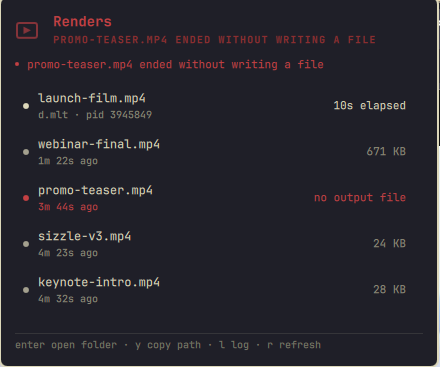
What it shows
One row per job, running first:
- The output file being written, and the project it came from.
- Elapsed time, and a percentage with an estimated time remaining when the renderer reports one.
- For a job that has ended: the size of the file it produced, or the fact that it produced nothing.
The bar carries a count of running renders and the icon pulses while work is in flight. It turns urgent only when a render ended without writing its output.
How progress is read
kdenlive_render runs melt with -progress2 and keeps a log beside the output file, at <output>.log. Each report is one line:
54 2451 98 elapsed seconds, current frame, percent
That is where the percentage comes from. It is often not available, and the reason is buffering rather than anything this plugin can fix: progress lines are a few bytes each, so when melt's output is a pipe they sit in a block buffer and never reach the log. Debug logging produces enough output to keep that buffer flushing, which is why a render started with debug logging reports progress and an ordinary one may not.
When there is no percentage the row shows elapsed time instead. A missing percentage is not reported as 0%, and no ETA is invented from one.
How a finished or failed render is judged
kdenlive_render exits 0 whether the render worked or not, prints nothing, and deletes its own log either way. So the verdict has to come from the filesystem: when a job that was running is gone, the output file either exists at a plausible size, or it does not.
A render that ends without writing its file is the one thing here that kdenlive itself does not tell you, and it is the only state that turns the bar urgent.
What this cannot catch: a render that fails immediately. A bad output path fails in under half a second, creates no file and leaves no log, so there is nothing for any poll interval to find. What is caught is a job that was underway and then ended empty — a full disk partway through a long export, which is the case worth knowing about.
Jobs are remembered between polls in ${XDG_CACHE_HOME:-~/.cache}/omarchy-renders/jobs.json. That file is the only thing written, it holds paths and progress numbers, and entries fall off after a day.
Other encoders
A melt or qmelt process without a kdenlive_render parent is counted so the panel does not claim nothing is happening, but it carries no progress: the log is kdenlive_render's doing, not melt's.
Keys
| Key | Action |
|---|---|
j / k or arrows |
move the cursor |
enter |
open the folder containing the output |
y |
copy the output path |
l |
open the render log, while it exists |
r |
refresh |
esc |
close |
On the bar icon: left click opens the panel, right click refreshes. In the panel, middle click copies the output path.
Settings
| Setting | Default | Meaning |
|---|---|---|
showCount |
true |
show the number of running renders beside the bar icon |
idleIntervalSec |
30 |
poll interval when nothing is rendering |
activeIntervalSec |
5 |
poll interval while a render is running |
Polling backs off when nothing is happening and tightens while a render runs, so a widget watching an hour-long export does not spend the other twenty-three hours doing it.
What it does not do
- Nothing is started, cancelled or killed. There is no way to stop a render from this panel.
- No render is reconfigured and no project file is written.
- Paths are validated rather than cleaned. A path is used only if it is absolute and free of control characters and angle brackets; otherwise opening and copying are disabled for that row and the panel says so. Sanitising a path would leave the panel acting on something that is not the file the render wrote.
- The output path and the project path both come from another process's command line and from the MLT XML it was given, so both are resolved against that process's own working directory rather than assumed to be absolute.
- The log is quoted for the terminal that opens it, and refused unless the path validated.
- Nothing is rendered as markup. External text is stripped of angle brackets, cleared of control characters and length-clamped at the model boundary, and every
Textitem is pinned toText.PlainText.
Requirements
| Dependency | Needed for |
|---|---|
Omarchy Quattro (omarchy-shell) |
the plugin host |
jq |
the status helper |
bash, coreutils, procps-ng |
date, stat, pgrep |
| kdenlive or another MLT renderer | something to watch |
wl-clipboard |
y |
| a file manager | enter |
Install
omarchy plugin add https://github.com/ianswope/omarchy-renders.git --enable
Remove
omarchy plugin remove ianswope.renders
The remembered-jobs file is left in place; delete ${XDG_CACHE_HOME:-~/.cache}/omarchy-renders separately if you want it gone.
Checking what the panel sees
~/.config/omarchy/plugins/ianswope.renders/bin/omarchy-renders-status | jq
It starts and stops nothing.
License
MIT. See LICENSE.