
Omarchy Icons
A modern, highly polished, and fully native icon theme manager and status bar widget for Omarchy Quattro (Hyprland + Quickshell), featuring a curated theme catalog, instant one-click pacman installation, live variant selection, real-time search, and seamless GTK & Omarchy theme synchronization.
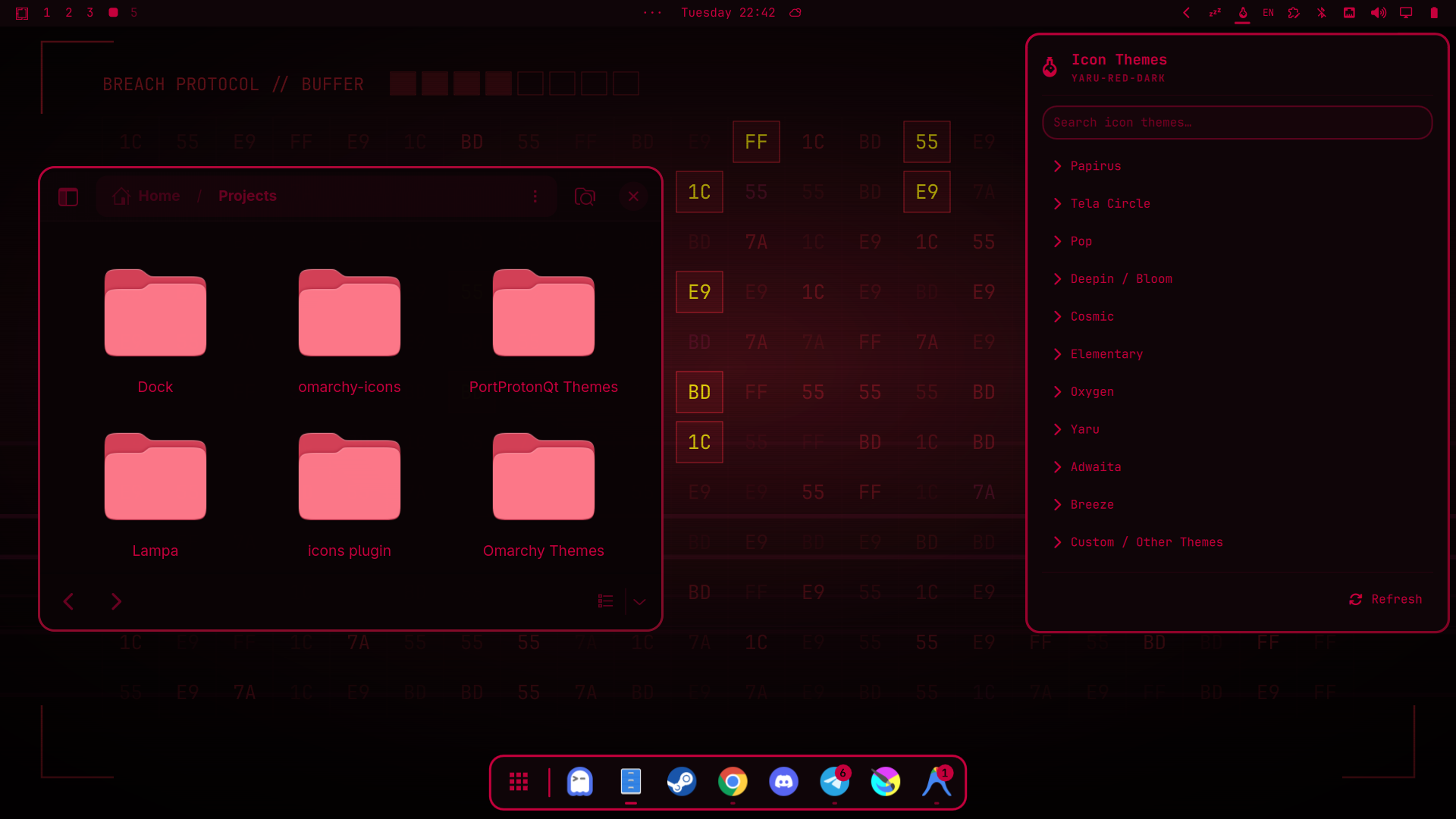
✨ Features
- 🎨 Curated Theme Catalog — Browse popular, high-quality icon theme suites including Papirus, Tela Circle, Pop, Deepin Bloom, Cosmic, Elementary, Oxygen, Yaru, Breeze, and Adwaita.
- 📦 One-Click Package Installation — Download and install missing theme packages directly from the Arch Linux official repositories via pacman with secure polkit authorization (
pkexec). - ⚡ Instant Live Theme Switching — Apply any theme variant with a single click. Changes immediately propagate across GTK 3, GTK 4, GSettings, Omarchy desktop theme files, and active dock/panel components.
- 🌈 Extensive Color Variant Selection — Easily expand theme families to explore and select specialized colorways (e.g. Tela Circle Dracula, Nord, Manjaro, Ubuntu, Blue, Red, Green, etc.).
- 🔍 Real-Time Instant Search — Quickly filter through theme names, variant styles, and descriptions as you type.
- 🎛️ Native Top Bar Widget (
BarWidget) — Sleek status bar launcher displaying a crisp palette glyph (🎨), seamlessly matching your active Omarchy status bar styling and theme colors. - 🛡️ Full GTK, Qt & KDE Dolphin Support — Automatically keeps
gsettings, GTK 3/4settings.ini, KDE globals~/.config/kdeglobals(Dolphin),qt5ct/qt6ct, and Omarchy theme files synchronized in real time. - 🚀 100% Quickshell Native — Smooth animations, reactive property bindings, and lightweight resource footprint.
🎨 Supported Icon Themes
| Theme Family | Arch Package | Color & Style Variants |
|---|---|---|
| Papirus | papirus-icon-theme |
Papirus |
| Tela Circle | tela-circle-icon-theme-all |
15 curated color schemes (Standard, Dracula, Nord, Blue, Brown, Green, Grey, Manjaro, Orange, Pink, Purple, Red, Ubuntu, Yellow, Black) |
| Pop | pop-icon-theme |
Adaptive Pop OS icon suite |
| Deepin / Bloom | deepin-icon-theme |
Bloom, Bloom-Dark, Bloom-Classic, Vintage, Sea |
| Cosmic | cosmic-icon-theme |
System76 COSMIC Desktop icons |
| Elementary | elementary-icon-theme |
Clean Elementary OS icon set |
| Oxygen | oxygen-icons |
Classic KDE Oxygen icon theme |
| Yaru | (Pre-installed / distro) | 20 Ubuntu color variants (Standard, Dark, Red, Blue, Olive, Sage, Magenta, Purple, etc.) |
| Adwaita | (Pre-installed / distro) | Standard GNOME Adwaita & Adwaita Legacy |
| Breeze | (Pre-installed / distro) | KDE Breeze & Breeze-Dark |
📦 Installation
Install and enable the widget with a single command:
omarchy plugin add https://github.com/rosakodu/omarchy-icons.git --enable
🎮 Usage
- Click the palette icon (🎨) in the Omarchy top status bar.
- Browse through the catalog or use the Search field to find a specific theme.
- Click on any theme card to expand and view available color schemes or Dark/Light variants.
- If a theme is not yet installed on your system, click Install package to download it via pacman.
- Click on the desired variant to activate it instantly. The currently active theme is marked with a checkmark (✓).
⚙️ How It Works
- Package Management: Downloads verified official packages using
pkexec pacman -S --noconfirm <package>. - Universal Desktop Sync: Seamlessly writes the active theme name to:
- GNOME / GTK:
gsettings set org.gnome.desktop.interface icon-theme "<theme>" - GTK 3 & GTK 4:
~/.config/gtk-3.0/settings.iniand~/.config/gtk-4.0/settings.ini - KDE / Dolphin:
~/.config/kdeglobals([Icons] Theme=<theme>) viakwriteconfig6 - Qt Standalone:
~/.config/qt5ct/qt5ct.confand~/.config/qt6ct/qt6ct.conf - XDG & Omarchy:
~/.icons/default/index.themeand~/.local/state/omarchy/current/theme/icons.theme
- GNOME / GTK:
- Real-Time Discovery: Scans installed themes directly from
/usr/share/icons/,~/.local/share/icons/, and~/.icons/.
🗑️ Uninstallation
omarchy plugin remove icons
📄 License
MIT © 2026 rosakodu