
omarchy-workspace-names
Name and colour your Hyprland workspaces, and see the current one in the Omarchy bar.
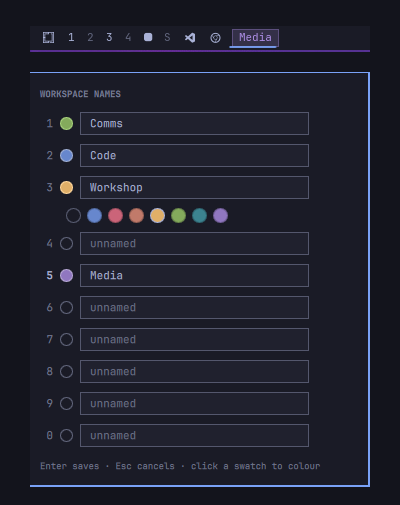
Hyprland can rename a workspace at runtime without changing its id, so
SUPER+1..9, SUPER+SHIFT+N and workspace cycling all keep working exactly as
before — only the displayed name changes. Hyprland forgets those names on
restart, so this plugin keeps a small JSON store and reconciles Hyprland
against it.
Install
omarchy plugin add https://github.com/idandeshe/omarchy-workspace-names --enable
omarchy restart shell
Or place it by hand:
git clone https://github.com/idandeshe/omarchy-workspace-names \
  ~/.config/omarchy/plugins/idan.workspace-names
omarchy-shell shell rescanPlugins
omarchy plugin enable idan.workspace-names
omarchy restart shell
The widget lands in the bar's left section. It works anywhere, but it reads
best at the end of the left cluster, next to the workspace pips it
captions — it is a label for them, and sitting apart breaks that association.
Move it with omarchy bar move idan.workspace-names --section left, or edit
bar.layout in ~/.config/omarchy/shell.json directly.
Requirements
-
Omarchy with the Quickshell-based shell (
omarchy-shell) -
Hyprland with the Lua dispatch API — verify with:
hyprctl dispatch 'hl.dsp.workspace.rename({ workspace = "1", name = "1" })'It should print
ok. Tested on Hyprland 0.56.2.
Usage
- The bar shows the focused workspace's name, or a dimmed tag glyph when it has none. Click it to open the editor.
- Click a row's swatch to open a palette of the active theme's colours. The hollow chip clears the colour back to the default.
- Names render as tags in the bar: the current workspace is filled with its colour, the rest are outlined. That container is what separates them from the glyph icons alongside.
- Edits are held until you press Save. Changed rows are marked, and closing with unsaved work asks whether to save or discard it. Esc in a field puts that row back to its last saved value.
Settings
The gear in the editor's header opens the settings view; the chevron goes back.
Always show names — instead of only the workspace you are on, the bar shows a chip for every named workspace. Then:
| Click another workspace's name | switch to it |
| Click the name of the workspace you are on | open the editor |
| Right-click any name | open the editor |
Clicking the current workspace opens the editor because there is nowhere to switch to. A gear badge trails the row as a visible route into the settings, since the names themselves are spoken for by switching.
With nothing named yet, or on a vertical bar, it falls back to the single label.
The setting is stored on the widget's entry in ~/.config/omarchy/shell.json
("alwaysShowNames": true), written through Omarchy's own API when you toggle
it — the same way the built-in clock and power widgets persist theirs.
Colours
Per-workspace colours fall back to a widget-level color, and then to the
theme accent. Set the fallback in ~/.config/omarchy/shell.json:
{ "id": "idan.workspace-names", "color": "#e0af68" }
The palette offered in the editor is read from the active theme's colors.toml
(accent, red, orange, yellow, green, cyan, blue, magenta,
deduplicated), because the shell's Color singleton keeps only a handful of
roles and discards the rest of the palette while parsing.
Stored colours are absolute hex, so they stay put across a theme switch rather than following it — a name/colour pairing is your decision, not the theme's.
The pill's corners follow Style.cornerRadius, which mirrors Hyprland's
decoration:rounding, so it is square on a desktop with rounding at 0.
Updates
The settings view shows the installed version and whether a newer one exists. When one does, a dot appears on the gear badge in the bar and the button becomes Update.
Updating opens a floating terminal running omarchy plugin update, which shows
you the diff and asks before pulling. That is deliberate: plugins run
unsandboxed inside omarchy-shell, and Omarchy's own policy is that "updates
show a diff of the changes before touching anything." The CLI validates the
result and rolls back automatically if it fails. Restart the shell afterwards to
load the new code.
An update is offered only when the published version is strictly newer than the installed one. A checkout that is ahead of the published release — say while you are working on the plugin — is reported as such rather than being offered a downgrade.
Network use. To check, the plugin runs git fetch against its own
repository at shell start and every six hours. Nothing is sent or collected — it
is the same fetch omarchy plugin update performs, and the comparison is
HEAD vs FETCH_HEAD. Turn it off with the Check for updates toggle in
settings, or set "updateChecks": false on the widget's entry in shell.json.
A plugin installed by hand rather than by omarchy plugin add has no remote to
check, and the settings view says so instead of offering an update.
Store
~/.config/omarchy/workspace-names.json
{
  "version": 2,
  "names":  { "1": "Comms",   "2": "Code" },
  "colors": { "1": "#9ece6a", "2": "#7aa2f7" }
}
Hand edits apply live — the file is watched. Version 1 files (names only, no
colors key) still load unchanged. Names are trimmed to 24 characters with
control characters stripped; colours must be a plain 6-digit hex or they are
dropped.
How it works
Each entry is pushed into Hyprland with:
hyprctl dispatch 'hl.dsp.workspace.rename({ workspace = "3", name = "Workshop" })'
rename only reaches workspaces that currently exist, so the plugin reconciles
on every change to the workspace set — a name declared for an empty slot is
applied the moment that slot is first opened. A workspace with no entry is
renamed back to its own id, which is Hyprland's default.
Special workspaces (scratchpad) and ids outside 1–10 are left alone. Colours are display-only and never reach Hyprland, which has no notion of a workspace colour.
Commands
omarchy-shell shell summon idan.workspace-names '{}'   # open the editor
omarchy-shell shell hide idan.workspace-names
omarchy plugin disable idan.workspace-names
Uninstall
omarchy plugin remove idan.workspace-names
rm ~/.config/omarchy/workspace-names.json
omarchy restart shell
Workspace names revert to plain numbers on the next Hyprland restart, or immediately if you rename them back by hand.
Note for hacking on it
Saving a file under ~/.config/omarchy/plugins/ hot-reloads plugin code, but
Panel.qml is loaded through a Loader whose resolved component Qt caches —
edits to it need a full omarchy restart shell.
License
MIT