
LM Studio Plugin for Omarchy
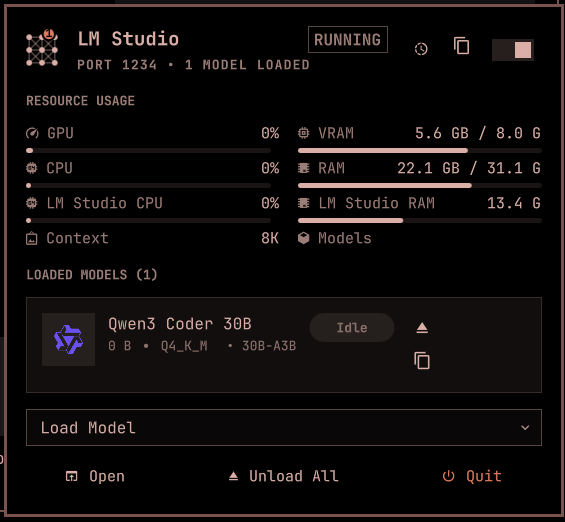
Monitor and control the LM Studio server from the Omarchy Quattro bar: start/stop the server, load/unload models, copy identifiers and the LLM base URL, and watch live GPU/CPU/RAM usage — all in a menu-style panel mirroring the native LM Studio tray card.
Features
- Bar widget: LM Studio server status icon (running/stopped), model count badge, warning state
- Menu-style panel: Mirrors the native LM Studio hover card
- Open LM Studio (launches the GUI app)
- Copy LLM Server Base URL (header button)
- Load Model (searchable dropdown of on-disk models)
- Unload All Models
- Quit LM Studio
- Start/stop server toggle in the header
- Loaded models list: Display name, memory, quantization/architecture, params, status badge, per-model unload and copy (name or identifier)
- Publisher logos: Model cards show the publisher's brand logo from Simple Icons (CC0), like LM Studio's model picker — e.g. Gemma shows the Google logo. Publishers without an icon (or offline) get a deterministic colored initial tile; no request is made until the panel is first opened, and only the publisher slug is sent to
cdn.simpleicons.org - Live resource monitor: GPU utilization, VRAM, system CPU/RAM, per-process LM Studio CPU/RAM, plus context-window and model-count cells — polled directly from the OS (nvidia-smi,
/proc/meminfo,/proc/stat), btop-style two-sample CPU deltas - Keyboard navigation: Full cursor-driven navigation across header → models → actions
- Optimistic UI: Instant feedback when toggling server (like Tailscale plugin)
- Auto-refresh: Configurable interval with startup ramp
- Settings: Custom LMS CLI path, refresh interval
Install
omarchy plugin add https://github.com/25cent9/omarchy-lmstudio-plugin.git --enable
Or for local development:
# Plugin is already at ~/.config/omarchy/plugins/io.github.25cent9.lmstudio
omarchy plugin enable io.github.25cent9.lmstudio
Uninstall
omarchy plugin remove io.github.25cent9.lmstudio
This disables the plugin and removes it from ~/.config/omarchy/plugins/io.github.25cent9.lmstudio. No user configuration is modified outside the plugin's own folder.
Usage
| Action | Method |
|---|---|
| Open/close panel | Click bar icon (left click) |
| Toggle server | Right-click bar icon, S in panel, or the header toggle |
| Refresh status | Middle-click bar icon, or press R in panel |
| Open LM Studio | Open footer button, or press O |
| Copy base URL | Header copy button |
| Load model | Load Model dropdown (searchable, keyboard-friendly) |
| Navigate | ↑/↓ arrows in panel (header → models → actions) |
| Unload model | Select model, press U (or per-model button / Unload All footer) |
| Copy model name | Select model, press C |
| Copy model identifier | Select model, press I |
| Quit LM Studio | Quit footer button, or press Q |
| Copy menu | ↑/↓ or j/k to choose, Enter to copy, Escape to close |
| Close panel | Escape |
Requirements
- LM Studio installed with the
lmsCLI (default:~/.lmstudio/bin/lms, or set a custom path in settings) - Omarchy with Quattro shell (quickshell)
wl-copy(package: wl-clipboard) for the copy actions (base URL, model name/identifier)gtk-launch(package: glib2) for launching the LM Studio GUI appnvidia-smifor GPU/VRAM metrics (falls back to—if absent; system CPU/RAM always work)
Configure
# Move to different bar section
omarchy bar move io.github.25cent9.lmstudio --section right

# Change refresh interval (via plugin settings UI or config)
# Set custom LMS path if not at ~/.lmstudio/bin/lms
Development
# Validate plugin
omarchy plugin validate ~/.config/omarchy/plugins/io.github.25cent9.lmstudio
qmllint -I $OMARCHY_PATH/shell ~/.config/omarchy/plugins/io.github.25cent9.lmstudio/Panel.qml ~/.config/omarchy/plugins/io.github.25cent9.lmstudio/Service.qml

# Test panel
omarchy-shell shell summon io.github.25cent9.lmstudio '{}'
omarchy-shell shell hide io.github.25cent9.lmstudio

# Rescan after changes
omarchy-shell shell rescanPlugins
File Structure
~/.config/omarchy/plugins/io.github.25cent9.lmstudio/
├── manifest.json       # Plugin manifest
├── Model.js            # Pure JS parsing + resource polling script (shared)
├── Service.qml         # Headless service (CLI calls, state, resource polling)
├── Panel.qml           # Bar widget entry point (loads PanelContent.qml)
├── PanelContent.qml    # Panel UI (menu-style actions, models, resource grid)
├── PublisherLogo.qml   # Publisher brand logo / initial-tile fallback
├── LMStudioIcon.qml    # Bar icon component
├── images/             # Screenshots used in this README
├── README.md           # This file
└── LICENSE             # MIT License
Architecture
Follows the Tailscale plugin pattern:
- Single
bar-widgetkind withPanel.qmlas entry point Service.qmlas headless singleton for all CLI communicationModel.jsfor pure parsing logic (testable in isolation)KeyboardPanelwith cursor-driven navigation- Optimistic toggle state (
_desiredServerState) for instant UI feedback
License
MIT License - see LICENSE file.