
omarchy-mullvad
Mullvad VPN for Omarchy: a bar widget with a popup panel, a full set of menu entries, and the CLI helper both are built on.
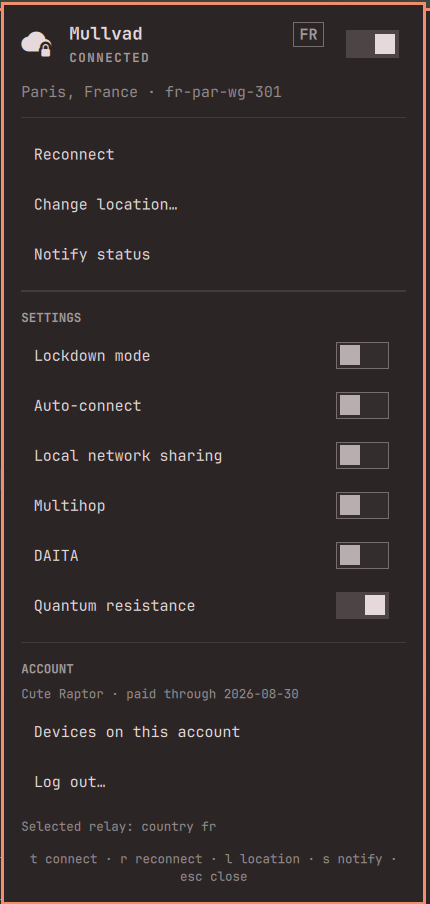
What you get
In the bar — the tunnel state at a glance. Bright icon while the tunnel is
up, dimmed while it is down, accent colour while Mullvad is blocking traffic,
and the exit country beside it ( FR).
- Left click opens the panel
- Right click connects or disconnects
- Middle click sends the status as a notification
In the panel — the state, the exit relay, and every control: connect,
reconnect, change location, and a live switch for lockdown mode, auto-connect,
local network sharing, multihop, DAITA, and quantum resistance. An account
section shows the device name and paid-through date, lists the devices on the
account, and logs out. With no account logged in, the panel collapses to a
single Log in… row. Keyboard: j/k or arrows to move, enter to
activate, t connect, r reconnect, l location, s notify, esc to close.
In the Omarchy menu — the same actions, searchable. Super+Space then type
vpn, or jump straight there:
omarchy menu summon mullvad
omarchy menu summon mullvad.location
Location drills down Country → City → Server, built from a live
mullvad relay list.
Install
The bar widget, as an Omarchy shell plugin:
omarchy plugin add https://github.com/achevalier-dev/omarchy-mullvad.git --enable
Then the menu rows and the CLI helper:
~/.config/omarchy/plugins/io.github.achevalier-dev.mullvad/install.sh
install.sh symlinks bin/mullvad-menu into ~/.local/bin and merges the menu
rows into ~/.config/omarchy/extensions/omarchy-menu.jsonc, backing the file up
first. It is safe to re-run — the block is replaced, never duplicated.
Menu rows and CLI without the bar widget: clone anywhere and run ./install.sh.
Requirements
- Omarchy 4.x
mullvadCLI withmullvad-daemonrunning (mullvad-vpn-daemon-bin)jq
How it works
State comes from a single long-lived mullvad status -j listen, which emits one
JSON line per change — the widget never polls.
Every action goes through bin/mullvad-menu, which waits for the daemon to
agree before it reports. mullvad connect returns while the tunnel is still
being built and mullvad tunnel set … returns before the value is stored, so
the helper waits for the transition to start, then to finish, and reads settings
back until they match. A switch only moves once the change actually took.
mullvad-menu is usable on its own:
mullvad-menu toggle          # connect or disconnect
mullvad-menu country         # pick a country from a menu
mullvad-menu toggle-lockdown # flip a setting, confirmed with the daemon
mullvad-menu login           # account number typed into a terminal
mullvad-menu account         # device and expiry as a notification
Signing in
Log in… opens a terminal running mullvad account login, which prompts for
the number on stdin — so your account number never appears in a command line,
the process list, or shell history. Logging out asks for confirmation first,
because it revokes the device. Nothing here ever puts the account number in a
notification or a log.
Uninstall
omarchy plugin remove io.github.achevalier-dev.mullvad
rm ~/.local/bin/mullvad-menu
Then delete the // >>> omarchy-mullvad … // <<< omarchy-mullvad block from
~/.config/omarchy/extensions/omarchy-menu.jsonc.
Note on plugins
Omarchy plugins run as unsandboxed code inside the long-lived omarchy-shell
process. Read MullvadPanel.qml and bin/mullvad-menu before enabling — they
are short on purpose.
License
MIT