
Screen layout
An Omarchy bar plugin for two things Hyprland can do but Omarchy has no control for: turning a display 90°, and reserving a shelf along one edge of it.
A shelf is a strip the tiling layout is not allowed to enter. Park a floating, pinned window there and it stays visible and usable on every workspace — a video, a chat window, a torn-off browser tab, a log tail. Nothing about it is video-specific; any window can live on the shelf.
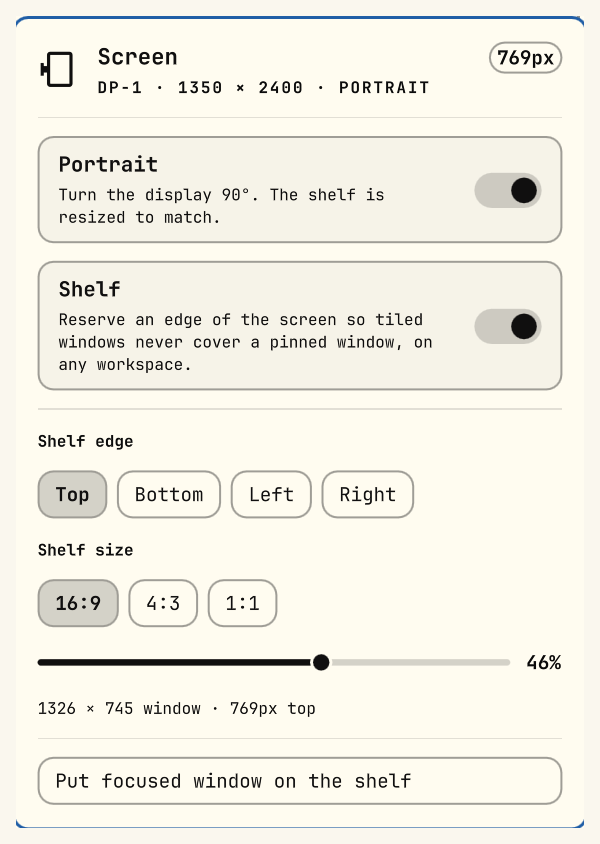
One bar icon opens one panel:
The icon is a monitor glyph that turns on its side when the display is portrait, and lights up while the shelf is reserved, so the bar tells you the state without opening anything.
Install
omarchy plugin add https://github.com/Adham2023/omarchy-screen-layout --enable
Then restart the shell so the widget is picked up:
omarchy-restart-shell
The widget lands in the bar's right section. Drag it wherever you like, or move
it with omarchy bar move.
Use
| Control | What it does |
|---|---|
| Portrait | Rotates the display 90°. The shelf is resized to match. |
| Shelf | Reserves the strip. Tiled windows are kept out of it on every workspace. |
| Shelf edge | Which side the strip is carved out of: top, bottom, left or right. |
| Shelf size | The shape of the window the shelf is sized for, and how much of the screen it takes. |
| Put focused window on the shelf | Floats, pins and sizes the focused window to fit. Press again to drop it back into the tiling layout. |
Arrow keys walk the rows while the panel is open; left/right tunes the chips and the slider; Enter activates; Esc closes.
Picking an edge. Top suits a portrait screen. In landscape a side shelf usually costs the layout far less, since the screen has width to spare and height to protect.
Sizing. One rule: the window takes percent of the axis the shelf cuts into — the screen height for a top/bottom shelf, the width for a left/right one — at the chosen aspect ratio, and is shrunk to fit if that would overflow the other axis. The caption under the slider always shows the real resulting size, so when a 16:9 window on a portrait screen hits the width limit and stops growing, you can see that it has.
Picture-in-picture windows are placed on the shelf automatically while it is on. With the shelf off, they keep Omarchy's default small top-right thumbnail.
Keybindings
The plugin installs none — bind whatever suits you in ~/.config/hypr/bindings.lua:
o.bind("SUPER + ALT + V", "Toggle shelf", "screen-layout shelf")
o.bind("SUPER + ALT + R", "Rotate display", "screen-layout rotate")
o.bind("SUPER + ALT + O", "Put window on shelf", "screen-layout pop")
screen-layout is bin/screen-layout inside the plugin folder. Symlink it onto
your PATH if you want the bindings above to work verbatim:
ln -s ~/.config/omarchy/plugins/io.github.adham2023.screen-layout/bin/screen-layout ~/.local/bin/screen-layout
From the terminal
screen-layout status                    everything the panel renders, as JSON
screen-layout shelf [toggle|on|off]
screen-layout rotate [toggle|portrait|landscape]
screen-layout pop                       put the focused window on the shelf
screen-layout set monitor NAME          "" follows the focused monitor
screen-layout set edge top|bottom|left|right
screen-layout set aspect W:H            e.g. 16:9, 4:3, 1:1
screen-layout set percent N             10-70
screen-layout set transform 1|3         portrait direction: 90° or 270°
Configuration
Settings are written to
${XDG_STATE_HOME:-~/.local/state}/omarchy/screen-layout.conf by the panel. You
can edit it by hand; every value is re-validated on load, so a typo falls back to
the default rather than producing a broken shelf.
MONITOR=          # empty follows the focused monitor; or a name from `hyprctl monitors`
EDGE=top          # top | bottom | left | right
ASPECT=16:9
PERCENT=40        # 10-70
TRANSFORM=1       # portrait direction: 1 = 90° clockwise, 3 = 270°
TRANSFORM is the only setting with no panel control, because which way you
want to turn the screen depends on your stand and does not change once you have
picked it.
How it works
Both settings are Hyprland monitor properties, applied through flag files in
Omarchy's Hyprland toggle directory
(${XDG_STATE_HOME:-~/.local/state}/omarchy/toggles/hypr/):
screen-layout-shelf.lua— thereservedarea, plus the window rule that positions picture-in-picture inside itscreen-layout-portrait.lua— the monitortransform
Omarchy re-reads that directory on every hyprctl reload, after your
hypr/monitors.lua, so the flags override your monitor config without editing
it. The plain state — unrotated, no shelf — is the absence of a file, which is
why both settings survive a reboot and why removing the plugin cleanly is just
deleting them.
hyprctl keyword is deliberately not used: Omarchy configures Hyprland with the
Lua parser, which rejects keyword outright.
A note on the bar: a layer-shell exclusive zone stacks with the monitor
reserved area rather than being part of it, so a shelf on the bar's own edge
starts past the bar. The bar's position is read from your shell.json.
Dependencies, privileges and side effects
Everything below runs as your user, with no elevation, no daemon and no network access.
| Commands run | hyprctl (monitors, layers, reload), jq, and omarchy-hyprland-window-pop for the pop action |
| Requires | Omarchy with Hyprland's Lua config parser. hyprctl and jq are Omarchy dependencies; omarchy-hyprland-window-pop ships with Omarchy |
| Files written | the two flag files and the config file listed above — nothing else, and nothing owned by Omarchy or by you |
| Reads | ~/.config/omarchy/shell.json (bar position only) |
| Effect on your config | none. hypr/monitors.lua is never edited; the flags layer on top of it |
| Privileges | none. Every command runs as the invoking user; the plugin never requests elevated rights and starts no secondary shell process |
The plugin runs inside the long-running Omarchy shell process, unsandboxed, like every Omarchy plugin.
Remove
omarchy plugin remove io.github.adham2023.screen-layout
rm -f ~/.local/state/omarchy/toggles/hypr/screen-layout-{shelf,portrait}.lua
rm -f ~/.local/state/omarchy/screen-layout.conf
hyprctl reload
Removing the flag files puts the display back to whatever hypr/monitors.lua
says, since that is the only thing they were overriding.
License
MIT — see LICENSE.