
Omasets Layout Composer
Omasets is a visual tiled-layout composer built specifically for Omarchy Quattro. Define applications as leaves, split the canvas horizontally or vertically, tune each split ratio, and launch the result onto a Hyprland workspace.
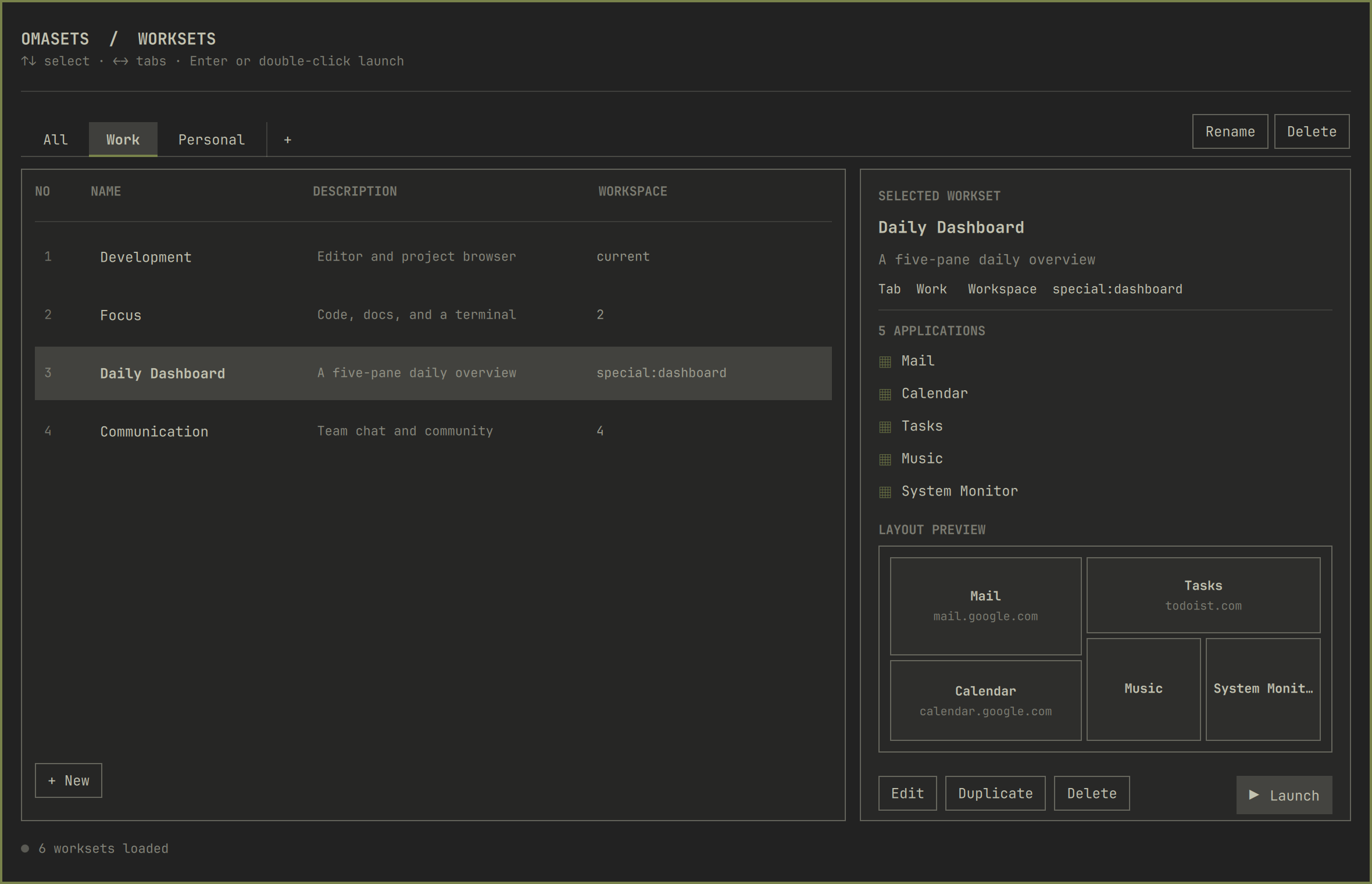
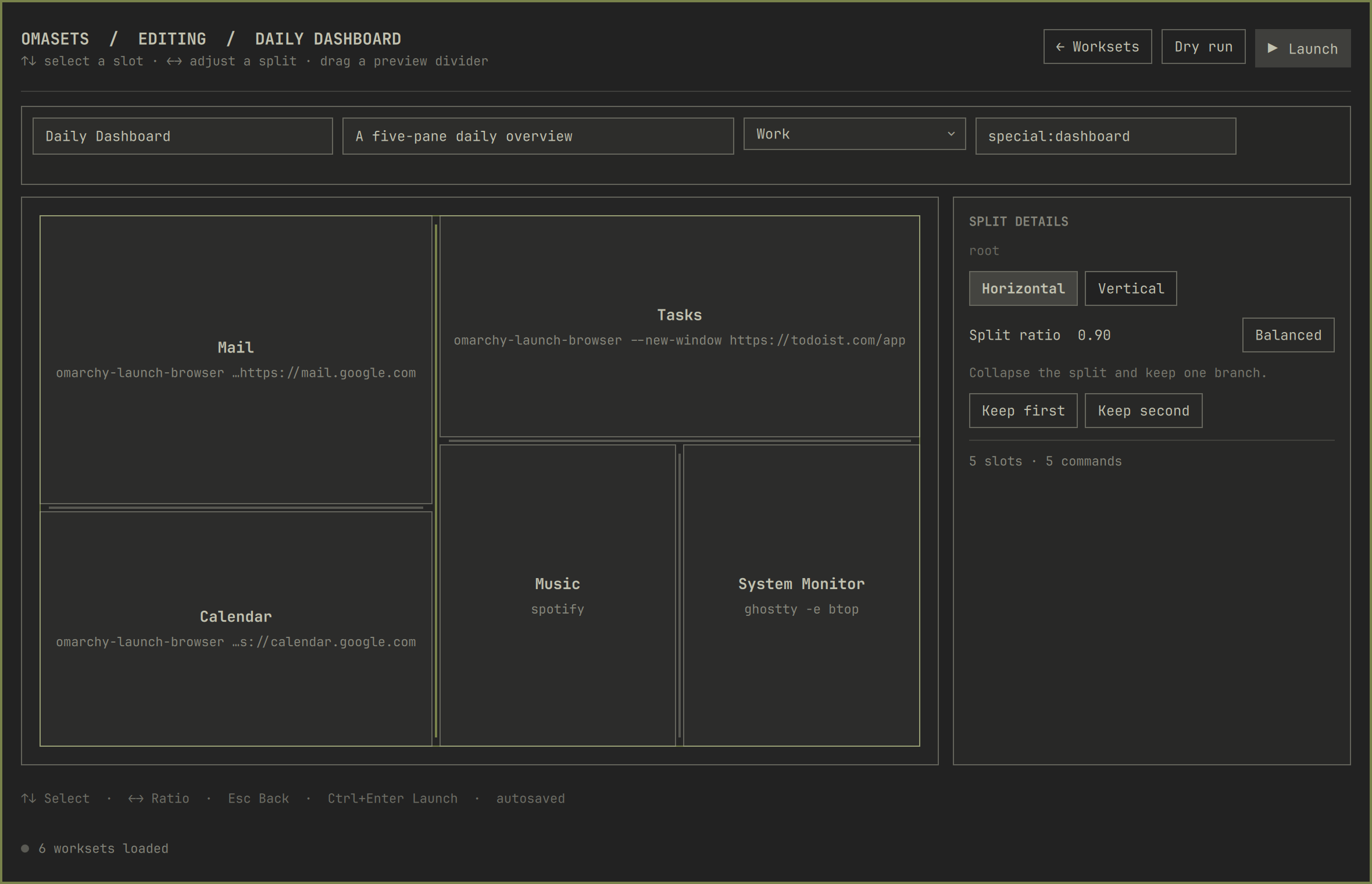
This project is deliberately separate from HyprSets. It carries forward HyprSets' layout-tree concept and launch experience while using Quattro's native Quickshell plugin UI and Hyprland Lua dispatcher.
What works in 0.1
- HyprSets-style home screen with tabs, a workset table, selection details, and explicit navigation into the editor.
- Theme-native Quickshell editor presented as a bar-side layer-shell panel, so Omasets never joins or disturbs the workspace's tiled window tree.
- Multiple named worksets and user-defined tabs stored in one JSON file.
- Recursive horizontal and vertical splits with adjustable ratios.
- Per-slot command, working directory, and post-launch delay.
- Current, numbered, named, and special workspace targets.
- Sequential launch with window detection, preselection, and split-ratio application.
- Cross-workspace recovery for single-instance applications: if Chromium, VS Code, or another existing process creates its new window elsewhere, Omasets moves that specific new window to the target before continuing.
- Dry-run preview before launching.
- Optional replacement of existing windows on the target workspace.
- Create, duplicate, delete, assign-to-tab, split, and collapse operations with automatic atomic persistence.
Omasets never edits ~/.config/hypr/ or Omarchy's packaged files. Its data is
stored at ~/.config/omarchy/omasets/layouts.json.
Requirements
- Omarchy 4 with the Quattro shell plugin system.
- Hyprland using the
dwindlelayout. bash,jq,flock,awk, andhyprctl. These are present on a standard Omarchy installation; Omasets does not install packages or request elevated privileges.
Install
omarchy plugin add https://github.com/agata/omasets.git --enable
The plugin adds ▦ Sets to the left side of the bar. It can also be opened without the widget:
omarchy-shell shell summon io.github.agata.omasets '{}'
For a local checkout:
omarchy plugin add "$PWD" --enable
Remove
omarchy plugin remove io.github.agata.omasets
Removing the plugin intentionally keeps the saved worksets at
~/.config/omarchy/omasets/layouts.json, so reinstalling does not lose them.
To erase those separately, remove ~/.config/omarchy/omasets/ only after
backing up any layouts you want to keep.
User flow and keyboard
The home screen follows HyprSets' information architecture: select All or a
custom tab, choose a workset from the table, then run it or open its editor.
Double-clicking a workset launches it. The editor is a separate view,
so the recursive canvas is no longer squeezed between the list and inspector.
The selected-workset pane includes a read-only miniature of the saved split
layout, so its direction, nesting, and ratio are visible before opening it.
When a command contains a URL, the preview shows its host name beneath the app
label; otherwise an explicit working directory is shown when available.
Launching closes Omasets immediately while its keep-loaded runner finishes in
the background. The editor-only Dry run validates the launch plan without
opening applications and reports a concise result in the status bar.
Ctrl+Enterlaunches the selected layout.Up/Down(orj/k) selects a workset;Enterlaunches it.Left/Right(orh/l) switches tabs on the workset list.Ctrl+Eopens the selected workset in the editor.Ctrl+Ncreates a workset and opens it in the editor.Ctrl+Sflushes pending edits.Escreturns from the editor to the workset list; from the list it closes Omasets.
In the editor, Up/Down walks the layout tree and Left/Right adjusts the
selected split ratio. A divider in the layout preview can be dragged directly;
nested dividers update their own split. The inspector keeps the exact ratio and
a one-click Balanced reset without duplicating the preview control.
Configuration format
The UI owns this file, but it remains intentionally readable and friendly to dotfile management:
{
  "version": 1,
  "tabs": [{
    "id": "development",
    "label": "Development"
  }],
  "layouts": [{
    "id": "code-and-web",
    "name": "Code + Web",
    "tabId": "development",
    "workspace": "current",
    "closeExisting": false,
    "tree": {
      "type": "split",
      "direction": "horizontal",
      "ratio": 1.0,
      "first": {
        "type": "leaf",
        "id": "editor",
        "label": "Editor",
        "command": "ghostty --working-directory=$HOME",
        "cwd": "",
        "waitMs": 250
      },
      "second": {
        "type": "leaf",
        "id": "browser",
        "label": "Browser",
        "command": "omarchy-launch-browser --new-window https://example.com",
        "cwd": "",
        "waitMs": 250
      }
    }
  }]
}
Ratios use Hyprland's dwindle range: 1.0 is balanced, values below it favor
the first branch less, and values above it favor the first branch more.
Safety and limitations
- Application launch commands are user-authored shell commands and run with the user's normal permissions. Omasets does not sandbox or validate their effects; only use commands you trust.
- Before a normal launch, Omasets checks the target workspace. If it contains windows, Omasets asks for confirmation, closes them through Hyprland, waits for them to disappear, and only then starts the workset. Applications can still prompt about unsaved work; cancel the dialog to keep every window open.
- Layout reconstruction is best-effort and targets the
dwindlelayout. Hyprland decides how unusual window types, delayed single-instance apps, and apps that ignore launch placement behave. - A command must create a new Hyprland window within eight seconds. Reusing an existing process is supported; reusing an already-open window without creating a new one is not a layout slot.
- Plugins run unsandboxed inside
omarchy-shell; review plugin updates before enabling them, as recommended by Omarchy.
Development
omarchy plugin validate .
qmllint -I /usr/share/omarchy/shell BarWidget.qml Composer.qml LayoutNode.qml LayoutPreview.qml
tests/run.sh
Saving files in an installed plugin checkout hot-reloads the plugin. If needed:
omarchy-shell shell rescanPlugins
License
MIT