
Omarchy Disposable Email
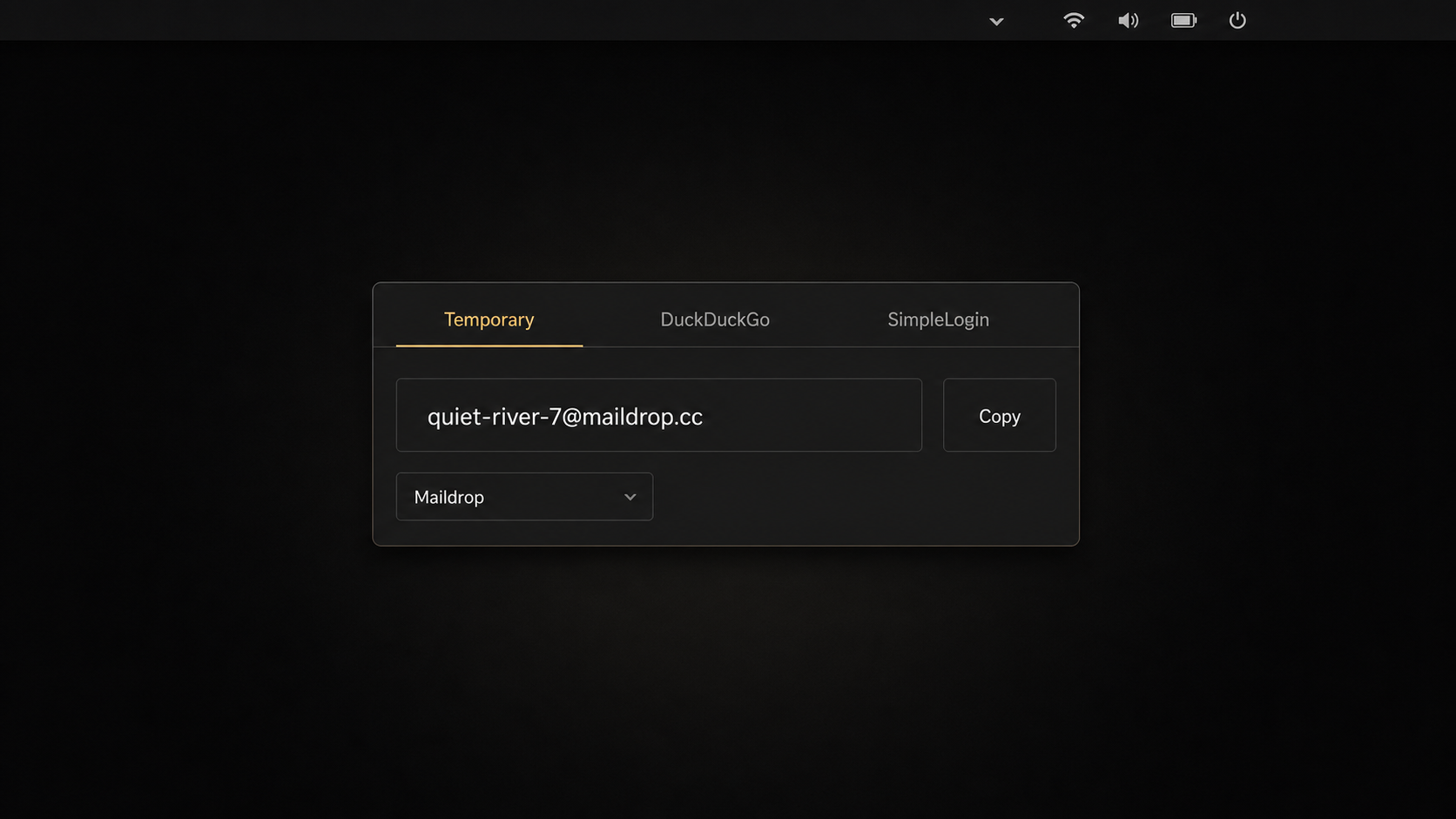
Disposable Email adds one Omarchy bar widget with three provider workflows:
- Temporary Address creates a provider-hosted address with a short, cryptographically random Nano ID style local part. It keeps a local history with Copy, Open, and Forget actions for each address. It supports Maildrop and Harakiri Mail. These inboxes are public: anyone who knows the address may be able to read messages, and forgetting an address here does not remove it from the provider.
- DuckDuckGo Email Protection accepts a bearer token, generates an alias, and can refresh, deactivate, or reactivate aliases that this plugin knows it created. This is an unofficial integration with the endpoints used by DuckDuckGo clients. DuckDuckGo can change or disable those endpoints at any time. The plugin does not claim to list every account alias, delete aliases, or provide activity and statistics views. See DuckDuckGo Email Protection.
- SimpleLogin accepts an API key, creates random or custom forwarding aliases, and supports mailbox selection, search, pagination, pinning, and enable or disable actions exposed by the provider API. Messages are forwarded to the selected mailbox and are not read inside this plugin. See SimpleLogin.
The provider names describe different lifecycles. Temporary addresses use a public provider inbox. DuckDuckGo and SimpleLogin create forwarding aliases. Remote aliases are not owned by this plugin. Forgetting local records, Reset, disconnecting a credential, or removing the plugin does not delete or disable remote aliases unless an explicit provider action was used first.
Install
Install and enable the repository as an Omarchy user plugin:
omarchy plugin add https://github.com/ajanraj/omarchy-disposable-email.git --enable
Omarchy places the checkout under
~/.config/omarchy/plugins/io.github.ajanraj.disposable-email/. The plugin does
not overwrite the packaged Omarchy tree under /usr/share/omarchy/.
The runtime dependencies are:
curlfor provider HTTP requestswl-copyfor copying an addressopensslfor cryptographically random temporary address local partssecret-toolfor Secret Service credentials
gio is also used in the manual cleanup example below. Check the executable
paths before enabling the plugin:
for command in curl wl-copy openssl secret-tool gio; do
  command -v "$command" || exit 1
done
Secret Service caveat
Credentials are stored in Secret Service, not in the state JSON file. Stock
Omarchy installs gnome-keyring and libsecret, and provisions a passwordless
default keyring. Secret Service keeps credentials out of plugin files, process
arguments, and logs, but the default keyring is not independently encrypted at
rest. Its protection relies mainly on home-directory permissions and disk
encryption. A locked, unavailable, or nonstandard Secret Service causes the
provider connection to fail. The plugin does not claim that a credential is
live or verified merely because it was entered.
Connect DuckDuckGo
Open the DuckDuckGo tab, follow DuckDuckGo's account setup, and paste the
bearer token into the masked field. The field is cleared immediately after the
request is handed to the service. A successful connection stores the token in
Secret Service under the duckduckgo provider name. Because the API is
unofficial, a token that works in a first-party client may still be rejected by
the endpoint used here.
Connect SimpleLogin
Open the SimpleLogin tab, open the provider's API key setup page, create an API
key, and paste it into the masked field. The field is cleared immediately
after the request is handed to the service. A successful connection stores the
key in Secret Service under the simplelogin provider name. Choose a mailbox
before creating a custom alias. Credentials must be checked against the
provider by the user; this README does not assert that any supplied key is
currently valid.
Keyboard shortcuts
The plugin exposes IPC commands for user-defined shortcuts. It does not mutate your Hyprland configuration. Add bindings such as these to your personal bindings file after checking for conflicts:
omarchy-shell io.github.ajanraj.disposable-email temporary ''
omarchy-shell io.github.ajanraj.disposable-email temporary maildrop
omarchy-shell io.github.ajanraj.disposable-email temporary harakiri
omarchy-shell io.github.ajanraj.disposable-email duckduckgo
omarchy-shell io.github.ajanraj.disposable-email simplelogin
o.bind("SUPER + SHIFT + ALT + T", "Disposable Email temporary", "omarchy-shell io.github.ajanraj.disposable-email temporary ''")
o.bind("SUPER + SHIFT + ALT + D", "Disposable Email DuckDuckGo", "omarchy-shell io.github.ajanraj.disposable-email duckduckgo")
o.bind("SUPER + SHIFT + ALT + S", "Disposable Email SimpleLogin", "omarchy-shell io.github.ajanraj.disposable-email simplelogin")
Inspect current bindings before assigning keys:
omarchy menu keybindings --print
The T command uses the saved temporary provider. D and S require
connected credentials. SimpleLogin creates a random alias. On success, the
new address is copied and a toast is sent; the address itself is not shown in
the toast.
Data and credential boundaries
Persistent UI state is stored at:
${XDG_STATE_HOME:-$HOME/.local/state}/io.github.ajanraj.disposable-email/state.json
The version 2 JSON shape is exactly this. Version 1 state is migrated on load so a previously remembered temporary address becomes the first history item.
| Key | Value | Meaning |
|---|---|---|
version |
2 |
State schema version |
lastTab |
temporary, duckduckgo, or simplelogin |
Last selected provider tab |
temporaryProvider |
maildrop or harakiri |
Selected temporary address provider |
temporaryAddresses |
Array of {provider, localPart, address, inboxUrl} |
Temporary address history, newest first |
knownDuckAliases |
Array of {address, localPart, active} records |
Duck aliases created by this plugin and remembered locally |
No token, API key, mailbox credential, message body, or remote alias inventory is written to this file. State parsing drops unknown fields, rejects malformed records, and deduplicates known Duck aliases. Secret Service items use these exact attributes:
application=io.github.ajanraj.disposable-email
provider=duckduckgo
provider=simplelogin
The provider value is paired with the application attribute. Store operations
put the token or key on secret-tool stdin without a trailing newline. Lookup,
store, and clear operations are serialized so overlapping credential commands
are rejected rather than mixed.
| Secret | Secret Service application |
Secret Service provider |
Stored value |
|---|---|---|---|
| DuckDuckGo bearer token | io.github.ajanraj.disposable-email |
duckduckgo |
Secret item value |
| SimpleLogin API key | io.github.ajanraj.disposable-email |
simplelogin |
Secret item value |
Reset and removal
Use Settings > Reset Plugin Data before removing the plugin. Reset clears local preferences, temporary address history, known Duck aliases, and both stored credentials. It does not affect remote aliases or public provider inboxes. There is no uninstall hook, so removing a plugin directory cannot automatically clean user data or Secret Service items.
If the plugin is already removed, run the following only after checking that
the explicit state path is the one you intend to trash. The secret-tool
commands use fixed application and provider attributes, and gio trash is
recoverable through the desktop trash when supported:
secret-tool clear application io.github.ajanraj.disposable-email provider duckduckgo
secret-tool clear application io.github.ajanraj.disposable-email provider simplelogin

state_root="${XDG_STATE_HOME:-$HOME/.local/state}"
state_path="$state_root/io.github.ajanraj.disposable-email/state.json"
case "$state_root" in
  /*) ;;
  *) printf '%s\n' "Refusing non-absolute state root: $state_root" >&2; exit 1 ;;
esac
case "$state_path" in
  "$state_root/io.github.ajanraj.disposable-email/state.json") ;;
  *)
  printf '%s\n' "Refusing unexpected state path: $state_path" >&2
  exit 1
  ;;
esac
if [ -e "$state_path" ] && [ ! -f "$state_path" ]; then
  printf '%s\n' "Refusing non-file state path: $state_path" >&2
  exit 1
fi
if [ -f "$state_path" ]; then
  gio trash -- "$state_path"
fi
The state directory may remain empty after this cleanup. Do not replace the validated file target with a broad recursive deletion. Remote aliases remain in their provider accounts and must be managed through the provider itself.
Limitations and exclusions
- Maildrop and Harakiri are public inbox services, not private inboxes.
- DuckDuckGo uses an unofficial API and only supports the operations described above. It is not a full account alias manager.
- SimpleLogin API behavior, quotas, mailbox permissions, and alias limits are controlled by SimpleLogin.
- This plugin does not read message bodies, delete remote aliases, enumerate all aliases, or export provider account data.
- Network availability, provider outages, API changes, Secret Service state, and missing desktop helpers can make an operation fail.
- The plugin has no uninstall hook and never attempts remote cleanup as a side effect of local reset or removal.
Development and validation
The state model is pure JavaScript and can be tested without a running shell:
node tests/ui_contract.test.js
node tests/state_model.test.js
node tests/service_ipc_contract.test.js
qmllint lib/CredentialStore.qml lib/StateStore.qml
When the full plugin tree is present, validate all QML entry points as well:
qmllint Panel.qml BarWidget.qml Service.qml \
  lib/*.qml providers/*.qml ui/*.qml
Run the focused tests and qmllint after changing persistence or provider
integration. A live provider account, bearer token, or API key is not required
for the local tests, and no test fixture contains one.
Attribution
This project is an Omarchy community plugin by Ajan Raj and is released under the MIT License. Provider names and services remain the property of their respective owners. Provider references: Maildrop, Harakiri Mail, DuckDuckGo Email Protection, and SimpleLogin.