
Battery Limiter for Omarchy
Cap your battery's charge level to extend its lifespan. Charging to 100% around the clock wears lithium cells; capping at 60–80% dramatically slows that aging. The Linux kernel exposes the knob — this plugin puts it in your bar, next to the health stats that show why you'd want it.
Install
Requires Omarchy 4.x (Quattro). No external dependencies — reads standard
kernel sysfs, and uses polkit/pkexec (part of every Omarchy install)
for the one privileged action.
omarchy plugin add https://github.com/alexdont/battery-limiter.git --enable
Optional keybinding (add to ~/.config/hypr/bindings.lua):
o.bind("SUPER + ALT + B", "Battery limiter", "omarchy-shell batterylimiter toggle")
Use
Bar icon — shows plus the active limit when one is set (quiet at stock 100%). Click to open the card. Prefer just the icon? Turn the number off with:
omarchy bar set io.github.alexdont.battery-limiter showLimit false --json
(true brings it back — takes effect instantly. The setting is declared
in the widget's manifest schema, so it will also appear in the shell's
widget-settings UI as that lands.)
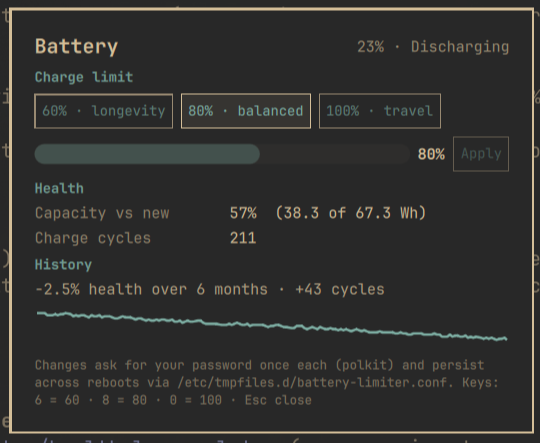
The card — current charge and state, the limit presets
(60% longevity · 80% balanced · 100% travel, also on keys 6/8/0),
a 50–100% slider for custom values (drag, then confirm with Apply — a
drag alone never triggers anything), and battery health: usable capacity
vs design capacity and the charge cycle count.
Notifications — when the battery finishes charging to your limit, a single low-priority notification tells you it's safe to unplug (once per plug-in session; quiet at stock 100%).
Health history — once a day the plugin appends one line (date, health
%, cycle count, raw capacity values) to
~/.local/state/omarchy/io.github.alexdont.battery-limiter/health-log.tsv
— a plain, greppable TSV you own, ~41 bytes per day (a year is ~15 KB).
The card's History section shows the trend it accumulates ("−2.1%
health over 6 months · +180 cycles") with a sparkline drawn over real
time, so gaps read as gaps. It starts as a single "tracking since …" line
and grows meaning the longer the plugin is installed.
Planned
charge_behavioursupport for laptops that expose it instead of a threshold.
How changing the limit works (read before installing)
Writing the kernel's charge threshold requires root. This plugin takes the most conservative approach available:
- Reading is unprivileged. Charge, status, health, cycles, and the current limit are plain sysfs reads. No setup, no root.
- Each change is one explicit
pkexecprompt. When you pick a preset or apply a slider value, polkit asks for your password, and a one-shot root shell does exactly two things:- writes your value to
/sys/class/power_supply/<battery>/charge_control_end_threshold; - writes one line to
/etc/tmpfiles.d/battery-limiter.confso systemd re-applies that value at boot (the sysfs value alone resets on reboot). Setting the limit back to 100% deletes that file — stock behavior, zero trace.
- writes your value to
- Nothing else runs as root. No daemon, no udev rules, no group membership changes, no setuid helpers. Decline the polkit prompt and nothing happens at all.
- The polkit dialog will say it's authorizing
/usr/bin/sh— that's this plugin's two-line apply script above, passed the validated limit and battery path as arguments. You can read the exact command inService.qml(setLimit).
Hardware support
Vendors vary. ASUS/LG/Samsung/Huawei expose an end threshold (this plugin's
target); some laptops expose nothing. The plugin detects support at start:
without a threshold control it stays read-only and still shows health
stats, which nearly every battery reports (via energy_full* or
charge_full*). ThinkPad start thresholds and TLP coexistence are out of
scope for v1 — if you run TLP with STOP_CHARGE_THRESH_BAT0 set, prefer
TLP and leave this plugin read-only.
Remove
omarchy plugin remove io.github.alexdont.battery-limiter
sudo rm -f /etc/tmpfiles.d/battery-limiter.conf   # only if you ever set a limit
The second command removes the boot persistence (or just set the limit to
100% in the plugin before removing — that deletes the file for you). The
only state the plugin keeps is the daily health log at
~/.local/state/omarchy/io.github.alexdont.battery-limiter/ — delete that
folder for a clean slate. It touches no other configuration.
License
MIT